Real Estate Agent Profile Page: What Belongs on It
A good real estate agent profile page shows numbers with their time window and source, testimonials labeled as ones you chose, links to reviews hosted somewhere you don’t control, and one plain contact form. Leave off star ratings you added yourself, career totals you can’t back up, and any stat you would have to estimate.

The five-star reviews an agent pastes onto their own website are exactly the reviews Google says won’t earn star ratings in search.
That comes from Google’s own developer documentation for review snippets. When the business being reviewed controls the reviews about itself, its pages that use LocalBusiness or Organization structured data are “ineligible for star review feature” (Google Search Central). Schema.org files a real estate agent under LocalBusiness. So the stars you mark up yourself are, by Google’s rules, the ones it won’t display.
That one rule says a lot about how to build a profile page. It’s where someone who already has your name checks whether you are who they were told you are, and every element on it either helps that check or gets in its way.
Who is actually reading your profile page
Mostly people who already have your name. In NAR’s 2025 Profile of Home Buyers and Sellers, 43% of buyers used an agent they found through a referral and another 18% used an agent they had worked with before; 66% of sellers found their agent through a referral or a past relationship (Virginia Realtors’ summary of the NAR report, covering transactions from July 2024 to June 2025).
The survey doesn’t say how many of those buyers searched the agent’s name first, and we won’t invent a number for it. But think about the order things happen in. A friend says “use Sarah, she was great.” Sarah’s name goes into a search bar that evening. Whatever comes back is the second opinion, and it’s the only part of the referral you control.
That reader is checking a recommendation, so the page has three jobs:
- Confirm you’re active. Recent, dated work in the area they’re buying or selling in.
- Sound like the person the friend described. A bio in your own words, and client quotes that say something specific.
- Make the next step small. One form, one phone number if you want calls, nothing to download.
If you work referrals on purpose, our guide to tracking referrals in Follow Up Boss covers the other end: finding out which past clients actually sent you business.
Numbers: give every one its window and its source
A number with no time window reads as a career total, whether or not you meant it that way. “118 homes sold” and “18 homes closed in the last 12 months” might describe the same agent. Only the second can be checked.
Four rules cover most of it:
- Put the window next to the number. “Last 12 months” belongs on the same line as the figure, not in a footnote.
- Say where it came from. “From my closed transactions” is a different claim from MLS data or a brokerage total. Pick the one that’s true.
- Leave a number off before you round it up. If you had one closing this year, don’t show “Homes closed: 1” and don’t pad it with team volume. Show recent sales instead and let the stat appear when it has something to say.
- Separate years in the business from years in your records. If your CRM only goes back to 2021, a number computed from it describes your records, not your career. Write your career length in the bio, in a sentence.
There’s an honest limit here that no page builder can fix. Any stat computed from your CRM is only as good as the deal records behind it. If closings sit in a stage that isn’t marked as won, or prices were never entered, the page undercounts you. A short deal stage audit in Follow Up Boss is the fix, and the CRM dashboard audit catches the other ways a number can mislead before you publish it.
Testimonials: label them as yours
Testimonials you picked are fine. Presenting them as something they aren’t is the problem. Since October 21, 2024, the FTC’s rule on consumer reviews and testimonials has banned fake reviews (including AI-generated ones), buying reviews with a set sentiment, undisclosed reviews from insiders, and company-controlled review sites that claim to be independent (FTC announcement). We aren’t lawyers, and your broker’s compliance policy is the one that governs you. The practical reading for a profile page is still simple:
- Say they’re yours. A line like “Testimonials shared by the agent” costs nothing and answers the obvious question.
- Use real names or initials with the client’s permission, and quote them exactly.
- Pick quotes with a fact in them. “She told us to fix the fence before listing, and we had an offer in nine days” does more than “Amazing agent!!”
- Don’t turn them into a star rating. A 5.0 built from reviews you selected isn’t a rating, and Google won’t show it anyway.
If you want the stars, send people to where they live. Link your Zillow, Google and realtor.com review profiles. Those reviews sit on platforms you don’t run.
What to put on it, and what to leave off
| Section | Put on it | Leave off |
|---|---|---|
| Name and photo | A current photo, your title and your team or brokerage | A photo from ten years ago |
| Bio | Where you work, who you usually help, how long you’ve done it, in your own voice | “Passionate about real estate” and other lines every agent could sign |
| Numbers | Homes closed, sales volume and time to close, each with “last 12 months” and its source | Unwindowed career totals, team volume shown as yours, anything estimated |
| Recent sales | A few dated closings, with your client’s permission | Listings you only showed, or deals that never closed |
| Testimonials | Exact quotes with a fact in them, labeled as ones you shared | Self-added star ratings, paraphrased or merged quotes |
| Reviews | Links to your Zillow, Google and realtor.com profiles | Copied review text dressed up as an independent score |
| Contact | One short form with a consent checkbox; phone and email only if you want them public | Long forms, auto-play video chat, a required phone field |
A 15-minute checklist before you publish
Go down this with the page open on your phone.
☐ Search my own name. Is this page, or my best profile, in the first results?
☐ Every number has a window (“last 12 months”) and a source on the same line.
☐ No number is rounded up, estimated, or borrowed from the team.
☐ Years in the business are in the bio as a sentence, not a stat tile.
☐ Each testimonial is exact, permitted, and has one specific fact in it.
☐ The testimonials are labeled as mine. There is no star rating I added myself.
☐ My Zillow, Google and realtor.com review profiles are linked.
☐ The form asks for name and email, has a consent box, and nothing else is required.
☐ I submitted the form myself and found the lead where I expected it.
A contact form that quietly fails, or fills your CRM with junk, is worse than no form. Our post on filtering lead form spam without losing real buyers covers the junk half.
How Ace Pages builds this from your Follow Up Boss deals
Here’s how Ace Pages, our profile page tool, handles the numbers, the testimonials and the form. Every agent on every Follow Up Ace account gets their own profile page free, one per agent. A team lead can build it from the admin dashboard, or an agent can draft and publish their own from the Companion app. Nothing goes public until someone presses publish.
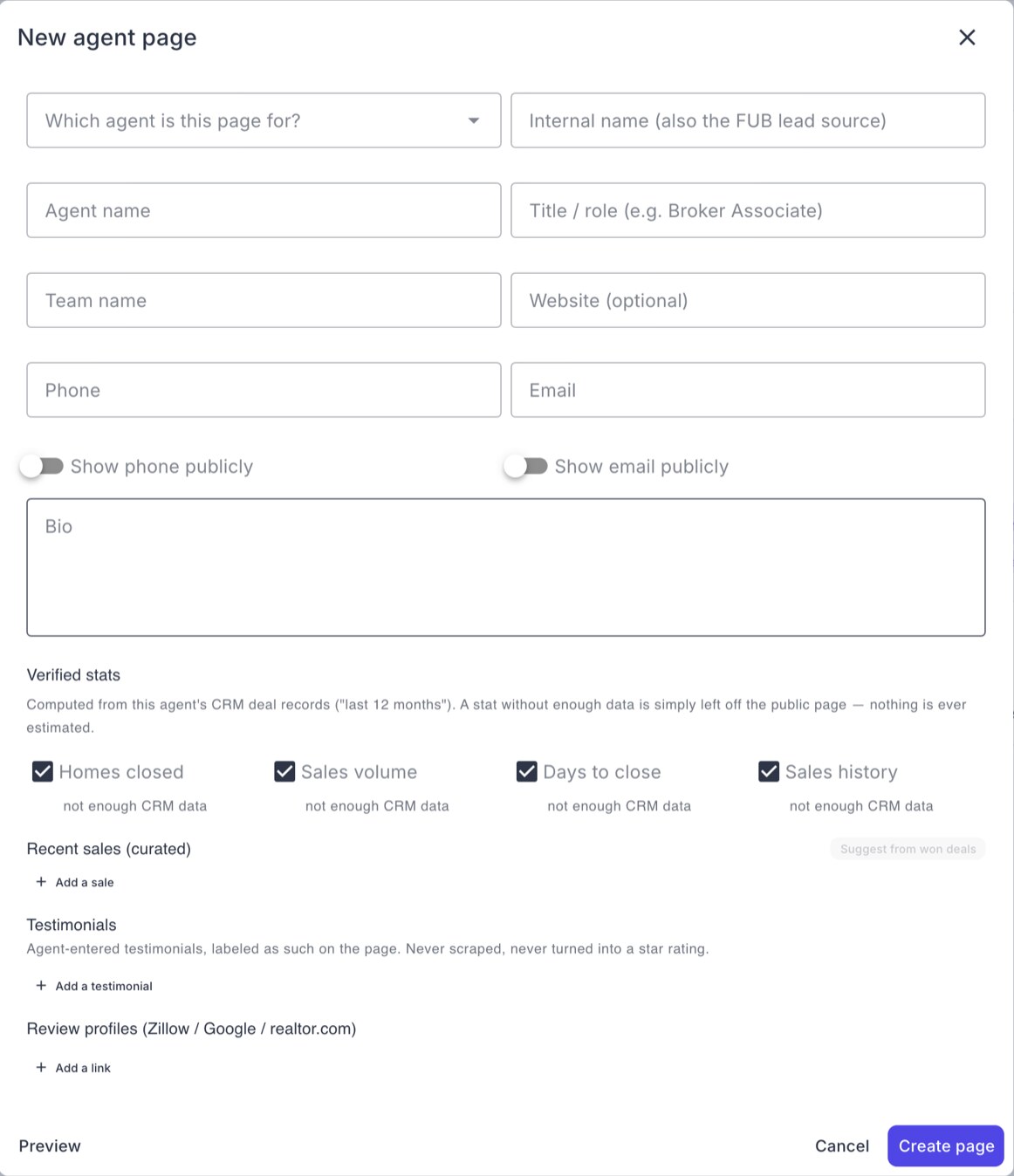
Here’s what it does with the rules above:
- Numbers come from the deals the agent is on in Follow Up Boss. Homes closed, sales volume and average time to close are each labeled “last 12 months.” A stat with nothing behind it is left off the page, never shown as zero or guessed. The editor says so in plain words: “nothing is ever estimated.” A deal shared with a teammate counts in full on each agent’s page, so say so in your bio if you co-list often.
- One tile to switch off if you follow the checklist above. The editor also offers a “Sales history” tile, on by default, that counts years back to the earliest deal you’re on in Follow Up Boss, open and lost deals included. If you’d rather state your career length in your bio, untick “Sales history” before you publish.
- Lost deals never count toward the three 12-month numbers. Only deals marked won or closed feed homes closed, sales volume and time to close, so a “Closed Lost” stage can’t inflate them.
- Recent sales are suggestions until you pick them. Ace offers won deals as starting points. Nothing shows until you save it to the page.
- Testimonials are labeled. The page prints “Testimonials shared by the agent” above them. Ace doesn’t pull reviews from anywhere and never turns quotes into a star rating, and the page’s structured data carries no rating at all.
- Review profiles are links. Add your Zillow, Google or realtor.com profiles and they appear as links that open the real profiles.
- The form asks for consent. Name and email are required, phone is optional, and the box reads “I agree to be contacted about my inquiry.” On an account connected to Follow Up Boss, the inquiry arrives there as a new lead tagged “Ace Page,” and an alert goes out to the agent.
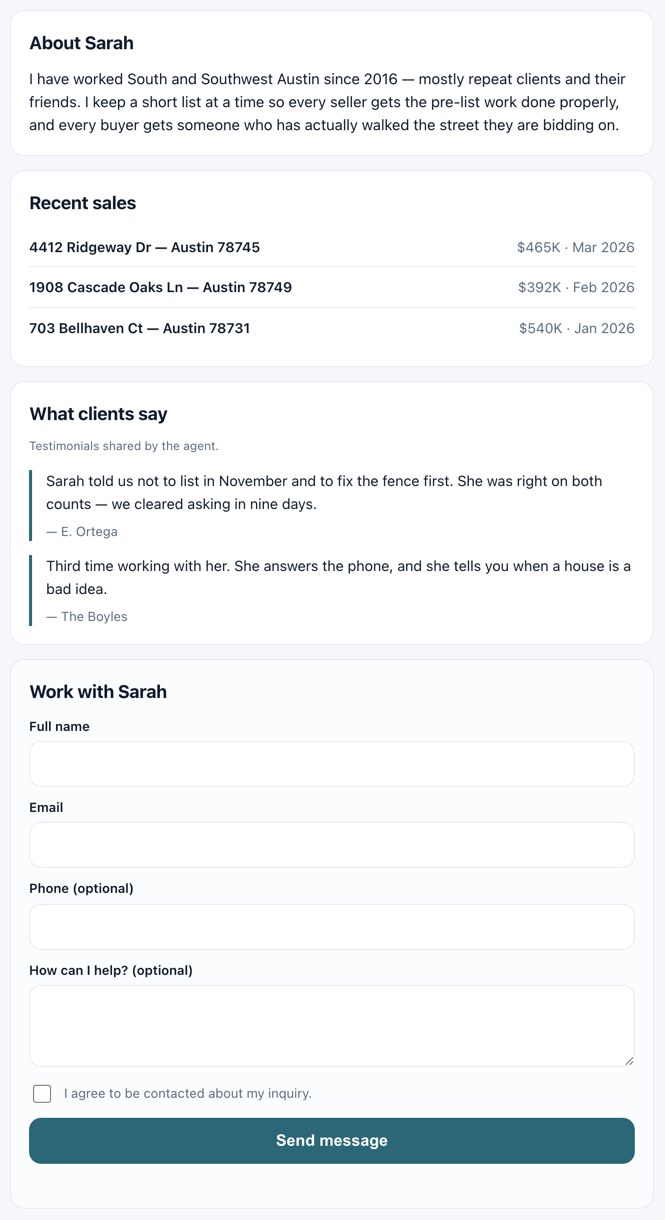
Two limits worth knowing before you rely on it. First, the numbers are a snapshot, taken when the page is created and refreshed when you press refresh, not on a schedule. After a busy month, refresh it. Second, the page reflects your Follow Up Boss deal records and nothing else, so the audit in the numbers section above applies here too.
The free page is one per agent with no account-wide cap. With Ace Trove or any paid Ace seat on the account, a team also gets a roster page linking every agent’s page, its own brand color and logo, and share links that credit the teammate who sent the visitor. Our plain comparison of Ace, Ace Pro and Ace Trove covers what else each plan includes.
A profile page earns its keep long after the first call, too. The same clients you quote on it are the ones worth writing to after closing, which is what our guide to past client follow-up is about.
Frequently asked questions
Can I show star ratings on my own real estate website?
You can display them, but Google’s guidelines make self-controlled reviews on LocalBusiness or Organization pages ineligible for star ratings in search. Link your Zillow, Google and realtor.com profiles instead.
What numbers should a real estate agent put on a profile page?
Homes closed, sales volume and average time to close in the last 12 months, each labeled with its window and source. Leave off anything you would have to estimate or borrow from the team.
Are agent testimonials allowed under the FTC’s fake review rule?
The rule, in effect since October 21, 2024, targets fake reviews, bought reviews with a set sentiment, undisclosed insider reviews and company-controlled review sites posing as independent. Real, permitted testimonials labeled as ones you chose are a different thing; your broker’s policy still governs.
A question for agents who get most of their business from referrals: when a referred client finally called you, what did they say they’d looked at first? We’d like to know which page actually gets read.
Set up your free agent page
The help article walks through creating the page, choosing which stats show, and what the paid team roster adds.
Read the setup guide