Features · the whole platform

Everything Ace does.

Who to work next + the draft, inside Follow Up Boss — and the rest of the platform around it.

The full suite, tier by tier.

AI Chat

Free for All

Natural language CRM queries embedded directly in Follow Up Boss. Contact lookup plus deal and task review — all from the FUB sidebar. Free chat is read-only: it finds, summarizes, and drafts without changing your CRM; paid seats unlock CRM write actions. Open a contact and the chat starts on a launchpad built from the model's read of that person — the headline, the suggested next moves, and the key signals, before you type a word.

Pro

Voice Chat

Ace Pro

ElevenLabs-powered WebRTC voice with 1-3 sentence responses optimized for speech. Look up contacts, review history, summarize calls, and prep for meetings — hands-free while driving. Unlimited voice on Ace Pro. Read-only by design — Ace answers, summarizes, and prepares; you tap Send when you're ready.

Ace Trove

Contact Intelligence

Part of Ace Trove

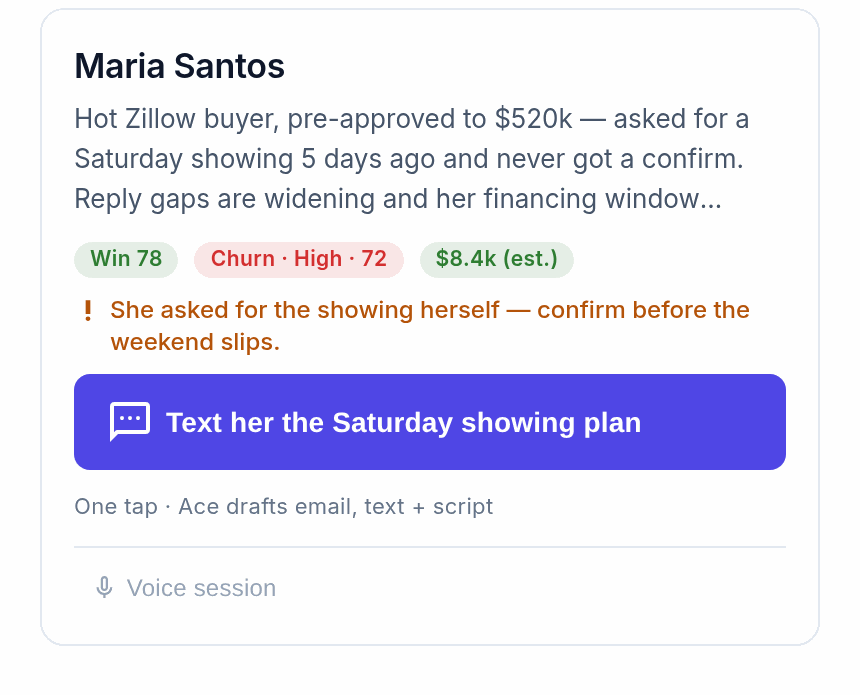
AI writes 7 model-grounded custom fields into FUB: Ace Win Score (a 0-100 within-account rank, not a close probability) and Ace Churn Risk on every connected account free; Ace Expected GCI (est.), Ace Opportunity, Ace Seller Tier, Ace Buyer Tier, and Ace Last Analyzed with Ace Trove. Engagement, velocity, channel, and readiness signals feed the models and dashboards instead of cluttering your field list. Bundled with the Command Center queue, 4 nightly anomaly detectors, and the Ask-Ace reasoning tools. See the full Ace Trove →

Daily Brief

Ace & Pro

Morning briefing with tasks due today, upcoming appointments, hot contacts needing attention, pipeline updates, and key metrics. Configurable delivery time, timezone, and sections. View 30-day history for trend analysis.

CRM Knowledge Graph

Free for All

Unlike generic AI wrappers, Ace maps your entire FUB Knowledge Graph. It instantly understands your custom stages, bespoke action plans, and smart lists, grounding its answers and recommendations in the way your team actually operates.

Market Intelligence

Ace & Pro

12+ Federal Reserve indicators: mortgage rates (30yr/15yr/ARM/FHA/VA/Jumbo), housing by state and metro, employment, inflation (CPI/PCE), affordability indexes, migration patterns, investment metrics, and economic forecasts. Plus a full mortgage calculator in every Ace surface — payment breakdowns, amortization, and the affordability inverse (“$3,200/month buys what price?”), using the current FRED rate with its as-of date. Always an estimate, never a lender quote.

Appointment Follow-Up

Every seat

After an appointment ends, Ace pings the agent — in-app, never by text — to "Debrief with Ace": it asks how it went. The agent answers in plain language; Ace writes the outcome, the debrief note, and the follow-up task into Follow Up Boss. Team leads on Ace Trove get the other half: an Appointment Follow-Up view showing which past appointments still have no outcome, with a one-click re-nudge.

Ace Smart Lists

Free for All

Ace builds your priority Smart Lists for you, natively in Follow Up Boss — pre-filtered on the Ace score fields and pre-ranked so the list order means something. Nine lists on every connected account: never-contacted speed-to-lead, hot leads, high-value going cold, a churn save list, slipping away, unrepresented open-house buyers, neighbor sign-ins, proven advocates, and calculator budget signals. Fourteen with Ace Trove adds hot buyers, ready sellers, likely sellers, at-risk opportunities, and biggest opportunities by expected commission (est.). Thresholds adapt to your book — "hot" means the top slice of your own scores, not a fixed number — and admins can re-sync or switch any list off from the dashboard.

Lead Magnets

Free for All

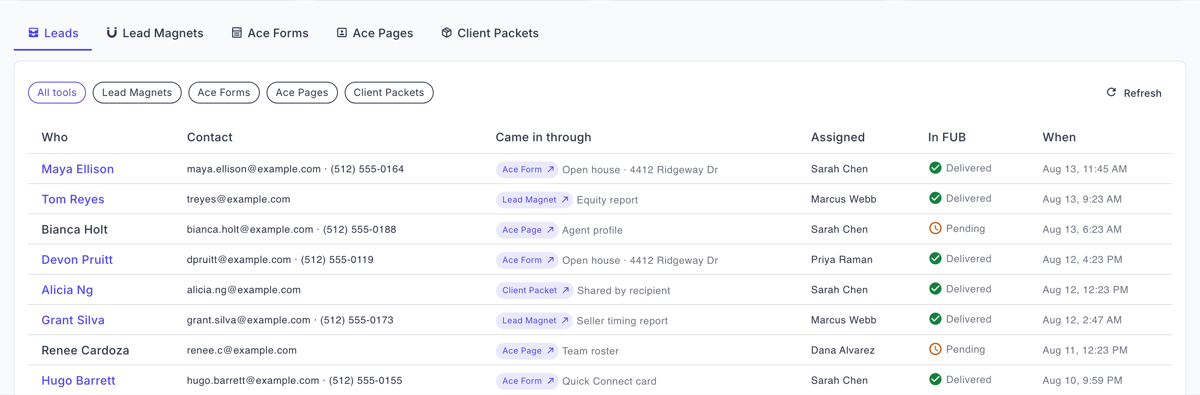
Every deployable lead-gen tool, hosted for you — five instant report pages (home equity position (est.), home risk, local market, rate & payment, seller-timing) built on public and government data, PLUS three interactive tools: Open House Sign-In (QR sign-in that instantly emails the visitor the home's Home File), the 10-second Quick Connect card (they get your vCard, you get the lead), and a branded Mortgage Calculator. Share the link or embed anywhere; every visitor unlocks the payoff with consent-first contact capture, and the lead is created in Follow Up Boss automatically. Free tool on every account; any paid seat or Ace Trove unlocks effectively unlimited tools, per-agent links with automatic assignment, and full branding. See Lead Magnets →

Ace Forms — Custom Forms

Free for All

Hosted embeddable capture forms — buyer consults, guide downloads, RSVP lists — for your website, bio link, or email signature. Every account gets one active account-level form with its template’s standard questions, and every consent-first submission lands in Follow Up Boss automatically. Paid seats add custom questions, branding, and per-agent links; Ace Pro or Ace Trove adds conditional routing rules. See Ace Forms →

Client Packets

Ace & Pro

A branded resource page built for ONE named buyer or seller — payment math, area reports, your documents, and their next steps, all in one link that stays current for the length of the deal. The client is never gated; when they open it, play with the calculator, or open a document, it writes to their Follow Up Boss timeline (when the client is matched to a Follow Up Boss contact — automatic by email or phone). Their hand-off card produces a referral link — a friend who signs up through it becomes a new lead credited back to your client in Follow Up Boss. Regular seats get 5 active packets, Pro or Ace Trove get 50.

Ace Pages

Free for All

A public, search-indexable profile page for every agent on the account — free, and capped by identity rather than by an account-wide pool, so a team of twenty publishes twenty pages on the free plan. The stats are built from your own Follow Up Boss deals and stored as a snapshot, so what a visitor sees is what your CRM recorded; a figure we can’t stand behind is omitted rather than shown as zero. Testimonials are agent-entered and labelled that way, and there is deliberately no star rating — we don’t scrape reviews and won’t publish one we can’t source. Any paid seat or Ace Trove adds the one-per-account team roster page, brand color and logo, and per-member ?u= attribution on share links; hiding the “Powered by Ace” footer is a Pro lever.

Client Referrals

Seat tier · wider with Trove

The sphere graph: one record per introduction, tracked from intro through captured, contacted, appointment, agreement, and closed. The last step is the one that usually rots in a spreadsheet, so it isn’t manual — when the referred person’s deal is won in Follow Up Boss, the referral advances to closed on its own and the credit lands on the person who made the introduction. Your ambassadors stop being a feeling and become a list. RESPA §8 is enforced as schema, not as policy: the referral record is built from an allowlist with no field for points, credits, gift value, a fee, or a payout — and an attempt to write one is refused outright rather than quietly dropped.

Home Almanac

25 homes on Ace · 100 on Pro · account-wide with Trove

The one thing in Ace that emails a client on a schedule — and every rule around it exists because of that sentence. Each past client gets a page for their home with no login ever (the link is the key), and a monthly change feed reporting what actually moved: estimated equity, local appreciation, and the maintenance checklist for their region and season. It sends only after the homeowner presses opt-in on that page; an agent adding a past client is not the client agreeing to a monthly commercial email, so enrolling someone grants nothing. A month with nothing new to report is skipped rather than padded out, every message carries one-click unsubscribe, and every dollar figure is labelled “(est.)” because equity is modelled from purchase price, tenure, and FHFA appreciation — not read from lien records.

For team leads: eight screens, one operating picture.

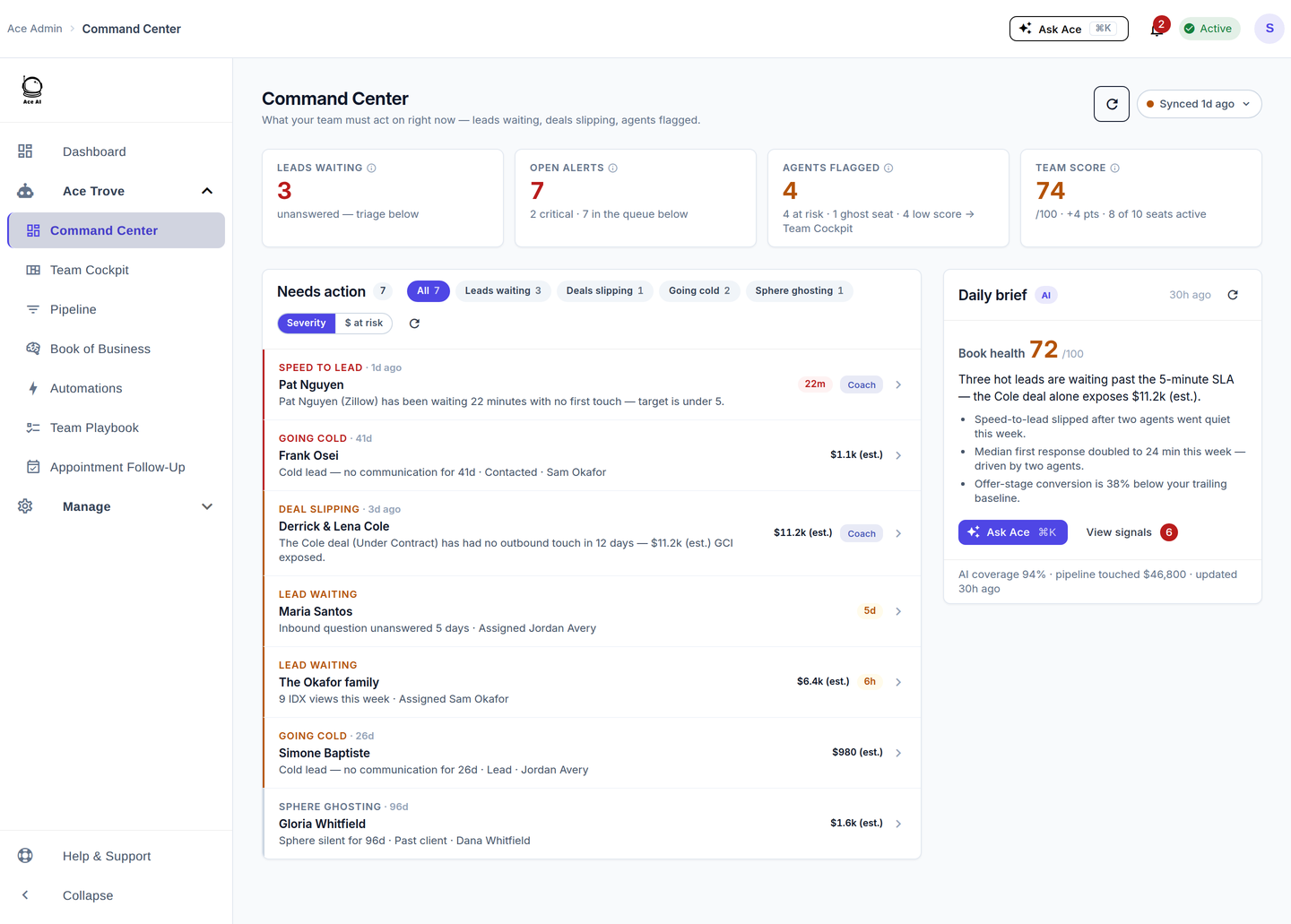
The account-wide add-on gives admins a command deck where every view answers one question — and the same number means the same thing on every screen.

  • Command Center — one act-now queue with two lenses (severity, dollars-at-risk), an inline WHY on every row, and a Coach action that messages the agent, logs the note in FUB, and lands in their Companion inbox.
  • Team Cockpit — the whole team on one screen: production, response time, coverage gaps, Effort Split (deal work vs lead gen), and who needs attention today.
  • Pipeline — funnel with appointments as real, measured outcomes; deal-stage lanes with projected close (est.); the Quiet Deal Radar for open deals nobody's touching.
  • Book of Business — the whole scored book: Win Score distribution, churn mix, opportunity classes, the Opportunity Radar drill (your highest-value next moves — including likely sellers — ranked with a per-agent breakdown), and a Model Quality report card that grades our own predictions against real outcomes.
  • Automations — the revenue-bleed patterns codified: speed-to-lead, no-reply, stale high-value, ghost seats, agent slip — every auto-send Fair-Housing-scanned.
  • Dynamic Smart List — an ordered set of ranking rules, each with a threshold you tune; every agent's NOW / NEXT queue follows them, with a live preview as you tune.
  • Appointment Follow-Up — which appointments happened, which still have no outcome, and a one-click nudge that has Ace collect the debrief.
  • Back Office — commission and cap tracking off your real closed deals, plus agent retention signals. A multi-agent deal is credited in full to the primary agent and flagged as shared, because Follow Up Boss carries no split ratio and inventing one would fabricate dollars; any row whose GCI came from a modelled basis rather than a recorded one rides through marked as an estimate.
  • Plus: Seller Radar account-wide — its nightly scan feeds the Opportunity Radar and each agent's queue — and the Ace Trove Brief, a morning email with yesterday's pulse, pipeline movement, and what needs your attention (it stays quiet on quiet days).

Ace, in or out of Follow Up Boss.

Your Ace workspace works two ways — docked inside Follow Up Boss, or standalone on any device. Same alerts, same pipeline, same coaching. Agents don't have to open Follow Up Boss to work their day.

Inside Follow Up Boss

Free for All

Ace lives in your Follow Up Boss sidebar — open a contact and it reads the person before you type. No separate login, no setup: every teammate who logs into FUB sees Ace.

Standalone Workspace

Ace & Ace Pro seats

Sign in at followupace.com/companion/login with a one-tap magic link and run Ace on its own — phone, tablet, or desktop, no Follow Up Boss tab open. Add it to your home screen and it opens like an app. Ace seats get your NOW list, alerts, and tasks; Ace Pro unlocks the full workspace.

Your conversations, logged to Follow Up Boss automatically.

Ace adds to your CRM — it never moves your work off it. Emails you send from your Ace queue land on the contact's Follow Up Boss timeline automatically, so the record your team relies on stays complete.

Email, from your own Gmail

Available today

Connect your own Gmail account and Ace's drafts send from your address — not a shared relay, not a lookalike domain. When you send from your Ace queue, the email is written onto the contact's Follow Up Boss timeline right away, so it's on the record instead of only in your sent folder.

Texting

Coming soon

Business texting through Ace — your own number, quiet-hours compliance built in, every text logged to Follow Up Boss. Coming soon. Ace does not send text messages today; agents can raise their hand inside the product to hear when it is ready.

Great AI doesn’t just do the work. It makes you better at working with AI.

Most AI is a black box — you get an answer and learn nothing. We built FollowUpAce to do the opposite. The agents who pull ahead aren’t the ones who lean on AI — they’re the ones who learn to direct it. So we make our process transparent on purpose, to turn everyone who uses Ace into someone genuinely better at working with AI.

We show you the prompt

Built into every recommended move

Tap “Recommend my next move” and Ace surfaces the exact, full prompt it’s about to run — the context, the specific ask, the constraints, the next step. You don’t just get a result; you see how a strong prompt is built, and you get sharper at directing AI in your own words.

You approve every send

Agent-reviewed · never auto-sent

Ace drafts; you decide. Every message headed to a client is agent-reviewed before it sends — never fired off automatically — so the AI does the heavy lifting while your judgment stays in charge. Transparency you can act on, not automation you have to trust blindly.

Our work is in the open

Regression-tested in CI · public evolution log

Our compliance and quality systems are regression-tested in CI, and a cloud agent logs every improvement we ship to a public evolution log. No mystery model, no hand-wavy “it’s AI” — an auditable process that gets a little better every day.

Want the full security picture? Read is Follow Up Ace safe? — how we handle your data, Fair Housing, and security posture, with the code behind each claim.

Each piece has its own page.

See all of it on your own database.

Admin signs up free, connects Follow Up Boss once, and the whole team gets Ace.