The Follow Up Boss app that tells you who to work now — and hands you the words.
Your Follow Up Boss workday, built for iPhone. Review your ranked queue, open a prepared draft, and send from your own number. The text lands back on the Follow Up Boss timeline, ready for your next conversation.

Free download · iOS 15.0+ · iPhone & iPad · Mobile workspace included with Ace and Ace Pro
What is the Follow Up Ace iPhone app? A free download for agents who run their business in Follow Up Boss. The mobile workspace is included with Ace and Ace Pro: a ranked queue of who to work next, prepared drafts to review, texting from your own number, and alerts you control. Follow Up Boss keeps the contact history.
iPhone and iPad only. There is no Android build and no Android release date. Android and desktop users get the same workspace in the browser at followupace.com/companion.
Open. Read. Send. Thirty seconds, standing in a driveway.
Your ranked queue, the context behind each priority, and a draft ready for your review. Pick up your work between showings, with the mobile workspace included in Ace and Ace Pro.
NOW, then NEXT
The app opens on NOW — the one person to work, with the brief that explains why they are at the top. NEXT is the rest of the ranked queue behind them. Your team lead tunes the ranking rules; the app just shows you the answer.
Same ranking that drives the Companion on the web — one queue, wherever you open it.
Text from your own number
Ace writes the draft. The iPhone's own Messages composer opens pre-filled. You tap Send — from your real number, so the reply comes back as a normal conversation, not a marketing thread.
There is no silent-send path in the app. Not a limitation we work around — a stance: every send in the app is yours. (Server-side automations an admin turns on — like Ace Autopilot — are separate, drafts-first, and documented.)
Every touch lands in FUB
The moment the text goes out, the app records it on the Follow Up Boss timeline. Your history stays complete whether you worked from the app, the browser, or Follow Up Boss itself — and your team lead's reporting stays honest.
If the logging call fails, the app tells you and offers a retry — the text already went out, and a missing timeline record is the failure we own.
What actually opens when you tap the icon.
Four real screens from the app, on demo data — nothing staged or drawn on.
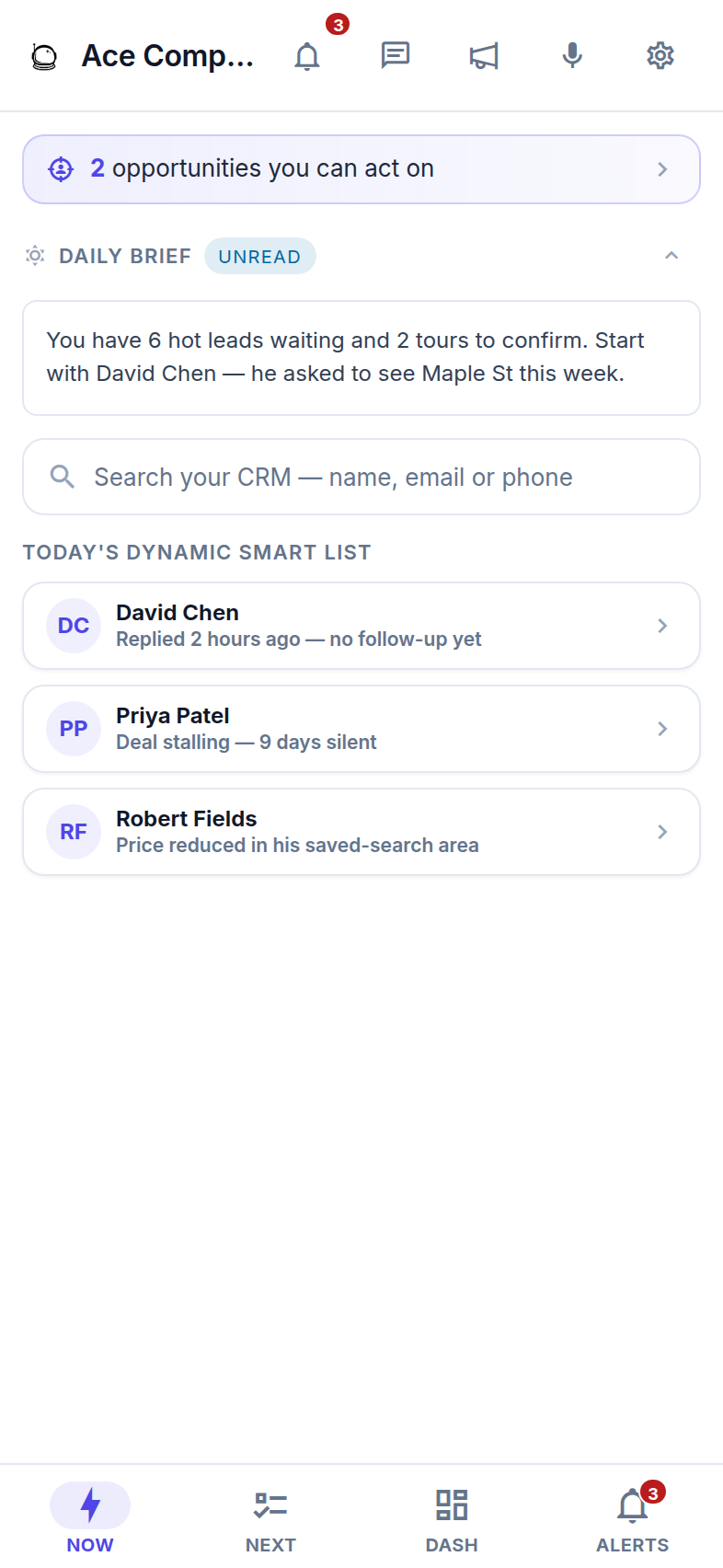
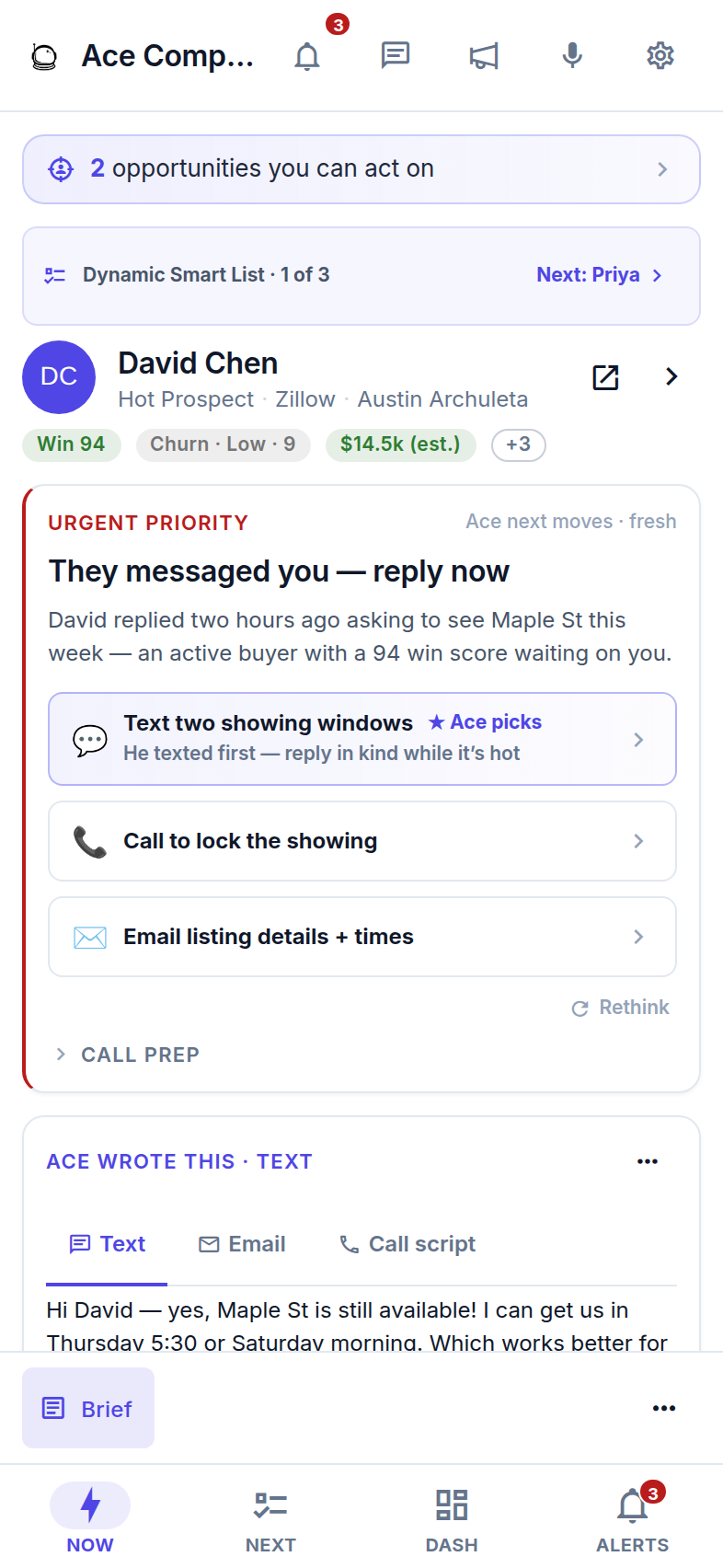
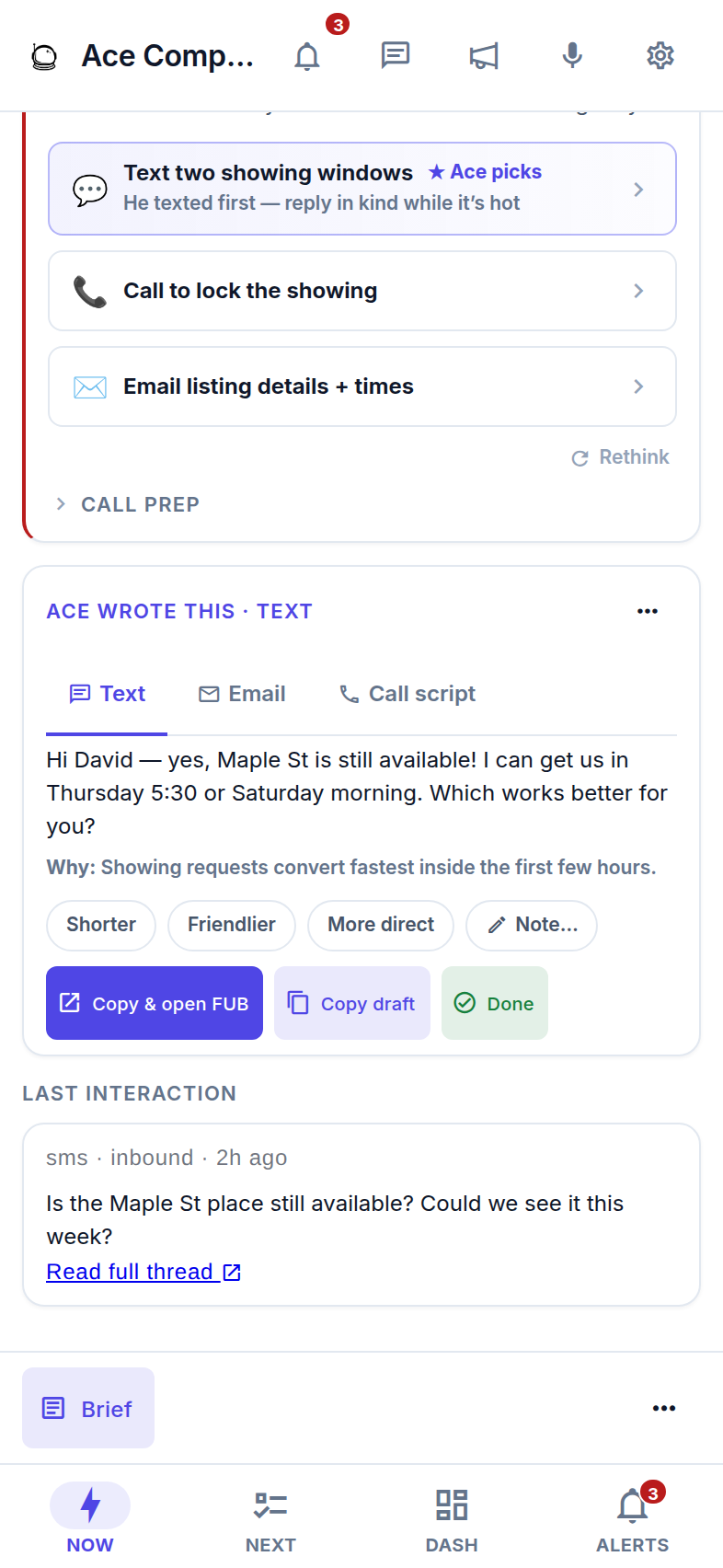
All names, numbers, and messages shown are demo data for illustration — not a real Follow Up Boss account.
The right alert. On your terms.
Know when a new lead arrives, a draft is ready, or a team workflow needs you. Choose your notifications, set quiet hours, and pause delivery when you need to focus.
- A new lead needs a first touch. Urgent lead alerts can break through quiet hours when you allow them. Your category switches and pauses still apply.
- A draft or team workflow is ready for you. See what needs attention, with a prepared draft to review or the details of an important handoff.
- Your phone follows your schedule. Quiet hours default to 9 PM–8 AM in your device’s local time. Change the window, choose which categories reach you, or pause delivery.
Contact alerts open the relevant person. Work you already handled syncs silently, keeping your queue current without another buzz.
Before you download, the honest checklist.
- An iPhone or iPad on iOS 15.0 or later. The App Store listing is filed under Business, rated 4+, and priced Free.
- A Follow Up Boss account, and a Follow Up Ace seat on it. There is no sign-up screen in the app. Seats are created when your team connects Follow Up Boss to Follow Up Ace — which brings the whole roster across at once. Free seats can sign in and see their alert count. The ranked queue and mobile workspace are included with Ace and Ace Pro.
- Your work email — no password. Use the email on your active Ace seat to receive a 6-digit code, then connect your own Follow Up Boss account when prompted. If the code does not arrive, check spam and confirm the seat email with your admin.
- Voice needs a Pro seat. Voice is a Pro-seat capability and it is read-only by design — it answers, summarizes, and prepares the draft; you still tap Send.
Apple's App Store rules say digital subscriptions sold inside an app have to go through Apple's own purchase system. Rather than route your team's billing through Apple, we simply turned buying off on iOS: on iPhone and iPad there are no prices, no upgrade buttons, and no checkout — locked features just render quietly. Plans are managed on the web at followupace.com/pricing, by you or by your admin. We would rather you read that here than discover it at the moment you wanted to upgrade.
It does not replace the Follow Up Boss app. It sits next to it.
Follow Up Boss publishes its own excellent mobile app, and you should keep it. The two are answering different questions.
The Follow Up Boss app answers “what is on this contact?”
Your pipeline, your contact records, your call and text history, your tasks — the CRM itself, in your pocket. That is where your data lives and it is not going anywhere.
The Follow Up Ace app answers “who do I work, and what do I say?”
Ranking across your whole book, a written draft for the person at the top, and the send logged back onto the FUB timeline. It reads and writes through Follow Up Boss — it does not ask you to migrate anything.
The same account also reaches Ace three other ways, and they all share the same memory: the assistant embedded inside Follow Up Boss on desktop, the Companion in any browser (the Android and desktop path — it is a Progressive Web App, so it installs to a home screen), and Claude or ChatGPT through the MCP connector on Pro seats.
What agents ask before they download.
Is there a Follow Up Boss app for iPhone?
Follow Up Boss publishes its own mobile app, and Follow Up Ace publishes a separate app for iPhone and iPad. Follow Up Ace is free to download. With an Ace or Ace Pro seat, its mobile workspace helps you work your ranked queue, review prepared drafts, and record texts sent from your own number on the Follow Up Boss timeline.
How much does the Follow Up Ace iPhone app cost?
The app is free to download. Free seats can sign in and see their alert count; the ranked queue and mobile workspace are included with Ace and Ace Pro. There are no in-app purchases. Plans are managed on the web at followupace.com.
Do I need a Follow Up Boss account to use the app?
Yes. Your team creates your Ace seat when it connects Follow Up Boss. Sign in with the work email on that active seat and the 6-digit code Ace emails you, then connect your own Follow Up Boss account when prompted. If the code does not arrive, check spam and confirm the seat email with your admin.
Does the app send texts for me?
No — and that is deliberate. Ace writes the draft; the iPhone's own Messages composer opens with it pre-filled and you tap Send yourself, from your real number, so replies come back as a normal conversation. There is no silent-send path in the app at all. Once the message goes out, Follow Up Ace records it on the Follow Up Boss timeline so the history stays complete.
What notifications does the app send?
Alerts cover new leads, drafts ready to review, and team workflows. Choose your notification categories, set quiet hours, or pause delivery. Quiet hours default to 9 PM to 8 AM in your device's local time. Urgent lead alerts can break through when you allow them; category switches and pauses still apply. Work already handled syncs silently.
Is there a Follow Up Ace app for Android?
Not today. Follow Up Ace ships on iPhone and iPad only, and we have no Android release date to announce. Android and desktop users get the same workspace in the browser at followupace.com/companion — it is a Progressive Web App, so you can add it to your home screen and it opens full-screen.
Which iPhones and iPads does it run on?
Any iPhone or iPad running iOS 15.0 or later. The App Store listing is rated 4+, filed under Business, and priced Free.
Download it before your next showing.
Free to download. Sign in to your Ace or Ace Pro seat with your work email and a 6-digit code to open your mobile workspace.