See the whole book.
Know where to look next.
Ace Trove brings your team’s priorities, contact intelligence, and revenue context into one account-wide view. One monthly price, based on your FUB database size.
Built for Follow Up Boss · Account-wide pricing · Controls set by your team
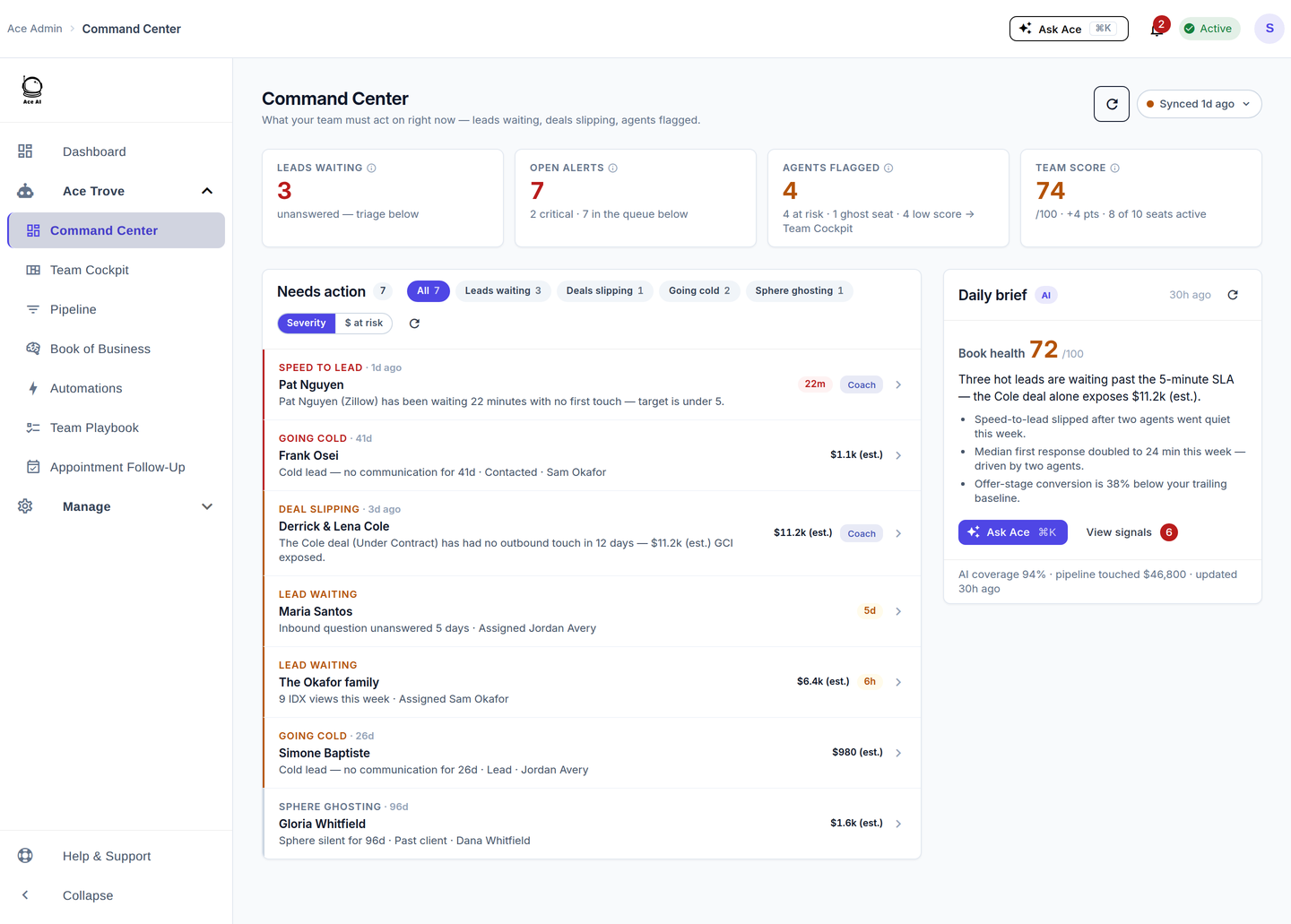
What is the Follow Up Boss Ace Trove? Ace Trove adds account-wide intelligence and team tools to Follow Up Boss: Command Center, Team Cockpit and Pipeline, Automations, Ace Autopilot (opt-in), Appointment Follow-Up, Back Office and Ask Ace, plus five more Ace fields on your contacts and 15 Ace Smart Lists instead of 9. Ace Win Score and Churn Risk stay free on every account. Pricing starts at $49/month, based on contact count, separately from individual Ace and Ace Pro seats — and it needs at least one paid Ace or Ace Pro seat.
New here? Start with what an AI real estate assistant does — the pillar guide to how Ace works inside Follow Up Boss.
See Ace Trove in 2 minutes
Recorded in the real product — the same seat with Trove off, then on.
Flat monthly rate, auto-quoted from your FUB database.
Starts at $49/mo for up to 5,000 contacts and scales with your database. Use the calculator below to estimate your tier; your account’s contact count determines the quote at activation. Ace Trove is an add-on for a team with at least one paid Ace or Ace Pro seat. Every tier includes every Ace Trove feature; higher tiers also include more team dashboard seats for staff such as a transaction coordinator (1 on Starter up to 12 on Enterprise, plus at least one free read-only viewer on every account, more on higher tiers) and a larger daily Ace Autopilot budget.
Free to start · Auto-quoted from your live FUB database · Cancel any time. Custom tier for 500k+ contacts.
Intelligence for the work. Visibility for the team.
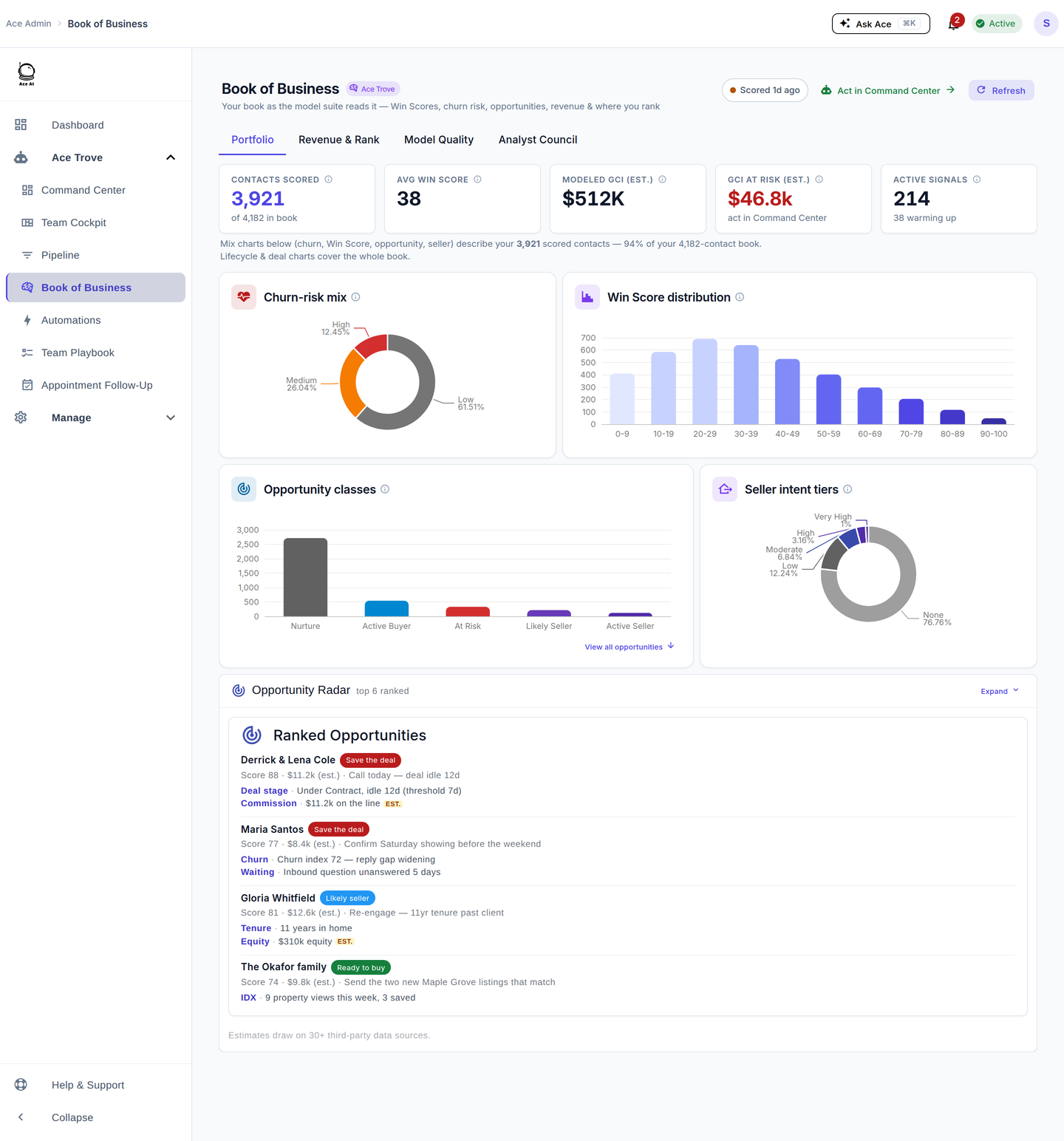
The sellers hiding in your entire database — found every night.
Ace Trove scans your Follow Up Boss database nightly (up to the first 2,000 contacts per run, with property enrichment added over successive runs), scores each contact's propensity to sell, and surfaces your likely sellers with the evidence behind every score. For the top ones, Ace drafts the outreach for you to review. Admins see likely sellers across the whole database; each agent sees the likely sellers in their own book, plus team totals. See Seller Radar →
- Nightly account-wide sweep of eligible contacts, with enrichment added over successive runs
- Ace Seller Tier written to a FUB custom field you can sort and build smart lists on — rolling out nightly as contacts are enriched. The 0–100 score and full evidence live in the Opportunity Radar, Seller Radar's home inside Book of Business
- Text, email & call-script drafts — compliance-checked, agent-reviewed, never auto-sent
Your AI Chief Revenue Officer.
An Ask Ace panel in the admin dashboard that you can open from any page with ⌘K / Ctrl+K. Ask "who's slipping?" / "where's GCI bleeding?" / "who's been waiting too long?" It brings account context and supported read-only CRM tools into an admin conversation.
- Account context from team metrics, alerts, waiting contacts, and rules, with supported read-only CRM tools for follow-up questions
- Conversation history persists per account
- Rate-limited 10 req/min, Ace-Trove-gated
GCI at risk in dollars, not vibes.
Revenue Guard is no longer a separate screen — it's the $ at risk lens on the one Command Center queue. Flip the sort and the queue re-ranks biggest-dollars-first, sized from your team's own median commission. One account-wide GCI at risk (est.) number, four filter chips for the patterns that leak the most:
- Leads waiting — new leads past their response window
- Deals slipping — open deals stalling or past expected close
- Going cold — engaged, high-value contacts the churn model flags
- Sphere ghosting — relationships and paid seats going dark
Every row carries an inline WHY, an Open-in-FUB action, and a one-click Coach. AI Signals run a 14-day shadow window per account so first alerts already match your team baseline.
And you don't hunt for it: the admin dashboard opens with a Live Intelligence band — GCI at risk (est.), high-intent leads waiting, contacts analyzed, open alerts — each tile one click from the full view.
Your funnel and your deals — one view, and exactly where you rank vs real peers.
One Pipeline view: the canonical 7-stage lead funnel and your deal pipeline side by side, with per-stage drop-off and a Speed-to-Lead distribution chart (7d / 30d / 90d / YTD). Then the part Follow Up Boss structurally can't do: your headline metrics — Closed-deal share, speed-to-lead, days-to-close, GCI per agent — ranked live against anonymized peer cohorts, bucketed by your team size, region, and deal volume.
- You vs Market — live peer percentiles (p25 / p50 / p75 / p90) with your exact rank
- Understands your team's custom stage names — renamed pipelines and bespoke stages still map to the funnel correctly
- Tracks appointments as first-class outcomes — set, held, no-show — so mid-funnel conversion is real, not inferred
- Top-decile playbook — copy what the best teams in your cohort actually do
- Drill-down per stage to the contacts dropping off
Peer benchmarks are anonymized cross-tenant aggregates: no cohort publishes until 10+ teams back it, and no identifiers ever leave your account.
Generated executive summary, every morning.
A generated executive summary panel. AI Signals run a 14-day shadow window per account so first alerts already match the team baseline — no two-week silent period after onboarding.
- Chief-of-staff narrative + Ace Tip
- "View signals" drawer with raw alert detail
- Auto-refreshes nightly with the batch
Fair-Housing-scanned automations.
A gallery of templates that fire AI-drafted, code-scanned email sends on FUB events. Templates included:
- New Lead Welcome
- Email Opened Follow-up
- Appointment Confirmation
- Stage Change Activator
- Deal Momentum Builder
Every ai_send_email action passes a code-level Fair Housing scan (80+ patterns) before send. A templated email that fails is blocked with an admin alert; an AI-written send is rewritten.
Seven model-grounded AI custom fields written into FUB.
Ace can write seven model-grounded fields into analyzed contacts. Every connected eligible account is scheduled nightly for Ace Win Score and Ace Churn Risk, whether free or on a paid seat. Trove adds five advanced fields and additional batched refreshes after meaningful CRM activity. Computation and confirmed FUB delivery are separate steps. The fields then support FUB Smart Lists, action plans, and agent views — two fields are free, and five require Ace Trove. These fields combine predictive models, CRM context, and freshness information. And you don't have to build the lists yourself: Ace deploys its curated Smart Lists into FUB for you, pre-ranked, with thresholds tuned to your book, and per-list opt-out from the dashboard.
- Free (2): Ace Win Score — a 0–100 within-account percentile rank, not a close probability (how scoring works) — and Ace Churn Risk (Low / Medium / High)
- Paid (5, Ace Trove only): Ace Expected GCI (est. — calibrated win probability × your account's real median commission), Ace Opportunity (At Risk / Active Buyer / Active Seller / Likely Seller / Nurture), Ace Seller Tier, Ace Buyer Tier (new 2026-08), Ace Last Analyzed
The fields are only the FUB-visible half. The same model suite drives the agent's in-CRM experience: open a contact and the embed assistant leads with the model's read — Win Score, Churn Risk, Opportunity, Seller intent, Expected GCI (est.) — the What's Next suggestions draft the move that matches it, and the embed dashboard's Intelligence tab ranks the book by the same scores, including a "Save first" list of engaged contacts most likely to go cold.
Consolidated June 2026: the legacy Ace Score / Tier / Status and AI summary fields were replaced by this lean, model-grounded set. Those signals are still computed internally — they now power the live dashboards instead of cluttering your field list. Field-by-field guide →
Every activity knows which deal it's pushing — so quiet deals can't hide.
Ace attributes every call, text, email, note and appointment to the deal it lands under: activity inside an open deal's window is deal work pushing a closing; everything else is lead-gen work pushing toward the next deal or appointment. Two views fall straight out of that:
- Quiet Deal Radar (Pipeline → Deal Pipeline) — open deals with no attributed activity in 7 / 14 / 30+ days, with the estimated commission sitting untouched. A deal can be months from its close date and still be quietly dying — this catches it before the date slips
- Effort Split (Team Cockpit) — each agent's deal-work vs lead-gen share, so you can see who's closing, who's prospecting, and who's coasting
- Smarter mid-deal alerts — a client in an active transaction gets tighter gone-quiet thresholds, and re-engagement nudges are suppressed for under-contract contacts: they're a closing in progress, not a cold lead
- Honest by design — a deal with no recorded activity yet runs its quiet clock from stage entry and says so; a contact with two overlapping open deals is attributed to the most recently active one and flagged, never silently guessed
Capture the outcome. Keep the next step moving.
Appointments are where deals are won — and where CRMs go dark. Ace closes the loop from both sides:
- For the agent: after an appointment ends, Ace nudges a debrief — an in-app notification plus a backup email, never an SMS. One tap opens the agent's own Ace chat, Ace speaks first ("How was the showing with Jane?"), the agent answers in plain language, and Ace writes the outcome, a debrief note, and an optional follow-up task straight into Follow Up Boss.
- For the team lead: the Appointment Follow-Up view shows upcoming and past appointments with the per-row truth — which past appointments carry a FUB outcome, which are missing one (the default view), and which have had the debrief nudged — with a one-click re-trigger.
Set / held / no-show become first-class outcomes your funnel and forecasts can actually measure — not a memory in an agent's head.
You decide what "work the right lead" means. Every agent's queue obeys.
The Dynamic Smart List is the ranking brain behind every agent's NOW / NEXT queue in the Ace Companion — "who to talk to next, and why." It's an ordered set of rules, each with a threshold: drag rules to set priority, toggle them on or off, and tune the thresholds; the changes apply to the whole team's queues at once, with a live preview of the resulting top-of-list as you tune. Seven base rules ship enabled on every account (resurfacing — a quiet contact just moved, new lead no contact yet, hot lead awaiting reply, stale touch, appointment with no prep call, past client / sphere lapsed, oldest last touch); Ace Trove adds rules that rank by model scores — Win Score, churn risk, Expected GCI (est.), likely buyers and sellers — plus high engagement score with no recent touch, engagement dropping, engagement score jumps, and drafts waiting for review (the engagement score is activity-based, not the Win Score). A Smart List can sort by one column — the Dynamic Smart List blends many rules, each with its own threshold, into one order, and it's yours to set.
What's per-seat, what's account-wide.
Per-seat Ace and Ace Pro are what your agents use. Ace Trove is what your account turns on to get the dashboard.
Per-seat Ace / Pro ($25 / $55 per seat)
- Full embed AI chat with FUB context
- Voice (Pro)
- The Claude / ChatGPT connector (Pro)
- 46 expert prompts, AI memory
- The 2 free predictive fields: Ace Win Score + Ace Churn Risk
- Daily Brief in your inbox
What you don't get without Ace Trove
- Command Center (sortable by GCI at risk (est.))
- Team Cockpit and Pipeline
- Automations
- Ace Autopilot (opt-in)
- Appointment Follow-Up
- Back Office — commissions, cap tracking, retention and Transactions
- The Expected GCI (est.), Opportunity, Seller Tier and Buyer Tier fields in Follow Up Boss
- 15 Ace Smart Lists instead of 9
Ace Win Score, Churn Risk, your ranked list of who to contact next and the Knowledge Base stay free on every account. Add Ace Trove for account-wide intelligence and team tools — it is an add-on for a team with at least one paid Ace or Ace Pro seat. Individual seat plans also work on their own.
Six questions team leads ask first.
How is Ace Trove different from per-seat Ace?
Per-seat Ace ($25) and Ace Pro ($55) are what each agent uses every day — the embed chat, voice and the Claude / ChatGPT connector (Ace Pro), 46 prompts, AI memory. Ace Trove is the account-wide add-on, and it needs at least one paid Ace or Ace Pro seat. Every connected account gets Win Score and Churn Risk free; Ace Trove adds Expected GCI (est.), Opportunity, Seller Tier, Buyer Tier and Last Analyzed when current outputs are available. It also powers the Command Center queue (home of the Revenue Guard dollars-at-risk lens), Team Cockpit and Pipeline, Automations, Ace Autopilot (opt-in), Appointment Follow-Up, Back Office (commissions, cap tracking and agent retention), Ask Ace, and 15 Ace Smart Lists instead of 9. Per-seat works without Ace Trove. Trove doesn't include voice or the connector — those stay per-seat.
What if I have 6,000 contacts in FUB?
You're in the Growth tier — $99/mo. The calculator above estimates a tier from the contact count you enter. In signed-in Billing, Ace reads your account’s Follow Up Boss contact count to prepare your quote before you subscribe.
Does Ace Trove include voice or the connector?
No. Voice and the Claude / ChatGPT connector are per-seat Ace Pro features ($55/seat). Ace Trove adds the account-wide team views and tools — but the agent-facing voice and connector are billed per seat. An account with Ace Trove but no Ace Pro seats gets the team views and tools, but the embed chat runs on the lower-tier model and there's no voice.
How do I sign up — is there a sales call?
No sales call. Self-serve at followupace.com. An admin connects Follow Up Boss and enables Ace as an embedded app. Agents open Ace inside FUB using their verified context and complete the first-use agreement and their own FUB connection when required. Add seats and Ace Trove when you're ready.
Can I cancel any time?
Cancel future renewal at any time. Paid access continues through the current billing period. Your Follow Up Boss records stay in FUB; remaining Ace features follow your active plan and our published privacy and retention policy.
Will Ace Trove send messages on my behalf without me approving?
Agent-facing suggestions arrive as drafts for review. Separately enabled workflows can send automatically: configured Automations, Autopilot playbooks after an administrator turns off draft review, and Home Almanac after the homeowner opts in. Autopilot starts with draft review enabled. Each workflow still applies its sending permissions, consent, and safety checks.
We’d rather make you better at AI than keep it a black box.
Use the context behind a recommendation to make your own decision. Suggestions arrive as reviewable drafts; authorized team members separately configure automatic workflows, with draft review enabled by default in Autopilot. Clear controls help your team put AI to work intentionally.
Bring your team’s next moves into focus.
Connect Follow Up Boss, explore your account view, and choose the intelligence and workflows that fit your team.