Follow Up Boss AI Seats: Ace vs Ace Pro vs Ace Trove
Give each agent working Follow Up Boss daily an Ace seat ($25 a month). Move an agent to Ace Pro ($55) only when they will use what Pro adds, mainly the Claude / ChatGPT connector and voice. Add Ace Trove once, for the whole account, when someone runs a team. Win Score, Churn Risk and the ranked queue stay free.

An Ace Pro seat costs $30 a month more than an Ace seat at list price, and that $30 buys exactly six things. Whether a given agent will open any of them is a question you can usually answer from your roster before you buy anything.
That is the whole point of this post. It is tempting to buy AI seats the way you buy phone plans: everyone gets the same one, usually the expensive one, because sorting people feels like more work than it is. It takes about ten minutes. Below is what each layer includes, quoted from the same plan list our checkout uses, plus a seat-by-seat test you can run against your own team.
Three layers, three different buyers
Follow Up Ace is sold in three layers that stack. Mixing them up is the most common source of buying the wrong thing.
| Layer | Who it is for | How it is billed |
|---|---|---|
| Free | Every connected account and every agent on it | $0 |
| Ace | One agent who works the CRM every day | $25 per seat, per month |
| Ace Pro | One agent who will use the connector, voice or drafts | $55 per seat, per month |
| Ace Trove | Whoever runs the team: lead, broker, ops | One flat monthly tier for the whole account, from $49 |
Seats are personal. Trove is not: you buy it once and it covers the account. Prices above are list prices; both seat prices step down on larger teams, so check checkout for your exact number. The pricing page carries the current figures.

What stays free on every account
Start here, because some teams pay for things they already have. On any connected account, at no cost:
- Ace chat inside Follow Up Boss for every agent, up to 15 messages a day.
- Ace Win Score and Churn Risk, written into two Follow Up Boss fields. Win Score is a 0–100 rank within your own account, not a close probability. More on that in the two free fields Ace keeps updated.
- The ranked list of who to contact next, with the reason each person is on it.
- The Knowledge Base, and 9 Ace Smart Lists set up inside Follow Up Boss. The full list is in our Smart Lists guide.
An agent who logs in a few times a month may never need more than this. That is a fine outcome, not a failure to upsell.
Ace ($25): the daily driver
The Ace seat is for the agent who opens Follow Up Boss every working day. From the plan list, it includes:
- Unlimited Ace chat inside Follow Up Boss
- Your daily brief every morning, by email and in-app
- Next Moves: the best next play on every contact
- AI memory: Ace remembers your clients and your voice (up to 100 facts)
- The Ace mobile workspace on the iPhone app and the browser: your ranked queue, alerts and tasks
The 15-message ceiling is what usually moves someone off free. If an agent hits it twice in a week, they are the person this seat was built for.
Ace Pro ($55): six things for $30 more
Everything in Ace, plus these six. Next to each is the question that tells you whether a particular agent will use it.
- The Claude / ChatGPT connector. Ace’s CRM tools inside Claude or ChatGPT, scoped to the agent’s own Follow Up Boss permissions. Does this agent already have Claude or ChatGPT open all day? If yes, this is the reason to buy Pro. The connector page covers setup, and this walkthrough shows what working the CRM from Claude looks like.
- One-tap AI drafts for text, email and call script. Does this agent write a lot of first touches from scratch?
- Voice chat in Follow Up Boss and the Ace workspace. Is this agent in the car between showings most of the day?
- Unlimited AI memory, instead of 100 facts. Does this agent run a large sphere they want Ace to remember in detail?
- The Zillow speed-to-lead playbook. Does this agent work Zillow leads?
- Contact search and full history in the Ace workspace. Does this agent need to pull up any contact on their phone, not just the ones in their queue?
Two answers of “yes” is a reasonable bar for Pro. One “yes” on the connector is usually enough by itself, because nothing on the Ace seat substitutes for it.
The seat-by-seat test
There is a decent body of research on why people use workplace software, and the finding that has held up longest is plain. In Fred Davis’s study of how people adopt new systems, how useful someone found a tool tracked how much they said they used it more closely than how easy it was (correlations of .63 versus .45 for self-reported current use). Put simply, people use the thing that helps with the job in front of them. Buying Pro for an agent who has no job for the connector does not make them use it.
The cost of guessing wrong is real, too. Zylo, which sells license-management software and so has an interest in the number, puts the average share of SaaS licenses left unused at 46%. That figure covers all business software, not real estate teams, so read it as a direction rather than a forecast for your office.

Run your roster through this table. It takes one pass.
| If the person… | Start them on |
|---|---|
| Logs in a few times a month | Free |
| Works Follow Up Boss every day and wants the morning brief | Ace |
| Already lives in Claude or ChatGPT | Ace Pro |
| Spends most of the day driving between appointments | Ace Pro |
| Works Zillow leads and writes many first touches | Ace Pro |
| Is a transaction coordinator or sales manager who needs team dashboards but does not work contacts | A team dashboard seat included with Ace Trove, not an agent seat |
Getting it wrong is cheap to undo. Upgrading an agent bills the prorated difference straight away. Moving someone back from Ace Pro to Ace switches the seat right away, with no refund for the rest of the period. Their voice chat and Claude / ChatGPT connector stay on until that paid period ends; drafts, unlimited memory and contact search stop at once. One rule to know: a seat the team pays for is changed by the admin, never by the agent.
Ace Trove: bought once, for the whole account
Trove is a different kind of purchase. It is not a bigger seat. It is the account-wide layer for whoever runs the team, and it needs at least one paid Ace or Ace Pro seat beside it. From the plan list:
- Command Center: one act-now list for your whole team that you can sort by GCI at risk (est.)
- Team Cockpit and Pipeline: every agent’s production, response time and deals side by side
- Automations: ready-made follow-up rules you switch on one at a time
- Ace Autopilot: opt-in outreach that starts as drafts for your review, with a daily budget set by your Trove tier. Here is who it will not contact.
- Appointment Follow-Up: after each appointment, Ace nudges the agent to log how it went
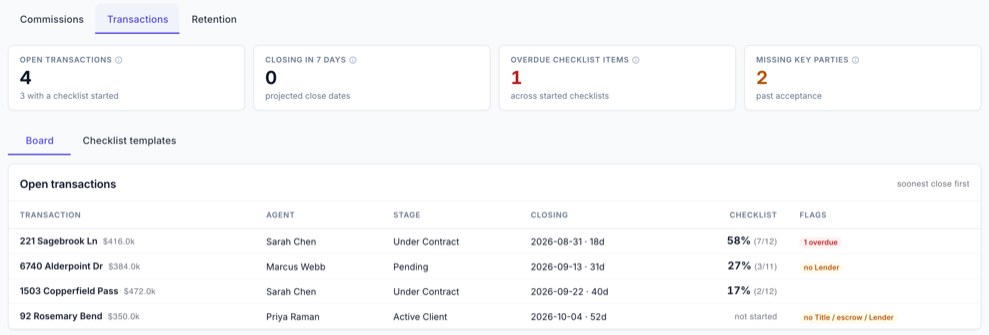
- Back Office: commission plans, cap tracking, agent retention and Transactions
- Expected GCI (est.), Opportunity, Seller Tier and Buyer Tier fields on your contacts in Follow Up Boss, refreshed nightly
- 15 Ace Smart Lists instead of 9
Trove is priced by the size of your Follow Up Boss database, not by headcount:
| Contacts in Follow Up Boss | Tier | Monthly |
|---|---|---|
| Up to 5,000 | Starter | $49 |
| Up to 20,000 | Growth | $99 |
| Up to 50,000 | Team | $199 |
| Up to 100,000 | Brokerage | $349 |
| Up to 250,000 | Scale | $549 |
| Up to 500,000 | Enterprise | $899 |
| Over 500,000 | Custom | Contact us |
Tiers differ in the number of staff dashboard seats and the Autopilot daily budget, not in features. If your database grows past its tier, admins get an email notice before the price changes. For the longer story of what Trove is for, see Introducing Ace Trove.
When Trove is not worth it yet
Be honest about this one. Command Center, Team Cockpit and agent retention exist to show one person what everyone else is doing. A two-agent team where nobody manages anybody gets the nightly fields and the extra Smart Lists, and not much else it will use. That team is usually better served by two good seats and the free layer until there is someone to run.
What these plans do not do
A few limits are worth knowing before you buy, because they shape who gets what.
- The connector sees what the agent can see. Each agent connects their own Follow Up Boss login, and Claude or ChatGPT only reaches the contacts that login is allowed to reach. If an agent’s Follow Up Boss role cannot open a teammate’s contacts, neither can the connector.
- Scores are ranks and estimates. Win Score ranks contacts against each other inside your account. Dollar figures in Trove carry “(est.)” because they are modeled, not observed.
- Autopilot does nothing until an admin turns it on. It is opt-in per account and starts as drafts for review.
- Pro features follow the seat. The connector, voice and drafts work for the agent on an Ace Pro seat, not for the account as a whole. That is the main reason to sort the roster first.
Frequently asked questions
Can one team mix Ace and Ace Pro seats?
Yes. Each agent gets their own seat, and an admin can put Ace and Ace Pro seats side by side on the same account. There is no requirement to put the whole team on the same seat. Start each agent on the seat their daily work calls for and move them later if that changes.
Does Ace Trove replace agent seats?
No. Ace Trove is an account-wide add-on that sits on top of seats, and it needs at least one paid Ace or Ace Pro seat on the account. It adds team pages such as Command Center and Back Office, plus the Expected GCI (est.), Opportunity, Seller Tier and Buyer Tier fields, for one flat monthly price.
What do I get without paying anything?
Every connected account gets Ace chat inside Follow Up Boss at 15 messages a day per agent, the Ace Win Score and Churn Risk fields, a ranked list of who to contact next, the Knowledge Base and 9 Ace Smart Lists. None of these are sold as part of Ace Trove.
See every plan side by side
The pricing page has the same plan lists, the full Ace Trove tier table, and a free start with no credit card.
Compare plans