Introducing Ace Trove: your Follow Up Boss finally tells you where the money is

Ace Trove is the account-wide AI intelligence add-on for Follow Up Boss teams. It reads your entire database every night, writes win and churn scores into your FUB custom fields, and hands your team one Command Center queue ranked by the dollars at risk — so a team lead can open the CRM in the morning and immediately see who is slipping, who is about to close, and who is quietly ready to sell.
The problem: your CRM knows everything and tells you nothing
Follow Up Boss is a good CRM. It stores every call, every text, every email, every stage change, every deal. If you want to know what happened, it is all in there.
The trouble is that "it is all in there" is not the same as knowing what to do. Every morning a team lead sits down in front of a database that holds thousands of contacts and hundreds of open deals, and the CRM says, in effect: here it all is, good luck.
Which of these leads is about to go cold? Which deal is quietly stalling past the point of no return? Which past client just crossed the tenure line where people start thinking about selling? The answers exist inside the data. Nobody has time to go find them by hand.
So teams do the human thing. They work the loudest lead, not the most valuable one. They notice a deal is dead a week after it died. They find out an agent's response time collapsed when the numbers come in at the end of the month. None of that is a discipline problem. It is a surfacing problem. The CRM never turns its own data into a decision.
What Ace Trove is
Ace Trove is the account-wide intelligence layer we built to close that gap. It is an add-on for Follow Up Boss teams that sits on top of your per-seat Ace assistant and works across your whole account — not one contact at a time, but your entire book, every night.
The idea is simple: the machine should read the database so your people do not have to. Ace Trove analyzes every contact you have, scores them against what actually closes in your market, writes the important numbers back into Follow Up Boss where your team already works, and organizes the day around one question — where is the money, and what is putting it at risk?
Here is what that looks like in practice.
Win, churn, and expected-GCI scores — in your FUB fields, every night
Ace Trove runs a suite of predictive models across your whole book and writes the results straight into Follow Up Boss custom fields. No export, no spreadsheet, no separate app to check. The scores are just there, on the contact record, ready to sort and filter with the Smart Lists you already use.
Two fields are free on every account:
- Ace Win Score — a calibrated 0–100 probability that a contact converts to a closed deal.
- Ace Churn Risk — a Low/Medium/High read on whether an engaged contact is about to go quiet.
Add Ace Trove and four more land on every record:
- Ace Expected GCI (est.) — win probability multiplied by your account's own median commission per closed deal.
- Ace Opportunity — At Risk, Active Buyer, Active Seller, Likely Seller, or Nurture.
- Ace Seller Tier — the nightly Seller Radar tier, on the record itself.
- Ace Last Analyzed — when the machine last read this contact.
Two things matter here. First, "calibrated" is a real claim, not a marketing word: a contact reading 30 has roughly a 30% chance of closing, checked against what actually happened and re-fit as your market shifts. Second, the models are retrained weekly on your market's outcomes, and the scores refresh nightly. This is a live read on your book, not a one-time grade. We publish the evaluation numbers behind these claims — held-out results for every model, with an honest explainer of what they mean — in the model evaluation report. (For the mechanics, see our guide to predictive lead scores.)
The Command Center: one queue for the whole team, ranked by dollars
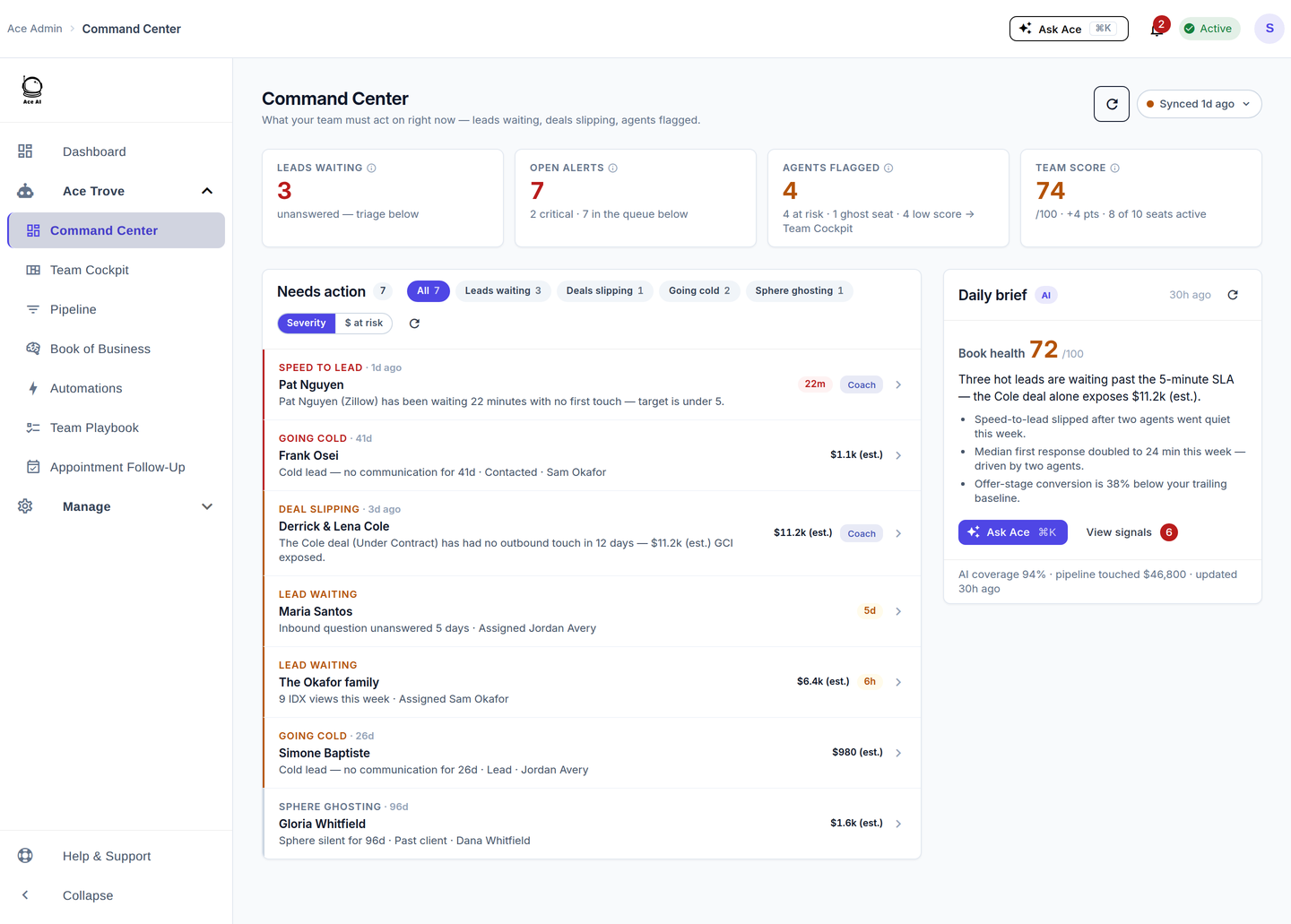
Scores on fields are useful. But a team lead does not want to sort six fields every morning — they want one screen that says "start here." That screen is the Command Center: a single queue of everything the team needs to act on now.
It has two lenses. Severity puts things in triage order. Flip to $ at risk and the same queue re-ranks biggest-dollars-first — that dollar lens is Revenue Guard, and it produces one account-wide GCI at risk (est.) number, sized from your team's own median commission rather than an industry average.
Filter chips break the risk into the patterns that actually leak commission: leads waiting past their response window, deals slipping, engaged contacts going cold, sphere relationships going dark.
And every row is actionable on the spot: an inline reason why it is there, an "Open in FUB" button, and a one-click Coach action that messages the agent, opens a follow-up task, and logs the note in Follow Up Boss.
That is the morning we wanted to give team leads: open the CRM, look at one queue, and know exactly where to spend the first hour.
Deal-stage economics, with projected closes
The Pipeline view does for deals what the Command Center does for contacts. Each of your pipeline stages shows its count, its value, and its GCI — plus the median days deals sit there, the rate at which they advance versus the rate they are lost, and a projected close (est.) for the open deals in the lane.
There is a dated list of the closings coming next — honest about which dates come straight from Follow Up Boss and which are estimated — alongside a weighted forecast and a model-weighted pipeline that discounts each open deal by the win probability of the contact attached to it.
It is the difference between "here are your deals" and "here is what this pipeline is actually going to pay you, and when."
Your whole book, not a sample
A note that matters more than it sounds: Ace Trove scores your whole book. The nightly refresh covers your entire scored population, and the Book of Business reads every contact in the store, not a capped sample. When it says a number, that number is your database — not the first few thousand records, not an extrapolation. For a team that has spent years building a database, that completeness is the whole point.
Seller Radar: the listings hiding in your database

Most of a team's future listings are already in the CRM as past clients and sphere. Ace Trove scans your whole database nightly for the ones most likely to sell, scoring propensity from tenure, estimated home equity, local market appreciation, area signals, and any seller notes the agent has already written in Follow Up Boss. The result rolls up as a Seller Tier written into a FUB field nightly; the full 0–100 score and the evidence behind it live in the Opportunity Radar — Seller Radar’s home inside Book of Business.
We are careful about what this is and is not. Home equity is estimated — a conservative model, always labeled "(est.)," never lien-level or appraisal-grade data. Life-event signals like a relocation or a downsizing only count when the agent already noted them in the CRM; we do not buy or mine third-party life-event lists.
And the suggestions Seller Radar produces are agent-reviewed, never auto-sent. It surfaces the opportunity and drafts the move; a human decides. The location signals behind the scores come from a network of 30+ third-party data sources — county parcel and assessor records plus federal datasets.
One number, everywhere you look
The quiet feature we are proudest of is consistency. A person or a deal shows the same stage, the same owner, the same days-idle, and the same dollar figure on the Command Center queue, in the Pipeline, in the Book of Business, in the Team Cockpit, and in the agent's own view. The GCI-at-risk number on the Overview is the same number on the Team Cockpit.
"Lead → Closed %" and "Deal win rate" are two honestly different metrics with two different denominators, each defined and labeled — never collapsed into a vague "close rate." When a figure is modeled, it carries "(est.)." The same number means the same thing on every screen, so a team never has to argue about which dashboard is right.
Who it's for
Ace Trove is built for Follow Up Boss teams — team leads and brokerages who have a real database and want it to do more than sit there. If you are a solo agent, the per-seat Ace assistant already gives you win scores and an AI that works inside your CRM. Ace Trove is the layer you add when there is a team to run, a pipeline to protect, and a book big enough that no one can hold all of it in their head.
It pairs naturally with the way real estate teams already think about accountability — which is why we built the team-lead surfaces around it. If that is you, the Ace Trove for teams page walks through the team-lead view in detail.
What it costs
Ace Trove is one flat monthly rate for the whole account, sized by your Follow Up Boss database — not per seat. It is auto-quoted from your contact count:
- Starter — $49/mo · up to 5,000 contacts
- Growth — $99/mo · up to 20,000 contacts
- Team — $199/mo · up to 50,000 contacts
- Brokerage — $349/mo · up to 100,000 contacts
- Scale — $549/mo · up to 250,000 contacts
- Enterprise — $899/mo · up to 500,000 contacts
- More than 500,000 contacts? Request a custom quote in-app.
Every tier unlocks the same feature set — the tiers only size the database, they do not gate capabilities. The per-seat assistant is separate and priced per person: Ace at $25/mo and Ace Pro at $55/mo (Pro adds voice and the Claude / ChatGPT connectors). Ace Trove is an add-on to those seats, so an account keeps its per-seat assistants and adds one account-wide subscription on top.
Two details worth knowing. If your database grows past a tier cap, upgrades are gentle and transparent — you have to sit meaningfully over the cap for a week before an upgrade is even scheduled, you get advance notice, you can defer, and tiers never auto-downgrade behind your back. And before any plan change, you see a proration preview with the exact charge — "$X.XX today, then $Y/mo" — so nothing about the bill is a surprise.
How to start
You can start free. Connect Follow Up Boss in one click and the per-seat Ace assistant begins working inside your CRM immediately, with live Ace Win Scores on your contacts. When you are ready for the account-wide layer, an admin adds Ace Trove from the Billing page — the tier is auto-quoted from your database size — and that night, Ace Trove reads your whole book for the first time. By morning your fields are scored, your Command Center queue is populated, and your Seller Radar has a list.
If you want to see how Ace Trove stacks up against the tools you are weighing, we keep honest, code-verified comparisons: Ace Trove vs Fello for seller-lead generation, vs Lofty for all-in-one platforms, and the full competitor comparison index. Or read the complete Ace Trove overview for every capability in one place.
Try Follow Up Ace in your Follow Up Boss
Free to start, no sales call. Connect Follow Up Boss in one click and Ace works inside your CRM.
Get Started Free