Real Estate Past Client Follow-Up: Write About Their House
Past client follow-up works when each message is about the client’s own house: what its estimated value did, what maintenance is coming due, what season just turned. Send only when something changed, ask the homeowner to opt in rather than adding them yourself, and keep vendors and other agents off the list.

If they turn out to be typical, the buyer you close with this month will list that house sometime around 2037.
That date comes from the National Association of REALTORS®. In its 2025 Profile of Home Buyers and Sellers, the median seller had owned their home for 11 years before selling, the longest NAR has recorded. The same survey says 91% of buyers would use their agent again or recommend them. Goodwill isn’t the hard part. The hard part is still being the agent they think of after a decade of other people’s email.
Run the arithmetic on the usual answer. A monthly market newsletter over 11 years is 132 emails. Most of them will be about interest rates, your recent listings and the season. Very few will be about the one thing that client actually owns. This post is about the opposite approach: follow-up where every message is about their house, and where you skip the months that have nothing to say.
Why the newsletter stops getting opened
A market update is written about you, or about the market in general. Your past client already gets plenty of both. What they don’t get is someone paying attention to the place they live.
Research on bulk email points the same way. In an eight-week field experiment on a university staff newsletter, Kong and colleagues (2022) tested which stories went at the top. The only arrangement that made readers slightly more interested in the newsletter was a top section holding nothing but the items they preferred. Putting the organization’s own messages up top helped those particular messages get noticed. That is one newsletter at one university, so treat it as a direction, not a law. For a past-client email the direction is clear enough: lead with their news, not yours.

What a homeowner will actually read
These are the things that change about a house over the years, and each one is a reason to write. If none of them changed this month, that is your answer for this month.
| What changed | What you send | Why they care |
|---|---|---|
| Estimated equity moved by a meaningful amount | The new estimate, labeled as an estimate, with the date it was figured | It is their biggest asset, and they rarely see it written down |
| A maintenance task is coming due | The task, matched to their climate and season: gutters, HVAC filter, water heater flush | It saves them money, and it is advice they will forward |
| They fixed or replaced something | Note it, and stop reminding them about it | It shows someone read what they told you |
| The season turned where they live | The two or three jobs that season brings for a house like theirs | It is timely without being a sales pitch |
| Nothing | Nothing | An empty email teaches them to skip the next one |
The last row is the one most systems get wrong. A drip campaign sends on a schedule whether or not there is anything to say, which is how automation fatigue sets in. Skipping an empty month costs you one touch. Sending it costs some of the trust behind every touch that follows.
Skipping empty months also protects your sending reputation
There is a mechanical reason as well. Google’s email sender guidelines ask senders to keep the spam rate reported in Postmaster Tools below 0.10% and never reach 0.30%. They also require marketing messages to support one-click unsubscribe. Google measures that rate across your whole sending domain, not per campaign, but a past-client list is small and every “report spam” click counts. One report on 300 messages is already 0.33%. The cheapest protection is not sending the email that would have earned the report.
Get the yes from them, not from your import
Here is the step most agents skip. Adding a past client to your list is not the same as them agreeing to a monthly email. They gave you their address to buy a house. It is fine to tell them once that something exists for them. After that, the ongoing email should go only to people who asked for it.
One invitation is enough. Here is a version you can send yourself:
Hi Dana — I set up a page for 4412 Ridgeway with what I know about the house: the year it was built, the systems, and a maintenance list for this time of year. Some of it came from public records, so it may be off. If anything is wrong, fix it on the page and the list will adjust.
If you would like an email when something on it changes, there is a button at the bottom. If not, no hard feelings. The page is yours either way.
Three things make that script work. It is about their house. It admits the data may be wrong, which invites them to correct it, and a correction is the best engagement you will get. And it makes the email a choice they make, with no pressure attached.
Clean the list before the first send
A “past clients” tag in Follow Up Boss usually holds more than past clients: the lender from the deal, the inspector, a co-op agent, someone who asked never to be contacted. Sending them a note about “your home” is how a list loses credibility on the first send. Before you start, run the passes in not everyone in your database is a lead and set up the tags that exclude contacts from automation. Then confirm you have a street address for every home. If you have no address, you have nothing to write about.
A cadence you can run
- Closing week. Hand over everything they will need later. A hosted welcome packet beats a PDF because you can update it.
- About 30 days in. Send the one invitation above, once.
- Monthly or quarterly after that, for those who said yes. Check the table: did anything change? If yes, send it. If not, skip the month.
- Whenever they respond. A corrected roof date or a forwarded page is a person engaging with you, so answer it like one.
Pick monthly if you can produce real changes that often, and quarterly if you can’t. The skip rule matters more than the interval.
Which signals mean something
Don’t judge interest by email opens. Apple Mail’s Mail Privacy Protection loads remote content privately, so an “open” can register without anyone reading. The signals worth acting on are things only a person does: correcting their home’s details, checking off a maintenance task, sharing the page with a neighbor, or clicking through on purpose. Someone who edits their home profile in year nine is worth a phone call. If you track which past clients send you referrals, a shared page belongs in that record too.
How Home Almanac runs this in Follow Up Ace
We built this playbook into a feature called Home Almanac. It works alongside Follow Up Boss: each past client’s home gets its own page and, if they ask for it, a short email when something on that page changes.
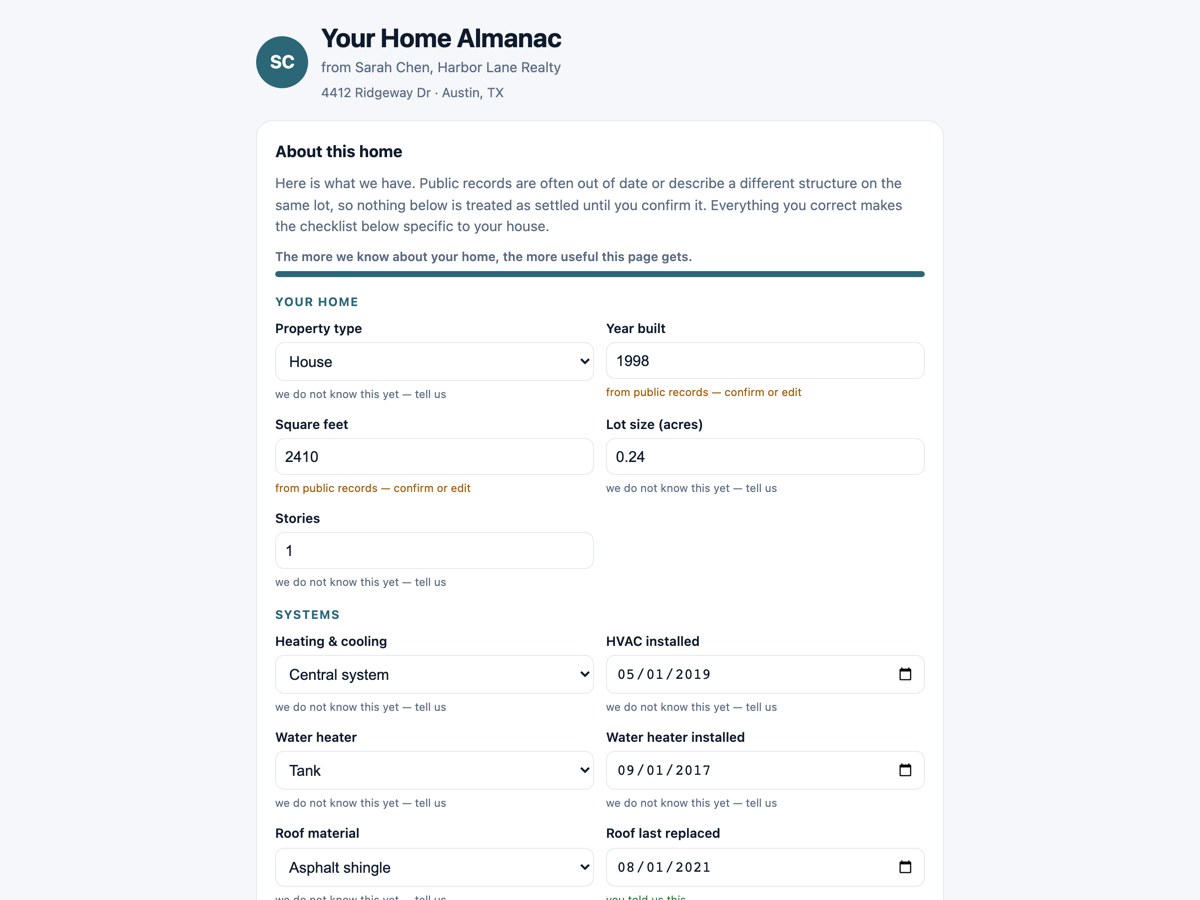
- A page per home, with no login. The homeowner opens it from a private link and can correct the year built, the systems, the roof date and so on. Their corrections make the maintenance list fit their house.
- Email only after they opt in. Enrolling a home sends a single invitation. Ongoing email starts only when the homeowner clicks “Yes, email me when it changes” on their own page.
- No change, no email. After the first issue, a month with no material change to the estimate, no task coming due, nothing checked off and no change of season sends nothing. The default is monthly, and quarterly is an option.
- Estimates are labeled. Equity is shown as “(est.)” with a note that it is not an appraisal or a CMA. When there is no public purchase price and no closed deal of yours on record, as often happens in non-disclosure states, that home gets no issue rather than a made-up number.
- Non-clients are refused. Lenders, vendors, recruiters, other agents and do-not-contact records can’t be enrolled.
- The agent hears about real moments. The agent who serves the home gets an alert the first time the homeowner opens their page, the first time they confirm or correct their profile, and when a neighbor leaves their details on a shared page.
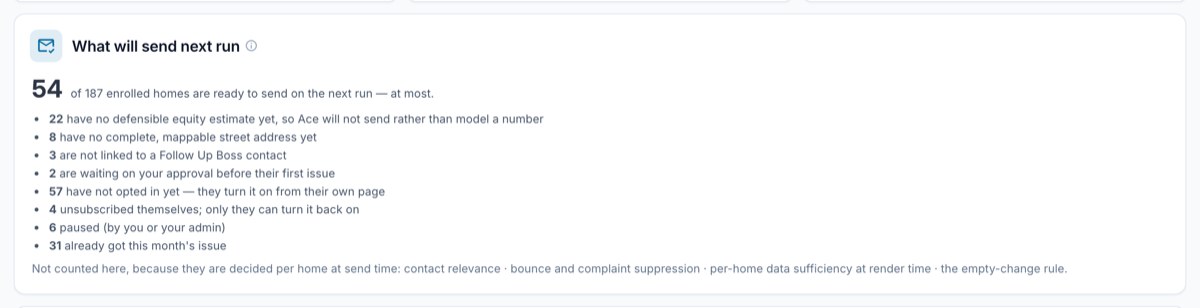
Before each monthly run, the admin view shows how many homes are ready to send, at most, and why the rest aren’t:
Without Ace Trove, Home Almanac works per agent: an Ace seat covers up to 25 homes in that agent’s own book, Ace Pro covers up to 100, and a free seat can’t send. With Ace Trove it covers every agent’s book on the account, with an allowance that scales with the Trove tier. Full details are on the pricing page. If you already use Homebot for home-value reports, our Homebot and Follow Up Boss guide covers how that tool fits in. If you would rather capture new homeowners than re-engage past ones, lead magnets handle that side.
What it does not do
- It doesn’t replace the call. The page and the email keep you present between conversations. The year-nine phone call still has to come from you.
- Its estimates are rough. They come from public data and the purchase record, and they can be off. A CMA is still your job.
- It doesn’t always have something to send. A home missing an address or a usable estimate gets no issue that month, and the admin view says which homes and why.
- It doesn’t text your clients. Issues go out by email.
Frequently asked questions
How often should I follow up with past clients?
As often as you have something real to say about their home, and no more. For most agents that means a monthly or quarterly check where an empty month is skipped. A personal call once or twice a year still matters more than any email.
Can I add all my past clients to a monthly email?
You can invite them, but an ongoing marketing email should go to people who asked for it. Send one invitation that explains what they would get, and let them opt in. Every marketing email also needs a working unsubscribe link and your postal address.
What should I send past clients instead of a market update?
Something about their own house: a labeled equity estimate when it moves, maintenance coming due for their climate and season, and an acknowledgment when they tell you something changed. Local market news works as a short addition to that, not as the whole email.
See how enrollment and opt-in work
The help article covers adding homes, what the homeowner sees, and why a given issue did or did not send.
Read the Home Almanac guide