Home Almanac: Enrollment, Homeowner Opt-In, and Why an Issue Did Not Send
Updated August 13, 2026
The Home Almanac gives a past client a page about their own home — its profile, a seasonal maintenance checklist, and an estimated equity position — plus a monthly (or quarterly) email that tells them what actually changed on it. It is the one thing in Ace that emails a client on a schedule, and every rule below exists because of that sentence.
What you'll have when you're done
- A past client with their own page about their own home — profile, seasonal maintenance checklist, estimated equity position — reachable with no login.
- Exactly one email sent: the invite telling them the page exists.
- A send-readiness summary that names, per home, why it will or won't receive the monthly issue.
- A monthly change feed that goes out only after the homeowner opts in themselves.
Your first win, in about 6 minutes
Your seat sets your allowance: a free seat enrolls 0 homes, Regular 25, Pro 100; Ace Trove opens the account’s whole book. Start with one past client whose address you are sure of.
- Agents: open Home Almanac in the Ace Companion. Admins with Ace Trove: Book of Business → Home Almanac tab.
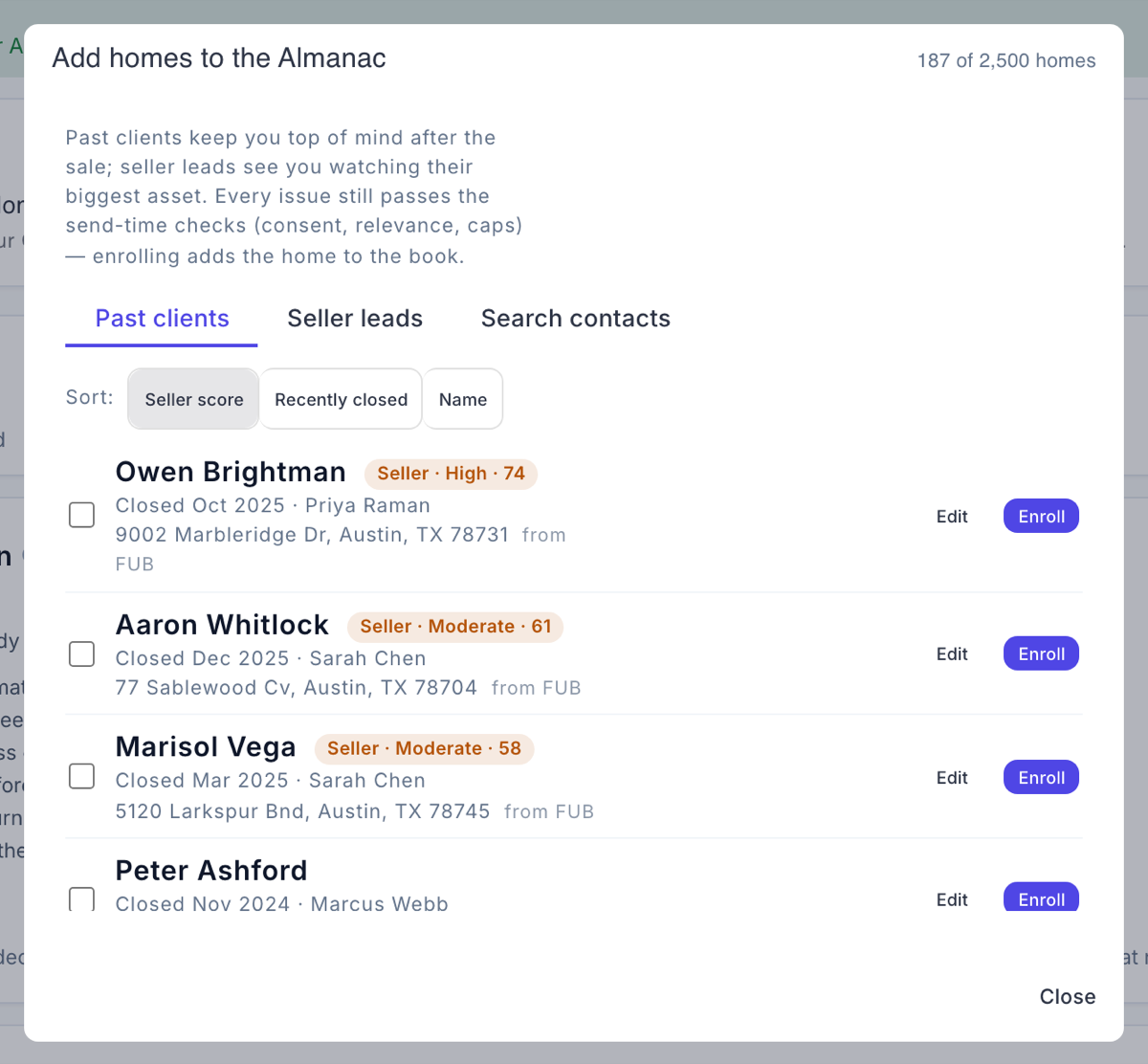
- Press Add homes (Companion: Add a home). Pick a past client from Past clients, Seller leads or Search contacts. Ace refuses lenders, vendors, recruiters, other agents and DNC records — the Almanac is for homeowners.
- Rows without a usable address show Add address instead of Enroll. Fill it in — a complete, mappable address is what makes the page and the equity estimate possible. A new address is added to the Follow Up Boss contact, never written over one already there.
- Confirm the selection and enroll. That is it — one invite goes out and Ace seeds the home profile from public records in the background.
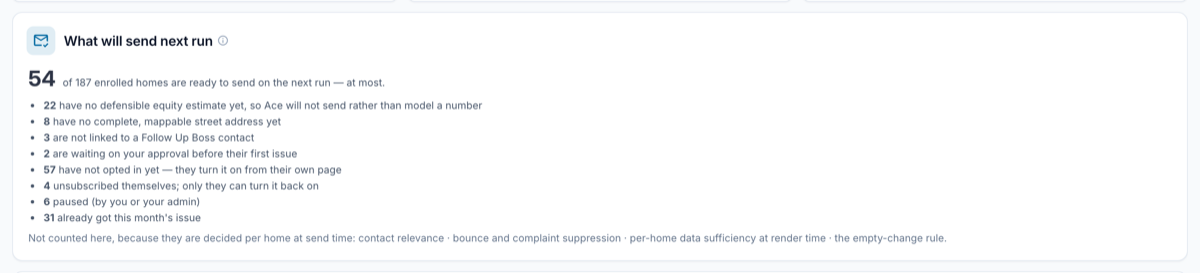
- Read the What will send next run panel. Your new home will sit under have not opted in yet until the client presses subscribe on their own page. That is the system working, not a fault.
- Text the client a line pointing them at the link. That is the only nudge available to you — and it is the right one.
Who can use it
Two things decide your allowance, and both are checked on every send:
- Your seat covers your own book: a free seat enrolls 0 homes, a Regular seat 25, a Pro seat 100.
- Ace Trove unlocks the account's whole book, with the allowance scaled by your Trove tier.
The per-home check always resolves against that home's owner's seat. One Pro teammate does not unlock sending for a free-seat agent's book.
Where to find it
- Agents: Home Almanac in the Ace Companion — your own enrolled homes.
- Admins: Book of Business → Home Almanac tab — account-wide, with Ace Trove.
- Your client's page lives at
/almanac/<id>and opens from the link in their email.
Enrolling a home
- Add homes. Press Add homes (Companion: Add a home) and pick a past client from Past clients, Seller leads or Search contacts, then confirm the selection. Ace refuses lenders, vendors, recruiters, other agents, and DNC records with an honest message — the Almanac is for homeowners.
- Confirm the address. A complete, mappable street address is what makes the page and the equity estimate possible. If you type a new address, Ace adds it to the Follow Up Boss contact — it never overwrites an address already there.
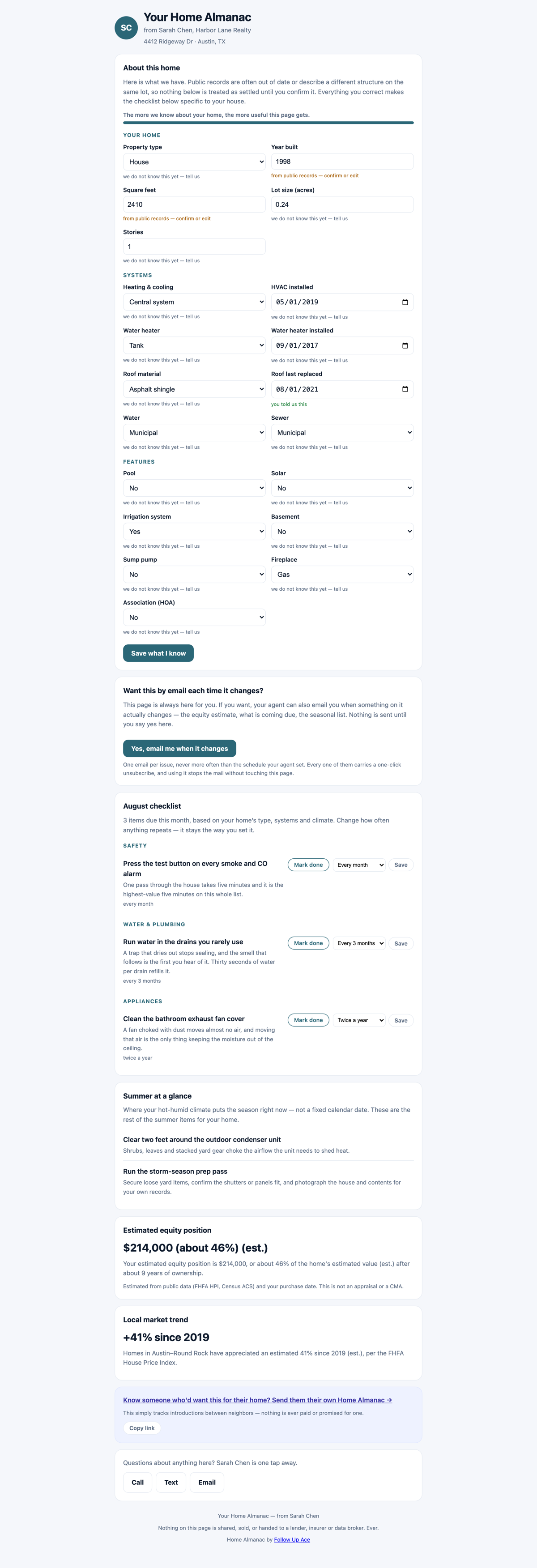
- Ace seeds the home profile from public records in the background, and the homeowner can correct or fill in the rest on their own page.
- One invite goes out. Enrollment sends exactly one transactional email telling the homeowner the page exists and where it is. That is the only automatic message enrollment produces.
- The homeowner opts in — or doesn't. Nothing monthly happens until they press the subscribe button on their own page.
Why enrolling someone does not subscribe them
This is deliberate and it is not a bug. You adding a past client is not that client agreeing to a monthly commercial email. So the monthly issue is gated on the homeowner's own opt-in, made from a button on their own page, and nothing in the product writes that consent on their behalf.
The practical consequence: after you enroll a batch of homes, expect them to sit in "have not opted in yet" until the invites land and people click. That is the system working.
Unsubscribing and re-subscribing
- Every issue carries a one-click unsubscribe, including the header form mail apps act on without opening the message.
- Unsubscribing pauses that home and records the opt-out across Ace, so the address is not mailed from another surface either.
- They can turn it back on from the same page — the subscribe button returns once they've opted out.
- You and your admin can pause a home too. If the homeowner unsubscribed, Ace reports that specifically rather than showing "paused," because resuming it on their behalf is exactly the thing you must not do.
Why an issue didn't send
Your almanac book has a panel called What will send next run — for example, "Of your 84 enrolled homes: 61 will send · 18 have no defensible equity estimate · 5 have not opted in." These are the buckets, in Ace's own words:
| Bucket | What it means & what to do |
|---|---|
| Ready to send | Ready on the next run. Nothing to do. |
| Already got this month's issue | Sent already this cycle. |
| Have not opted in yet | The invite went out; they turn it on from their own page. Nudge them personally if you like — you cannot flip it for them. |
| Unsubscribed themselves | Only they can turn it back on. |
| Paused | Paused by you or your admin. Resume it when you're ready. |
| No defensible equity estimate | Ace could not derive a figure it can stand behind, so it will not send rather than model a number. Common in non-disclosure states where no purchase price is public and Ace has no closed transaction of your own for the property. |
| No complete, mappable address | Fix the street address on the home. |
| Not linked to a Follow Up Boss contact | Re-link the home to the person. |
| Waiting on your approval | Only if your account turned on first-issue review. Approve the preview. |
| Over this run's volume cap | New accounts ramp up gradually rather than blasting a whole book on day one. These roll to the next run. |
The empty-change rule
If nothing meaningful moved on a home this cycle, Ace sends nothing. A monthly email with no news is both dishonest and the fastest way to get marked as spam. A quiet month is a skipped month, not a filler email.
About the equity number
- It is always labeled "(est.)" and carries a not-an-appraisal, not-a-CMA disclaimer that cannot be edited away.
- It is derived from the purchase price and date on the county record, grown by the federal house-price index for that area — or, where no purchase price is public, from your own closed transaction on that property.
- When neither is available, Ace does not model one. The home simply isn't eligible that cycle and you're told why.
Coming from another tool?
If you are moving a homeowner list off Homebot or a similar home-value product, you do not have to re-type it. The Almanac import takes a CSV of homeowners and addresses and runs it through the same enrollment path you would use by hand — with one difference that matters more than the time it saves.
Import → review → invite. That is the whole shape, and there is no fourth step where a batch of monthly issues goes out.
- Import. Upload the CSV. Ace matches each row to a Follow Up Boss contact by email, and creates the contact when there is no match — Follow Up Boss stays the system of record, so nothing lives only inside Ace.
- Review. You get a per-row result before anything is committed: matched, created, skipped, or rejected with the reason. Incomplete addresses and non-homeowner contacts are refused here, by the same rules that refuse them one at a time.
- Invite. Each imported home receives the same single transactional invite a hand-enrolled home gets — the one message telling the homeowner their page exists and where it is.
The practical read: importing 300 homes does not produce 300 monthly emails. It produces 300 pages, 300 invites, and however many opt-ins your clients choose to give you.
Frequently asked questions
Can I subscribe a client myself to get them started?
No. The opt-in has to be theirs, from their own page. You can re-send nothing and force nothing — but a personal text pointing them at the link works fine.
Does the homeowner need to log in?
No. The link is the access.
Will Ace email a contact who is really a lender or another agent?
No. Those are refused at enrollment and re-checked at send time.
Is my client's information sold or enriched with purchased data?
No. The home profile comes from public records and from what the homeowner fills in themselves.
Why did a home stop after one issue?
Most often the homeowner unsubscribed, or nothing changed that month. Check the readiness buckets — the specific reason is always named.
Related articles
Last updated: August 2026
Thanks for the feedback — it helps us improve.