Your Free Ace Page (and What the Paid Team Roster Adds)
Updated August 13, 2026
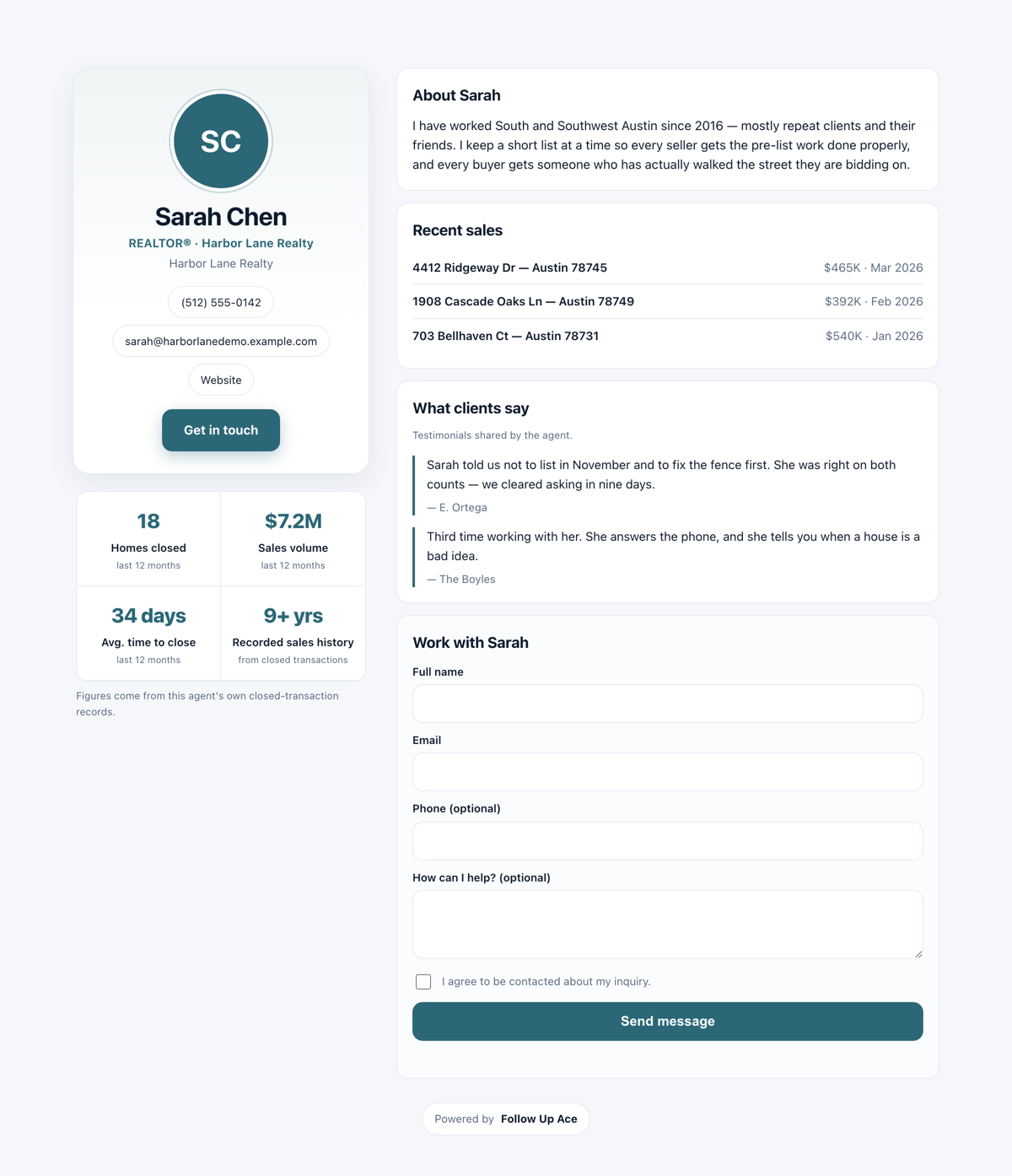
An Ace Page is a public, search-indexable profile page for an agent, built from your account's own Follow Up Boss deal records plus what you add yourself. It has a contact form, so it captures leads into Follow Up Boss like the rest of the Capture family.
What you'll have when you're done
- A public, search-indexable profile page at
/a/<page id>that you can put in an email signature, on a yard sign, or in a listing presentation. - Your real closed-sale history on it, pulled from your own Follow Up Boss deals — nothing invented, nothing scraped.
- A contact form that captures into Follow Up Boss like the rest of the Capture family.
- Control over what strangers can see: phone and email are off until you turn them on.
Your first win, in about 6 minutes
This one is free for every agent — the cap is one page per Follow Up Boss user, not an account-wide pool, so a team of 20 on the free plan publishes 20 pages. You do not need an admin.
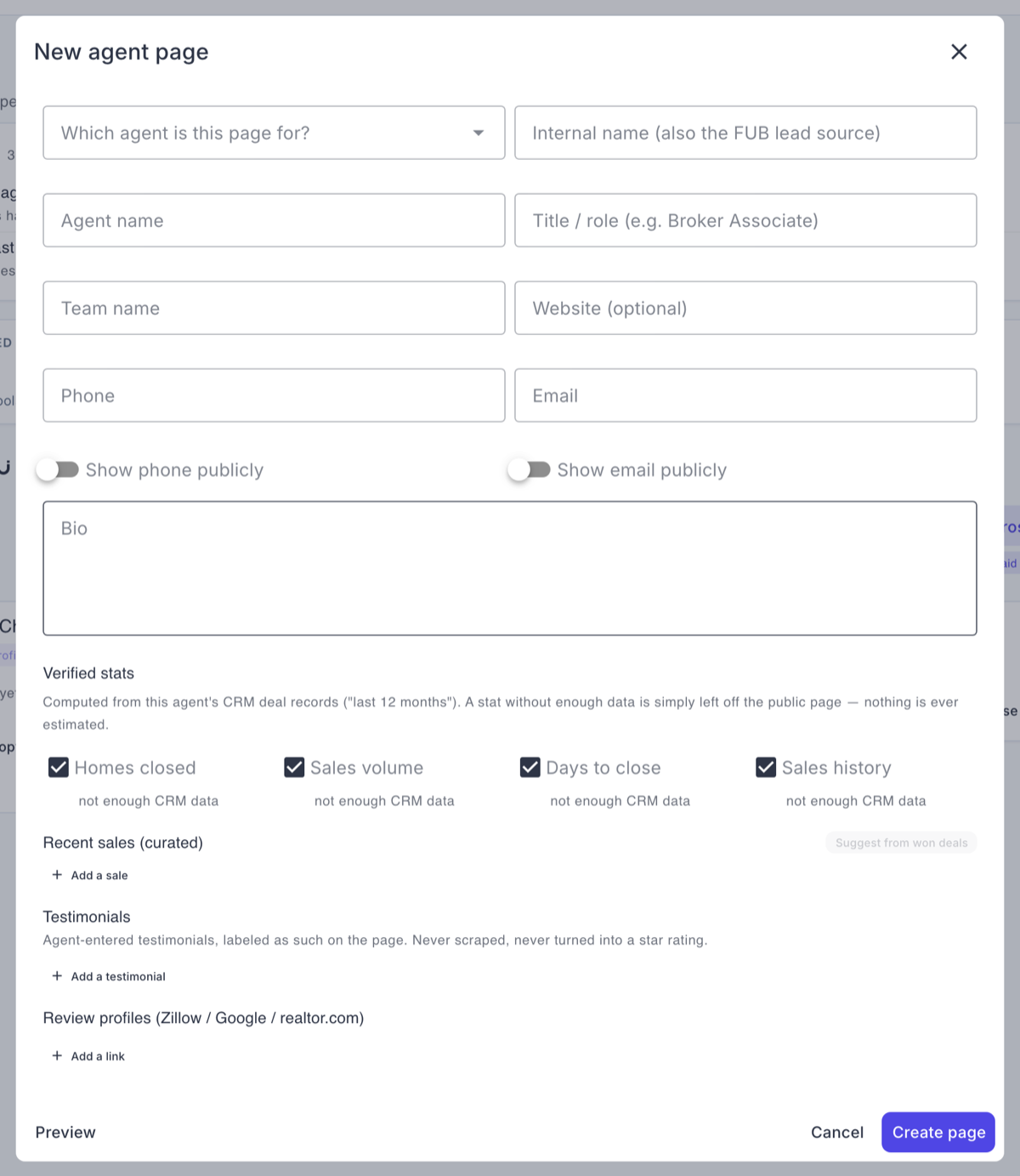
- Agents: open My Ace Page in the Ace Companion. Admins publishing for someone else: Capture → Ace Pages → New agent page, then answer Which agent is this page for?
- Confirm the identity block — name, title and photo prefill from Follow Up Boss. Fix anything stale.
- Write two or three sentences of bio. Under Testimonials, use Add a testimonial if you have them; they are labeled as agent-provided on the page, which is why we can publish them at all.
- Under Recent sales (curated), press Suggest from won deals and save the ones you want. Nothing appears on the page until you save it.
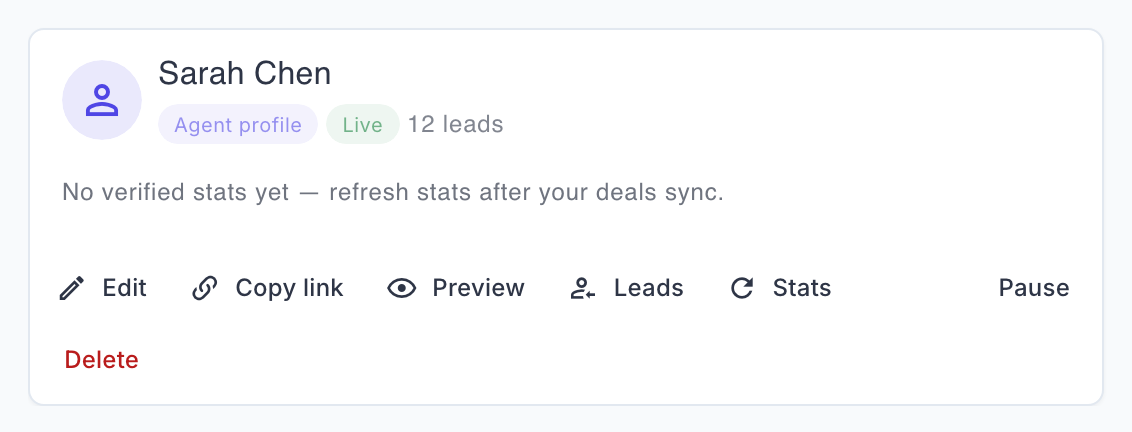
- Save the page, then press Stats on its card to recompute the stored snapshot from your deals mirror. Decide in the builder whether to expose your phone and email.
- Publish, then use Copy link on the card and paste the URL into your email signature.

Who can use it
Every agent gets their own profile page, free. The free cap is by identity — one page per Follow Up Boss user — not an account-wide pool. A team of 20 on the free plan publishes 20 pages, and there is no page-count limit or setting to raise.
A paid seat (Regular or Pro) or Ace Trove adds three things:
- The team roster page — one per account.
- Brand color and logo customization — set once in Account Settings → Team Branding (the top-right account menu, not the left nav) and inherited by every public page Ace serves.
- Per-member attribution links, so a lead from your link is credited to you.
Where to find it
Admin: Capture → Ace Pages tab. Agents: My Ace Page in the Ace Companion — you can publish your own without waiting on an admin. Published pages live at /a/<page id>.
Publishing your page
- New agent page, then pick the teammate. (The paid team roster is a separate Team roster page button beside it.)
- Confirm your identity block. Name, title, and photo prefill from Follow Up Boss; correct anything that's off.
- Write your bio and add testimonials. Testimonials are yours to enter and are labeled as agent-provided on the page.
- Pick sales to feature from the suggestions Ace pulls out of your recent closed deals. These are suggestions only — nothing appears on the page until you save it.
- Recompute your stats. Press Stats on the page card — it recomputes the stored snapshot from your deals mirror.
- Decide what's public. Showing your phone and your email are both off by default. Turn on only what you want strangers to have.
- Publish.
The truth-first rules behind your stats
The page is built to be defensible, which occasionally means it shows less than you'd like:
- A missing stat is left out entirely — never shown as zero, never estimated to fill the space.
- "Recorded sales history" is not "years in business." It measures how far back this account's Follow Up Boss data goes. If you switched CRMs three years ago, it says three years, and relabeling it would be a false claim about your career.
- Ace never publishes a star rating. There is no verified public review source behind it, so no rating is emitted anywhere on the page or in its search-engine data — and Ace does not scrape Zillow or Google reviews.
- Stats are a stored snapshot, not live. They are as fresh as your last refresh; there's no background job updating them. Refresh before you promote the page.
Leads from your page
- Submissions require consent and land in Follow Up Boss, and appear in Capture → Leads alongside every other tool.
- The same person submitting twice within a day is quietly de-duplicated rather than creating two contacts.
- Visitor contact details are stored only in your account's page-lead records.
Coming from another tool?
If your team currently lives on Zillow agent profiles or a similar third-party directory, the honest comparison is worth making before you copy anything across.
What carries over on its own. Nothing has to be imported at all. Ace Pages are built from data you already have: the roster bootstrap creates one page per active Follow Up Boss user straight from your own roster, and each page’s stats and recent-sale suggestions come from your own deals mirror. One action, and every agent has a page.
What you copy by hand. Your bio, your headshot if Follow Up Boss doesn’t have a current one, and your testimonials. Testimonials are entered by the agent and are labeled on the page as agent-provided — that label is the reason we can publish them.
What an Ace Page has that a directory profile doesn’t. The lead is yours — it goes to your Follow Up Boss, not to a marketplace that may also sell it to three other agents — and the page is free per agent, capped by identity rather than by an account-wide pool.
Frequently asked questions
Does every agent on my team need a paid seat for a page?
No. The profile page is free per agent. Paid adds the roster, branding, and per-member attribution.
Will my page show up in Google?
It's built to be indexable. Indexing is Google's decision and its timing is theirs.
Can I show reviews from Zillow?
No. Ace does not scrape review sites. You can add testimonials yourself, and they are labeled as agent-provided.
My sale isn't on the page.
Featured sales come from suggestions you save. Open the page, pick the sale, and save.
Why is my phone number not showing?
Phone and email are off by default. Turn them on in the page settings.
Related articles
Last updated: August 2026
Thanks for the feedback — it helps us improve.