Follow Up Boss Automations: Who Your Rules Can Reach
An automation trigger describes a clock, not a person: “no reply in 24 hours” fires the same way for a buyer lead and for your title officer. Auditing a rule means listing who can actually enter it, deciding who never should, and putting one exclusion check in front of the action.

The rule was not wrong. It was told to text anyone who had not replied in 24 hours, and that is exactly what it did. It was never told that this particular contact runs title on your closings.
A follow-up rule cannot tell your title officer from a cold lead, because nothing in the rule was ever about who anyone is. A clock is the right thing for a rule to watch, and there is nothing to fix in the trigger. But it does mean a rule's audience is defined by omission — everyone in the database who was not excluded. That list is worth reading at least once.
Your triggers describe a clock, not a person
Follow Up Boss describes its own automations exactly this way: you “choose the events or conditions that matter to your team, like a new lead entering Follow Up Boss or an existing lead becoming active again” (followupboss.com/features/automations). Events and conditions. Both are things that happen. Neither is a statement about who the contact is.
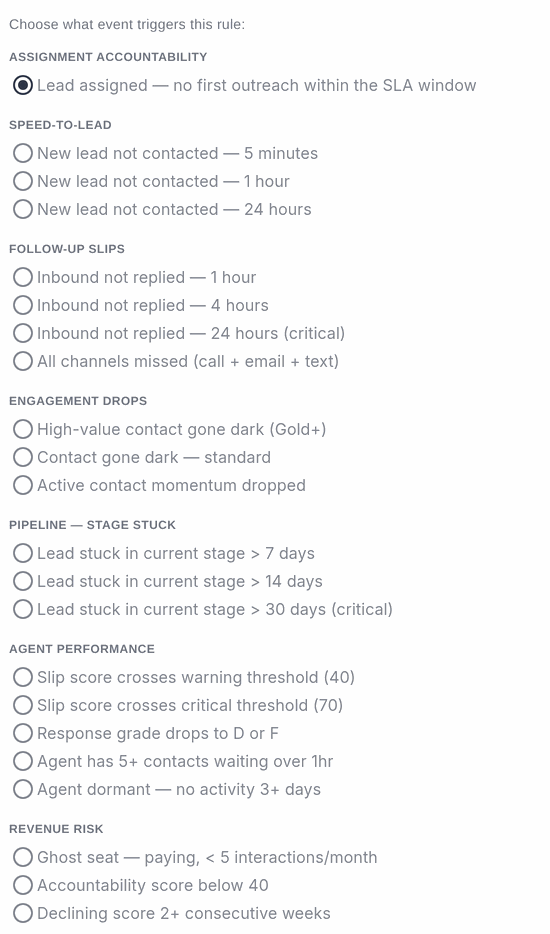
The same shape holds in Ace. Our contact rules watch first-contact windows, unanswered inbounds, contacts going quiet, stages that stop moving, and leads that were assigned but never worked. Useful, all of it. Also completely silent on whether the person on the other end is a buyer, a lender, or the photographer who shoots your listings.
Who is in the room when the rule fires
Open your own database and the non-clients are easy to name once you go looking. Five groups turn up on nearly every team:
- Transaction partners. Lenders, loan officers, title reps, escrow officers, home inspectors, appraisers, insurance agents.
- Other agents. Co-op agents, referral partners, and anyone you are recruiting.
- Vendors. Contractors, photographers, stagers, handymen.
- Internal records. Team members, staff, and the test contacts every account accumulates.
- People you already decided not to contact. Anything parked in a Trash, Spam, Junk, Do Not Call or DNC stage.
We wrote a longer field guide to finding them in Follow Up Boss Database: Not Everyone In It Is a Lead, and a companion piece on cleaning up CRM data. The audit below is the narrower question: not “who is in here,” but “who can my rules touch.”
The cost of getting it wrong is not just an awkward text. Automated mail sent to people who never asked for it is charged to the same sending reputation you use to reach the clients who did. Google's bulk sender guidance is blunt about the ceiling: “Keep spam rates reported in Postmaster Tools below 0.30%”, and it recommends staying under 0.10% (Google Workspace Admin Help). Whether those specific thresholds bite depends on your sending volume — but the direction is one-way. You do not get the reputation back quickly.
The 20-minute audit
Do this on whatever automation layer you already run — Follow Up Boss action plans, Ace rules, a Zapier chain, all three. It is the same exercise.
- List every active rule and write down its trigger in plain words. Not the rule's name — its trigger. “No outbound within an hour of assignment.” “No stage change in 14 days.”
- Build the matching smart list with no role filter at all. Just the trigger condition. That list is the rule's real audience, and it is usually larger than the mental picture you had of it.
- Read the first 30 names out loud. Mark everyone who is not a client and never will be. If you cannot tell from the record, that is the finding — the rule cannot tell either.
- Decide where each one gets stopped. On the contact, on the account, or automatically. The next section is the order those settle in.
A table to speed up step three. Five families of contact trigger, and the non-client that most reliably slips into each one:
| Trigger family | What it watches | Who slips in |
|---|---|---|
| Speed to lead | A new contact goes uncontacted for 5 minutes, 1 hour or 24 hours | Partners and vendors entered as fresh contacts, which is every one of them on day one |
| Follow-up slips | An inbound call, text or email goes unanswered | The vendor chasing an invoice; the lender sending a pre-approval |
| Engagement drops | A contact who was active goes quiet | The stager whose job ended, correctly, three weeks ago |
| Stage stuck | No stage movement in 7, 14 or 30 days | Everyone parked in a stage that is storage, not pipeline |
| Assigned, not worked | A lead is assigned and gets no first outreach | Contacts assigned for ownership rather than for work |
Three ways to stop a rule, and the order they settle in

Any system worth trusting needs all three of these, and needs to say out loud which wins.
1. The override on the contact
One person, decided by a human, no configuration. In Ace that is two tags: ace-ignore marks a contact as one to leave alone — scoring, the suggestion queue, the nightly scans and the rules in this article all read it — and ace-include forces a contact back in. An explicit ignore tag beats every automatic rule and every account setting, and the include tag beats both the role list and the automatic classification. Any agent who can tag a contact can apply either one.
2. The role list on the account
Team-wide and admin-level, on the Contact roles panel inside Back Office → Recruiting: the stages, tags, sources and internal email domains your whole team treats as non-clients. This is where “everyone in our Referral Partner stage” belongs, rather than tagging 400 people one at a time.
One property worth knowing before you set it: in Ace, adding a stage to that list applies to the contacts already in it, at the moment a rule is evaluated. There is no bulk re-classification to kick off and no waiting for those records to get touched again.
3. The automatic classification
Role words in the stage or tag name, read the way a human would read them. A contact tagged lender, title rep, home inspector, photographer, stager or team member is classified as that thing, without anyone configuring it.
This is the layer with the sharp edge, and it is worth understanding before you write your own version of it in any tool. A tag that mentions a role is not a role. “Needs lender” is a buyer. “Referred by realtor” is a buyer. “Working with lender” is a buyer who is further along than most. Ace skips tags that open that way, on purpose, because the alternative is silently deleting real buyers from follow-up. We broke that down trap by trap in Follow Up Boss Tags: Exclusion Rules That Don't Backfire.
What happens before an Ace rule fires
Ace's contact rules check that classification before the rule is allowed to do anything. If the contact comes back as a non-client, the rule produces nothing: no in-app alert, no Follow Up Boss task, no admin notification, no reassignment, no automated email or text, and no execution record. It does not fire quietly and get filtered on the way out. It does not fire.
Three properties of that check matter more than the check itself:
- It fails open. A contact Ace has not classified yet evaluates normally. Dropping a real buyer out of follow-up is a worse outcome than alerting on a lender, so the check only withholds when it has an answer.
- It runs on every path. A live CRM webhook, a delayed follow-up clock, the overnight stale-lead scan and the assignment SLA scan all reach rules through the same gate. No automatic path gets to a rule without passing it.
- A contact deleted in Follow Up Boss stops being eligible. Deleting someone is an instruction, and a rule firing at a deleted record three hours later is not a small annoyance.
Automations is an admin surface on accounts with Ace Trove. The classification underneath it is shared with the rest of Ace, which is why an exclusion you set once also quiets the suggestion queue and the nightly scans rather than just the rules.
What this does not do
Four limits, stated plainly, because a control you misunderstand is worse than one you do not have.
- It does not reach your other tools. This governs rules Ace runs. Action plans, drips and dialers running inside Follow Up Boss or another platform keep firing on their own conditions, and they need their own pass of the audit above.
- Cold is not excluded, and should not be. Stages like Cold, Unresponsive and Archived are deliberately left alone. A quiet contact who shows a real signal is the most valuable thing in the database, not a mistake — that is the whole premise of no lead left behind.
- A phone-registry tag is not an instruction. A tag like “DNC registered phone” describes a number's presence on the national registry. It does not tell anyone what your relationship with that person permits. Ace does not read it as a do-not-contact instruction, because whether an existing business relationship allows the call is a decision for you and your broker, not for a classifier.
- It only knows what is written down. If the only record that someone is your brother-in-law's handyman lives in your head, no rule will infer it. That is what the ignore tag is for.
None of this makes a rule smart. It makes a rule narrow, which is the honest version. Whether what a rule did was worth doing is a separate audit, and we wrote that one up as six questions for auditing what your AI follow-up actually did.
Common questions
Does this stop automated emails and texts, or only alerts?
Both. When an Ace contact rule finds a non-client, it produces no actions at all — including the actions that email or text the contact directly. The rule stops before it reaches the list of things to do.
What if someone is both? A lender who is also buying an investment property.
Tag them ace-include. That marker beats the automatic classification and the account-wide role list, so they stay in scoring, suggestions and rules as a real client, no matter what their other tags say. It is the cleanest answer to every edge case in this article.
Does excluding a contact delete anything?
No. The record, the history, the notes and any deal stay exactly where they are, and the contact still appears in searches and smart lists. What changes is which automated work happens around them. If you are trying to sort a book of business by who is actually workable, segmenting by lead type is the better starting point.
How long should this take on a database I have never audited?
The twenty minutes is for reading your rules. Fixing what you find takes longer. The order that wastes the least effort: account-wide role list first, because it covers the most people per decision, then individual tags for the exceptions.
Where do I start if I do not run automations at all yet?
Do steps one through three anyway, against your Follow Up Boss action plans. The audit is about the audience, not the tool — and knowing who a rule can reach is the prerequisite for turning a new one on with any confidence. Our curated smart lists are a reasonable place to see what a clean audience looks like.
Try Follow Up Ace in your Follow Up Boss
Free to start, no sales call. Connect Follow Up Boss in one click and Ace works inside your CRM.
Get Started Free