Follow Up Boss Mailchimp Integration: What Actually Syncs
Follow Up Boss’s built-in Mailchimp integration copies every contact outside the Trash stage into one Mailchimp audience once a day, with stage, tags, agent, source and price. Sends, opens, clicks and Mailchimp unsubscribes come back. Unsubscribes you mark in Follow Up Boss, relationships and Mailchimp tags do not cross.

Remove a contact from your Mailchimp audience on Monday, and by Tuesday Follow Up Boss will have put them back.
Follow Up Boss says so in its own help article: if a contact is ever removed from your Mailchimp list, “the integration will automatically add it back on the next sync” (Follow Up Boss Help Center). The built-in sync treats your CRM as the master list. Mailchimp is where you send from, and that one design choice explains almost every surprise teams run into with it.
Below is what crosses in each direction, the four rules that catch teams out, and a 15-minute check to run before your next send. Everything about the integration comes from that help article, read on November 4, 2026. If Follow Up Boss changes the integration, their article wins over ours.
How the built-in sync works
An admin connects it. You create an API key in Mailchimp, paste it into Follow Up Boss under Admin → Integrations → Mailchimp, and pick one Mailchimp audience. From then on, once a day, Follow Up Boss copies its contacts into that audience. You don’t pick which ones. The built-in sync takes all of them except contacts in the Trash stage.
For each contact it carries a name, one email address, one phone number, the assigned agent, stage, tags, source and price. Change any of those in Follow Up Boss and the Mailchimp record updates on the next pass, with one exception covered below.
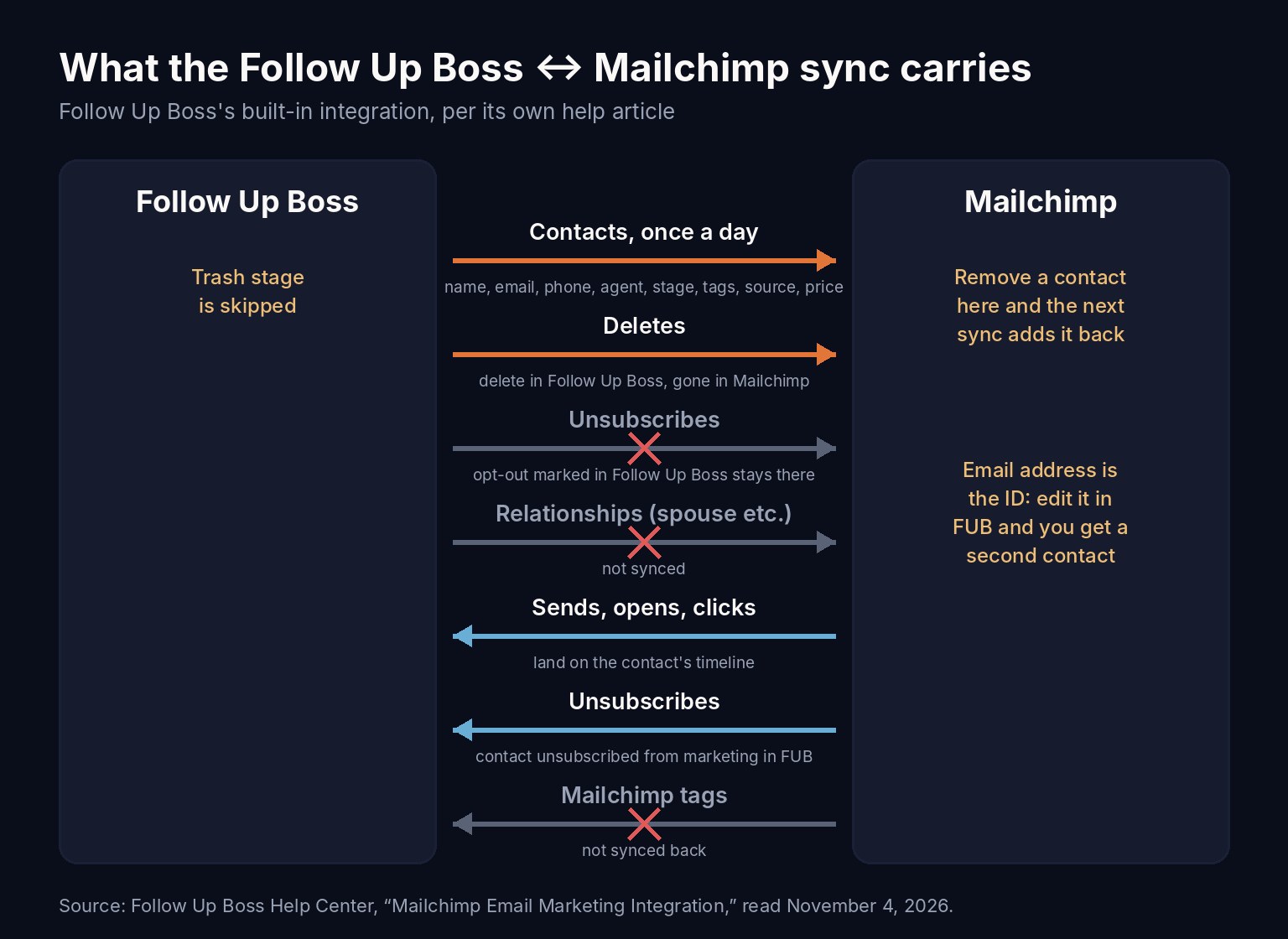
Coming back the other way, Follow Up Boss records the email you sent, opens, clicks and Mailchimp unsubscribes against each contact. A Last Sent Marketing Campaign column appears too, and you can filter Smart Lists on it. That is the column that lets an agent see that a lead got last week’s market update before picking up the phone.
If you are not an admin, the built-in sync isn’t available to you. Follow Up Boss points agents to Zapier instead, and Zapier is also the route if you want to send only some contacts. Our guide to connecting Zapier to Follow Up Boss covers the setup.
Four rules that catch teams out
1. Cleaning the list in Mailchimp doesn’t stick
Because the sync re-adds anything that is missing, removing an old lead, a vendor or a past client’s ex-spouse in Mailchimp only lasts until the next daily run. Mailchimp’s permanent delete is the exception: Mailchimp’s own help says “you can’t add a deleted contact back to your audience” (Mailchimp), which also means you can’t undo it. For ordinary cleanup, work in Follow Up Boss. A contact deleted there is deleted from Mailchimp, and Trash-stage contacts aren’t synced at all.
One thing the help article doesn’t say is whether moving an already-synced contact into Trash removes it from Mailchimp. Try it on one contact and look at your audience the next day before you rely on it.
2. An opt-out only travels one way
This is the one with legal weight. When someone unsubscribes through a Mailchimp email, Follow Up Boss marks them unsubscribed from marketing email too. But when an agent marks someone unsubscribed in Follow Up Boss, because the lead replied “please take me off your list” to a direct email, that opt-out is not synced to Mailchimp. The next newsletter goes out to them anyway.
The FTC’s CAN-SPAM guide says you “must honor a recipient’s opt-out request within 10 business days,” and each email sent in violation can carry a penalty of up to $53,088 (FTC, CAN-SPAM Act: A Compliance Guide for Business). We aren’t your lawyer, and your broker’s policy may be stricter. The practical rule is simple: whoever records an opt-out in Follow Up Boss also unsubscribes that address in Mailchimp, the same day.
The reverse has a gap too. Re-subscribing someone in Follow Up Boss does not re-subscribe them in Mailchimp. Follow Up Boss tells you to contact Mailchimp for that.
3. The email address is the ID
Mailchimp identifies a contact by email address. Edit a lead’s email in Follow Up Boss and the sync creates a second Mailchimp contact with the new address, while the old one stays put with the old address. Now one person is in your audience twice, or the dead address keeps bouncing.
After any email edit, archive the old address in Mailchimp, and check the next day that it stayed gone. If your database has a lot of these, our walkthrough on cleaning up CRM data in Follow Up Boss covers finding duplicates on the CRM side first.
4. Spouses and co-buyers are left out
Relationships, the second person on a contact record, and their contact details are not synced. If the spouse who actually reads the newsletter lives only as a relationship, they never get it. Either give that person their own contact in Follow Up Boss or use a Follow Up Boss batch email when both should hear from you.
Two smaller settings matter as well. Every Mailchimp audience field except email has to be marked not required, or the integration won’t work with it. And tags you add in Mailchimp never come back into Follow Up Boss, so keep tagging in the CRM.
Choosing who actually gets the newsletter
Since the built-in sync sends everyone, choosing happens in Mailchimp. Stage, tags and assigned agent arrive with each contact, so you can build Mailchimp segments on them: past clients only, or one agent’s book, or everyone except a Vendor tag.
Exclusion by tag is where real buyers quietly drop off lists, though. A tag that reads like a role often describes a need. Our piece on Follow Up Boss tag exclusion rules walks through three ways that goes wrong and a short test for it. One more trap: a Do Not Email tag in Follow Up Boss does reach Mailchimp as a tag, so a segment can leave those contacts out. But a campaign sent to the whole audience will still reach them, and the tag lands up to a day late. Treat the tag as a backstop and the Mailchimp unsubscribe as the real fix.
What the opens and clicks really tell you
The marketing activity Mailchimp sends back is useful. Opens are the weakest part of it.
Apple’s Mail Privacy Protection, when a reader turns it on, “prevents senders from seeing if you’ve opened the email message they sent you” (Apple Support). In practice that shows up as opens that may not mean a human read anything. The same Apple page notes that the protection “does not extend to links,” so a click is a much better sign that someone acted.
So don’t build a “hot lead” Smart List on opens. Use a click on the timeline as a reason to reach out, and make the reason specific: they clicked the open-house link, so lead with the open house. Our post on cold lead re-engagement emails has the wording for that first message. Even a click is a weaker signal than a reply, and a stretch of clicks from one address with no other activity can be a mail filter rather than a person.
Where Ace fits
Ace works from the same email-marketing activity Follow Up Boss records, Mailchimp’s included, and handles it the way this post suggests:
- Opens count for nothing in Ace’s engagement score.
- A click counts a little, but Ace never treats it as the contact getting in touch, so a newsletter click can’t make a quiet lead look like they just replied.
- An email-marketing unsubscribe is honored. When Follow Up Boss records one, Mailchimp’s included, Ace flags the contact, and the emails Ace can send for a team (automation emails, and Autopilot or Relay only where an admin has turned them on) skip that person.
- Opt-out tags count too. Automation emails and Autopilot also skip contacts carrying common opt-out tags such as Unsubscribed, Do Not Email, DNC or No Marketing.
What Ace does not do is fix the one-way opt-out gap above. It doesn’t connect to Mailchimp or write to your audience, so an opt-out you mark in Follow Up Boss still has to be repeated in Mailchimp by a person. If you want to see the other places activity does and doesn’t land in Follow Up Boss, our activity logging audit covers calls, texts and email.
The 15-minute check before your next send
| Check | Where | What good looks like |
|---|---|---|
| Required fields | Mailchimp audience settings | Every field except email is not required |
| Opt-outs marked in Follow Up Boss | Follow Up Boss, then Mailchimp | Each one is also unsubscribed in Mailchimp |
| Changed email addresses | Mailchimp audience | No person appears twice; old addresses archived |
| Who should get this send | Mailchimp segment | Built on stage, tags or agent, not the whole audience |
| Exclusion tags | Follow Up Boss tags | Each one tested on a few real contacts first |
| Spouses and co-buyers | Follow Up Boss relationships | Anyone who should get mail has their own contact |
| List cleanup | Follow Up Boss | Done there, never only in Mailchimp |
Teams that want to rank the whole database rather than mail it can start from Ace Smart Lists in Follow Up Boss, which sort contacts by who is worth a call this week.
Frequently asked questions
How often does Follow Up Boss sync to Mailchimp?
Once a day. The built-in integration copies contacts into one Mailchimp audience daily, and a contact removed in Mailchimp is added back on the next sync.
Do unsubscribes sync between Follow Up Boss and Mailchimp?
Only from Mailchimp. A Mailchimp unsubscribe marks the contact unsubscribed from marketing email in Follow Up Boss. An unsubscribe marked in Follow Up Boss is not synced to Mailchimp, so unsubscribe that address in Mailchimp too.
Can I sync only some Follow Up Boss contacts to Mailchimp?
Not with the built-in integration, which syncs every contact outside the Trash stage. Use Mailchimp segments on synced stage, tags or agent, or use Zapier to send only certain contacts.
A question for teams that have run this for a while: when an agent records an opt-out in Follow Up Boss, who on your team is the one who repeats it in Mailchimp? We’d like to hear how you keep that from slipping.
See how other tools land in Follow Up Boss
Lead sources, email tools and dialers each write into Follow Up Boss differently. Our integrations guide covers what to check for each.
Read the integrations guide