Follow Up Boss Email Parser: Why Leads Land as Notes
Follow Up Boss turns lead notification emails into contacts in three ways: Lead Processing on a connected inbox, a personal @followupboss.me lead address, or a forwarding rule. Most failures come from four things: a missing header line, a deleted template field, a source spelled two ways, or an inquiry merged into an existing contact.

A website form sends Follow Up Boss an email with a name, an email address and a phone number, all in the right places. If the first line of that email isn’t “New lead activity notification,” Follow Up Boss doesn’t create a lead from it. It files the message as a note.
That rule comes straight from Follow Up Boss’s help article on its email parser, and it is the kind of detail nobody reads until a lead goes missing. A note is not a new lead. Lead Flow has nothing to assign, no action plan starts, and unless someone happens to read that note, nobody calls.
Email parsing is not a corner case in Follow Up Boss. Its own help center says it “primarily pulls in lead data via email parsing as most lead providers do not have an available API” (Email Parsing Feedback). So if you run portals, a home-value site or a custom website form, some share of your new leads probably reaches you as an email that a parser has to read correctly. This guide covers the three ways those emails get in, the four ways they quietly fail, and a fifteen-minute test that tells you which of your sources are fine.
Three ways a lead email gets into Follow Up Boss

1. Lead Processing on your connected inbox
If you have connected Gmail, Google Workspace or Microsoft 365 to Follow Up Boss, it can watch that inbox and parse lead notifications as they arrive. Follow Up Boss calls this Lead Processing, and the toggle lives under Admin > API.
The detail that catches teams out: it switches on by itself only for the account owner. Follow Up Boss’s help article says it “is enabled automatically for account owners when an email is connected,” while “admins and agents will need to manually enable this feature.” An agent who connected their inbox last spring and assumed portal leads were flowing in may have had nothing parsed at all.
Lead Processing also pulls from every lead source it can detect. If you only want a few sources parsed, Follow Up Boss suggests the next route instead.
2. Your @followupboss.me lead email address
Every Follow Up Boss user has their own lead email address ending in @followupboss.me, also under Admin > API (Follow Up Boss Lead Email Address). You paste it into the lead provider’s notification settings, and the provider sends a copy of each new-lead email there.
Two things about this address matter for a team. The account owner can see every team member’s address on that page. And a lead sent to an agent’s personal address is assigned to that agent automatically. That is convenient for an agent’s own sources, and a surprise for a team lead who expected a lead to go through the team’s routing.
3. A forwarding rule
Some providers have no field for a second notification address. For those, Follow Up Boss documents a Gmail filter that forwards matching messages to your @followupboss.me address (Creating Auto Forwarding Rules in Gmail). Gmail asks you to verify the new forwarding address first, and its verification message goes to the @followupboss.me address. Follow Up Boss forwards it on to your login email, so look there for the confirmation link.
| Route | Best for | Watch out for |
|---|---|---|
| Lead Processing | Agents whose inbox already receives every portal notification | Off by default for admins and agents; parses every source it detects |
| @followupboss.me address | Providers with a “send lead notifications to” field | Leads to an agent’s personal address are assigned to that agent |
| Forwarding rule | Providers that only email your login address | The filter only catches emails that match it; a provider that changes its sender or subject can slip past |
Four ways a parsed lead goes missing
When a source stops producing contacts, the email almost always still arrives. The parse is what fails, and it fails in a handful of predictable ways.
The header line is missing
This is the hook at the top of this post. If you send leads from your own website or form tool, Follow Up Boss gives you three templates: Short (name, email, phone), Full (adds price, source and notes) and Advanced (adds property, address and campaign fields). Each starts with the line “New lead activity notification,” and that line has to be at the top of the body for the email to become a new lead rather than a note.
A template field was deleted
The parser recognizes a format by its full set of labels. Follow Up Boss is blunt about it: leave the fields you don’t need blank, and “DO NOT delete them from the notification email or the parser won’t recognize the format and process your lead.” Whoever cleaned up the form email to look tidier may have broken it.
The source is spelled two ways
Lead Flow is set up per source. Follow Up Boss creates a new row on its Lead Flow page the first time a lead arrives from a source it has not seen, and each row gets its own agent assignment and action plan. So if one form sends Source: Website and another sends Source: website form, you have two sources. The second one doesn’t pick up the rules you set for the first; check its row and set them.
The spelling also decides your reporting. Our guide to lead source ROI works from the source on each contact, and two spellings split one channel’s closings across two rows.
The inquiry merged into someone you already had
When a past lead fills out a form again, the new inquiry can be combined with their existing contact rather than creating a new one. Follow Up Boss lists this as the first thing to check when a StreetEasy email “is not parsed” (StreetEasy integration). Before you decide a source is broken, search the lead’s email address in Follow Up Boss and look at their timeline.
The fifteen-minute parsing test
Run this once per source, with a test name and an email address you control. It is the only way to know what each source does today, because formats change. Follow Up Boss notes that providers’ email formats change over time and need updating on its side.
- List your email-parsed sources. Open Admin > Lead Flow and note every source you know arrives by email: portals, home-value sites, your website form.
- Check who has Lead Processing on. Ask every admin and agent who relies on their inbox being watched to open Admin > API and confirm the toggle is on.
- Submit one test lead per source. Use a name you will recognize, such as “Parser Test October.”
- Open the contact, not just the inbox. Confirm it exists as a new contact, with the right source, the right agent and the right action plan. A note on someone else’s timeline is a fail.
- Compare fields to the email. Click View Email on the inquiry. Anything in the email that didn’t land on the profile goes in Email Parsing Feedback, which is how Follow Up Boss asks you to report a broken format.
- Delete or tag the test contacts so they don’t sit in anyone’s queue or your reports.
If you would rather check your whole setup in one pass, our free Follow Up Boss health check grades your lead flows alongside the rest of the account, and the integration troubleshooting guide picks up where this test ends for Zapier and API sources.
What an email parser cannot carry
This is the honest limit of the whole method. Follow Up Boss’s own parser formats “do not support custom fields,” and its help article recommends sending extra data as a note instead. A note is readable by a person. You can’t build a Smart List on it, and an action plan can’t branch on it.
There is a better-behaved middle ground, if your provider supports it: the Real Estate Lead Metadata standard (leadmetadata.org), which puts lead fields in hidden tags in the email instead of in its visible layout. Follow Up Boss is listed among the systems that read it, and its help center says format changes are “not an issue” for providers that use it.
Past that, the route is the API. Follow Up Boss’s developer documentation calls its events endpoint “the only correct option to send leads and their activity to Follow Up Boss” from a website, portal or any other lead source (Follow Up Boss API: /events). Leads sent that way can set custom fields, and the docs spell out which event types start action plans: Registration, Seller Inquiry, Property Inquiry, General Inquiry and Visited Open House. Our Follow Up Boss API guide walks through the setup, and connecting Zapier is the no-code version.
Where Ace’s capture pages fit
Ace’s capture pages, such as open house sign-ins and other Ace Forms, Lead Magnets and Ace Pages, don’t send lead emails for Follow Up Boss to parse. When your account has Follow Up Boss connected, a lead from one of them is sent through that same events endpoint. Its source is “Follow Up Ace” plus the page or form name (or the template’s name if you didn’t give it one), spelled the same way every time. Name each page or form if you want it routed on its own Lead Flow row. (A submission that looks like junk is held in Ace until someone releases it, rather than sent.)
Ace Forms go one step further than an email can. When a visitor answers questions like whether they’re working with an agent or how soon they plan to buy, those answers are written to Follow Up Boss custom fields, so a Smart List can filter on them. Our open house follow-up guide names two free lists that do exactly that.
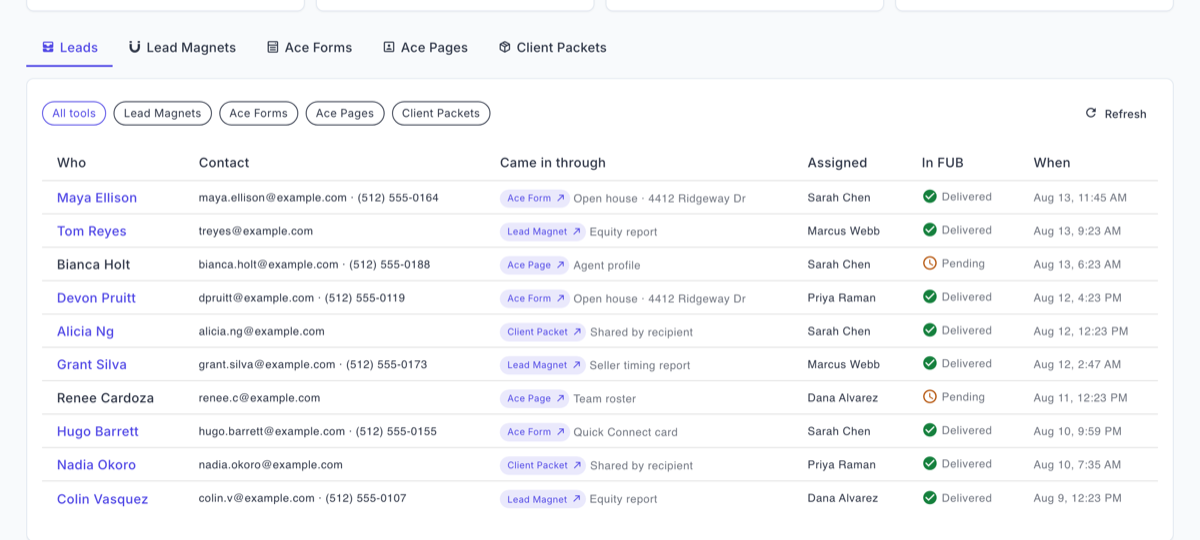
None of this replaces the parser for your other sources. Portals and home-value sites still deliver the way they deliver, and the test above is still the way to check them.
Frequently asked questions
Where do I find my Follow Up Boss lead email address?
Go to Admin > API in Follow Up Boss. Each user has their own address ending in @followupboss.me, and the account owner can see every team member’s address on that page.
Why did my lead email become a note instead of a new contact?
For leads you send in Follow Up Boss’s own parser format, the body has to start with “New lead activity notification” and keep every field label in the template, even blank ones. Otherwise the email is filed as a note. It can also land on an existing contact if the same person inquired before.
Can the Follow Up Boss email parser fill custom fields?
No. Follow Up Boss says its parser formats do not support custom fields and recommends sending extra data as a note. To set custom fields, send leads through the Follow Up Boss API instead.
A question for anyone who runs lead intake for a team: which source has broken on you most often after a provider changed its emails, and how long did it take before someone noticed?
Check the rest of your lead routing
The free health check grades your Follow Up Boss setup, lead flows and action plans included, so you can see what else deserves a test like this one.
Run the health check