Using AI to Score and Segment New Real Estate Leads

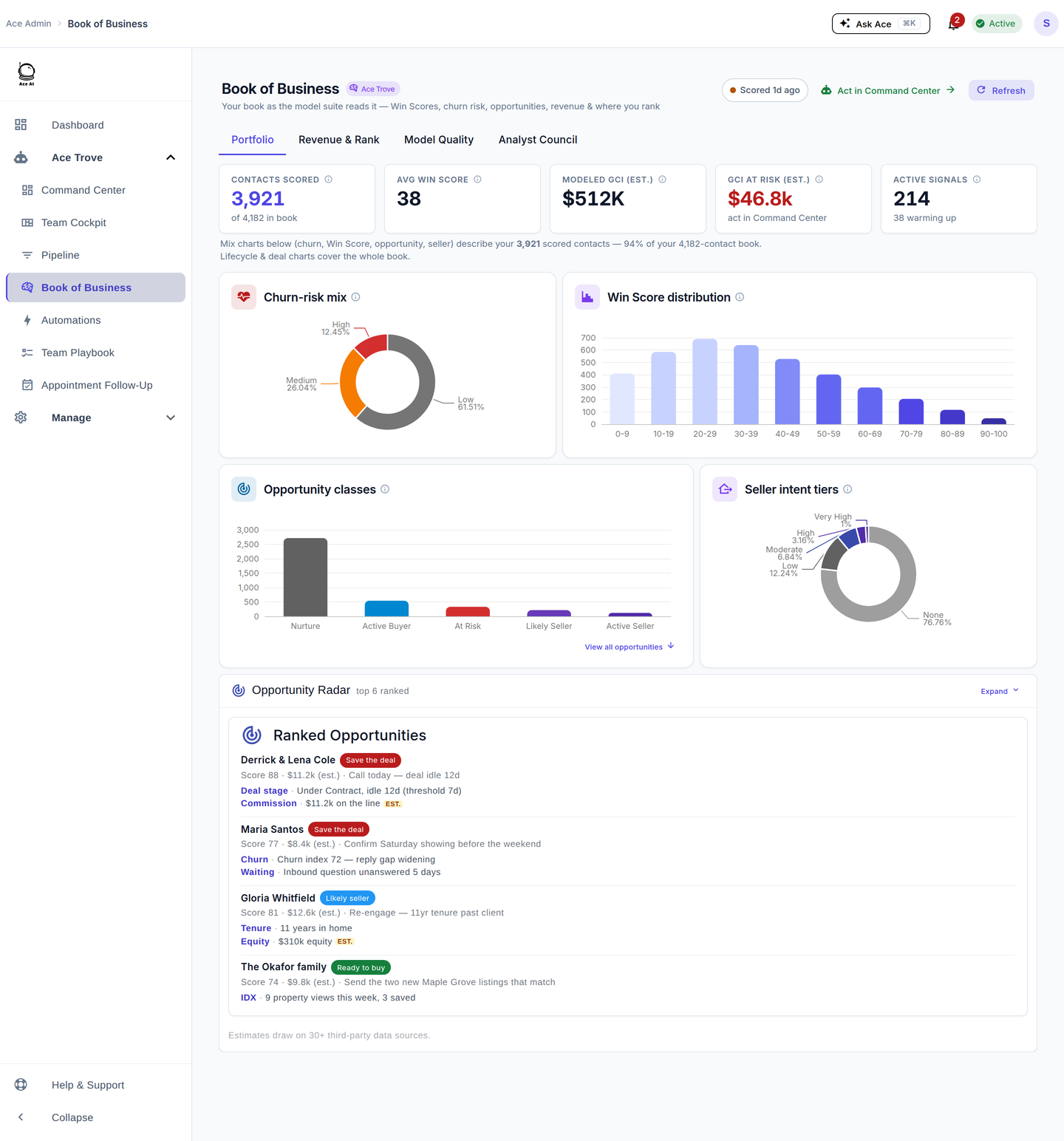
Every connected account can use numeric Ace Win Score and Low / Medium / High Ace Churn Risk. Ace Trove schedules account-wide scoring nightly and adds Expected GCI, Opportunity, Seller Tier, Buyer Tier, and Last Analyzed when a completed analysis has supported output. Sort and filter the fields to focus review; do not treat a queued run or model value as an automatic outreach decision.
What does AI lead scoring actually do in a real estate CRM?
AI lead scoring uses supported CRM evidence—such as form submissions, replies, calls, stage changes, and notes—to produce a relative model rank. Follow Up Ace publishes a deliberately small set of structured values so teams can sort and filter without turning every signal into a new custom field.
The practical result is a focused review queue. Agents still decide whom to contact after checking stage, recency, consent, ownership, and conversation history.
What fields does Ace Trove write to Follow Up Boss?
Ace maintains two groups of custom fields in Follow Up Boss: two free definitions and five additional Ace Trove definitions.
Free score fields (every connected account)
These definitions require no Ace Trove subscription. Values are delivered on the free-account scoring cadence; meaningful activity can schedule a debounced refresh, but the event itself is not proof of completion.
| Field name | What it measures | Use case |
|---|---|---|
| customAceWinScore | Within-account percentile rank (0–100) of the calibrated win probability | Primary sort field for daily call lists |
| customAceChurnRisk | Low / Medium / High — model risk that an engaged contact goes cold | Flag who to save first |
AI-generated intelligence fields (Ace Trove add-on)
Ace Trove can write these additional fields after a completed analysis produces supported values (source: chat-app/shared/aceIntelligenceFieldsConfig.js — ACE_INTELLIGENCE_FIELDS):
- customAceExpectedGCI — forward revenue estimate (est.): calibrated win probability × the account's median commission
- customAceOpportunity — next-best-opportunity class: At Risk, Active Buyer, Active Seller, Likely Seller, or Nurture
- customAceSellerTier — relative seller-propensity band from property and behavioral signals
- customAceBuyerTier — relative buyer-propensity band: Very High, High, Moderate, Low, or None
- customAceLastAnalyzed — date of the most recent completed analysis
Together these fields provide a structured starting point. The agent should still review the underlying contact evidence before calling or changing a workflow.
How does Ace Trove rank leads?
Ace Win Score does not use a fixed temperature cutoff. customAceWinScore is a 0–100 within-account percentile rank of calibrated win probability, recomputed as the account's scored contact pool changes. Sort it descending to review the account's highest-ranked supported contacts; do not read the number as a close probability.
customAceWinScore and the Trove-only tier fields are sortable and filterable FUB custom fields once their definitions have been structurally verified and the scoring pipeline has delivered a value.
When does Ace Trove analyze contacts — nightly batch or real time?
Delivery follows the account's scoring cadence. Meaningful CRM activity can schedule an additional debounced rescore, but webhook receipt alone is not proof that analysis completed or a value reached Follow Up Boss.
Nightly account-wide batch
Ace Trove schedules account-wide model scoring nightly. Work is processed in bounded batches, and only completed, supported outputs enter the guarded Follow Up Boss write queue. Missing output remains blank rather than being inferred from a queued or failed run.
Use Ace Last Analyzed and the displayed pipeline state to judge freshness. A scheduled run is not a promise that every contact has a fresh value by a particular morning.
Real-time speed-to-lead fast lane
When a brand-new contact enters Follow Up Boss, the activity pipeline can schedule a fast-lane scoring burst after a short quiet window. Queueing that burst is an intermediate state; the UI must still distinguish scheduled, running, completed, failed, and stale results.
For existing contacts, activity events such as stage changes, new notes, or inbound calls also trigger burst analysis through the same BullMQ queue, with a longer quiet window to batch rapid activity before scoring.
How do I set up AI lead scoring in Follow Up Boss?
- Connect your Follow Up Boss account from the Ace Trove dashboard. Follow Up Ace reads your FUB data through the official API — no data export required.
- Choose an Ace Trove tier based on your contact count: Starter ($49/mo, up to 5,000 contacts), Growth ($99/mo, up to 20,000), Team ($199/mo, up to 50,000), Brokerage ($349/mo, up to 100,000), Scale ($549/mo, up to 250,000), or Enterprise ($899/mo, up to 500,000) — source:
chat-app/config/accountAiBillingConfig.js, lines 64–69. - Have the Follow Up Boss account owner authorize custom-field creation. FUB restricts custom-field creation to the account owner.
- The initial analysis batch begins processing your existing contacts. New contacts are scored on arrival.
- Sort
customAceWinScoredescending for a priority review, or filtercustomAceChurnRisk = Highfor an agent-reviewed save-list.
What is the difference between AI lead scoring and manual lead segmentation?
Manual segmentation requires an agent to read through contact history, make a judgment call, and update a tag or status field — a process that takes one to three minutes per contact and rarely gets done for the full database. It also reflects the agent's state of knowledge at a single point in time; a contact who went quiet three months ago and just re-engaged will stay in "Cold" until someone manually checks.
AI scoring applies a consistent model across the supported contact population. A new activity can schedule a rescore, but agents should rely on the completed value and freshness state—not assume that an event instantly changed a contact's rank.
The practical upside for teams: agents spend time on conversations, not on database hygiene.
Does AI lead scoring work with compliance rules?
Yes. Follow Up Ace includes a built-in compliance layer that runs on every AI-generated message and suggestion. The scanForComplianceViolations() function (source: chat-app/utils/complianceGuard.js, line 293) checks text against Fair Housing Act prohibited language before anything reaches an agent's screen. This applies to AI-drafted follow-up suggestions that Ace Trove generates alongside the scoring output.
Learn more about how the compliance layer works on the Compliance page.
Can I use AI lead scoring data with Claude or ChatGPT via MCP?
Yes. Follow Up Ace's MCP (Model Context Protocol) connector lets authorized AI clients work with Follow Up Boss data. For example, you can ask for high-Win-Score contacts that have not been contacted recently, then review the returned records before acting.
This makes the scored data actionable beyond the CRM: you can use it to draft personalized follow-up messages, build outreach plans, or analyze patterns across your pipeline — all in a conversational interface.
Which plan do I need for AI lead scoring?
Ace Trove and the nightly batch scoring are part of the Ace Trove subscription, which is an account-level add-on separate from the per-seat plan. Individual agent seats are available on Free, Regular ($25/seat/month), or Pro ($55/seat/month) plans, with Pro required for voice chat (source: chat-app/routes/embed.js, line 2647: voiceChatEnabled: toPlan === 'pro').
The Ace Trove tier is priced by contact count so that smaller teams are not paying for capacity they do not use. A single agent with 3,000 contacts qualifies for the Starter tier at $49/month; a brokerage with 80,000 contacts falls into Brokerage at $349/month.
See the Guides section for a walkthrough of how to set up your first Ace Trove smart list in Follow Up Boss, and the Competitor Comparison page to see how Ace Trove stacks up against other CRM AI tools in the market.
Key takeaways
- Ace writes a free Win Score and Churn Risk into Follow Up Boss custom fields on every connected account, plus (with Ace Trove) Expected GCI, Opportunity, Seller Tier, Buyer Tier, and a last-analyzed timestamp — automatically, without any manual data entry.
- Scoring follows the account cadence; meaningful activity can schedule a debounced refresh, and only completed supported output is written.
- Ace Win Score is a within-account percentile rank, not a fixed temperature cutoff or close probability.
- Use the freshness state and Ace Last Analyzed before treating a modeled value as current.
- Every AI suggestion generated alongside the score passes through Fair Housing compliance scanning before it reaches an agent.
- Scored data is accessible to Claude and ChatGPT via the MCP connector, enabling natural-language queries against your full FUB database.
Try Follow Up Ace in your Follow Up Boss
Free to start, no sales call. Connect Follow Up Boss in one click and Ace works inside your CRM.
Get Started Free