5 Ways AI Improves Lead Scoring in Follow Up Boss
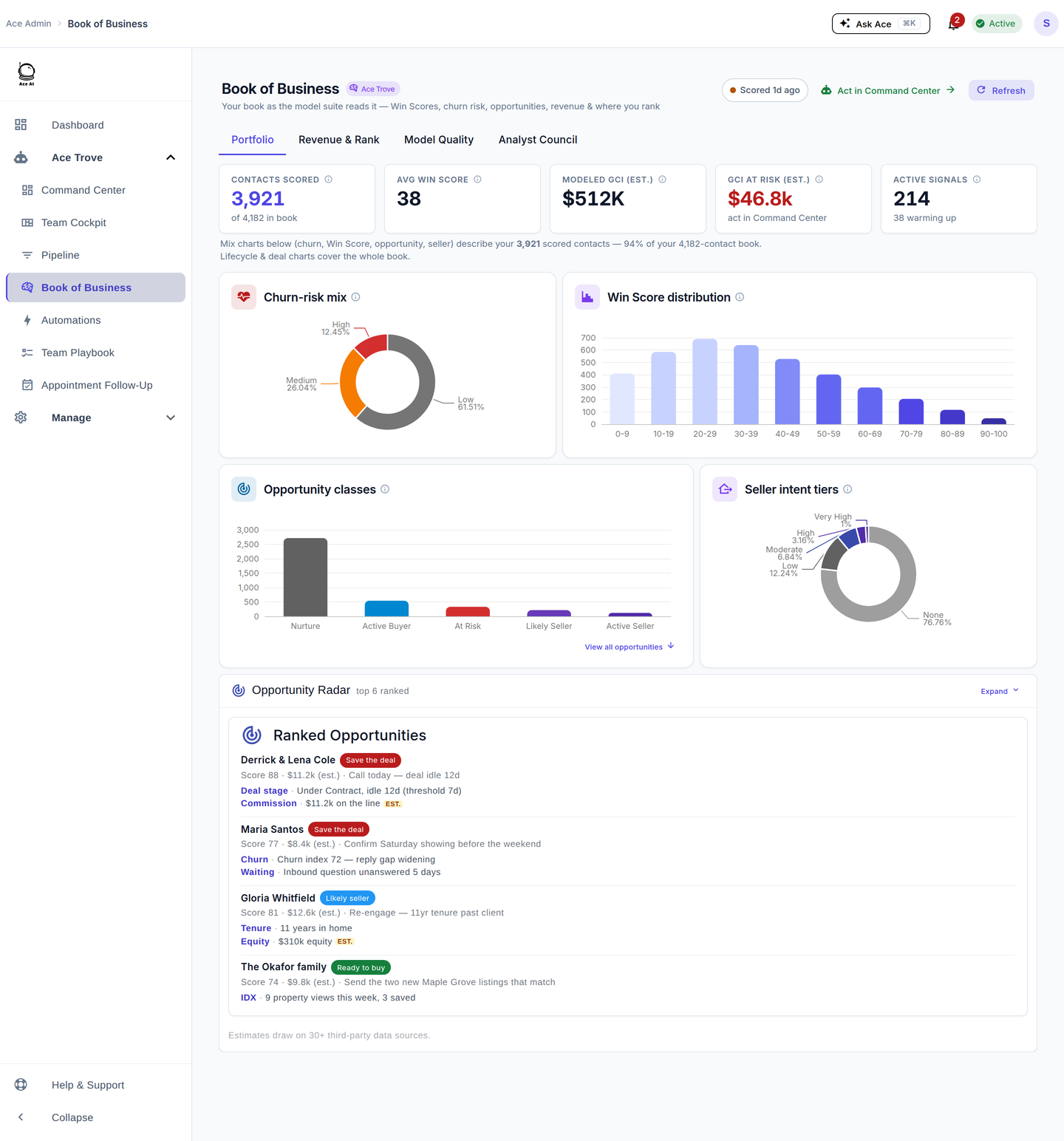
Ace combines collected CRM activity and historical context to rank the contacts who merit attention. Win Score is a 0–100 within-account percentile rank, not a close probability. Every connected eligible account is scheduled nightly for Ace Win Score and Ace Churn Risk, whether free or on a paid seat. Trove adds Ace Expected GCI (est.), Ace Opportunity, Ace Seller Tier, Ace Buyer Tier, and Ace Last Analyzed, plus additional batched refreshes after meaningful CRM activity. Collecting an event, computing a score, and confirming a FUB field write are separate steps; queueing and retries can delay delivery.

Most Follow Up Boss users end up with the same problem: a database that grows faster than they can work it. Contacts pile up, stages get stale, and the hottest lead in the system sits un-called because nothing flagged it. Manual lead scoring — gut feel, colored stars, the occasional tag — works when you have 50 contacts. It breaks down at 500.
AI-powered lead scoring addresses this by continuously reading behavioral signals — page views, email opens, text replies, call activity — and translating them into ranked, actionable data fields that live directly inside Follow Up Boss. Here are five concrete ways that works in practice.
1. How does a live engagement score replace manual lead ranking?
A live engagement score replaces manual ranking by reading every inbound and outbound event in real time and converting it to a single number (0–100) written back to the contact record. Agents see the score update minutes after a lead replies to a text rather than waiting for a weekly CRM cleanup session.
Follow Up Ace writes two core score fields to FUB for all accounts, even on the free tier:
- Ace Win Score (customAceWinScore) — A 0–100 within-account modeled win rank, delivered on the account scoring cadence. It is not a close probability.
- Ace Tier (customAceTier) — A human-readable label derived from the score: Hot, Warm, Cool, Cold, or Dormant. Useful for building smart lists and action plans in FUB.
The practical difference from manual scoring: when a lead who went quiet for two months suddenly searches ten listings in an afternoon, the Ace Score jumps that evening. With manual scoring, that same lead sits labeled "Cold" until someone stumbles across them.
You can build a FUB smart list filtered on customAceTier = Hot and work it as your daily priority queue — one list, no curation overhead.
2. What is engagement velocity and why does it matter more than a point-in-time score?
Engagement velocity measures how quickly a contact's activity is accelerating or decelerating, not just where they stand today. A lead at score 60 who was at 20 last week is more urgent than a lead at score 75 who has been flat for a month. Velocity separates the two.
The Ace Velocity Score (customAceVelocityScore) is a webhook-driven field available on all accounts. It derives from activity event volume across two windows:
- 7-day window — captures a recent spike (a lead who just started actively searching)
- 30-day window — smooths out noise and shows sustained momentum
Practically, you can build a FUB smart list sorted by velocity score descending. That list surfaces contacts whose interest is accelerating right now — the leads who are most likely to convert if called today, not contacts who were hot three weeks ago and have since gone quiet.
Velocity is particularly useful for large databases where a static score would give you hundreds of "Warm" contacts with no way to rank them. Velocity adds the time dimension that makes prioritization meaningful.
3. How does AI classify lead type and buyer readiness inside FUB?
AI classifies lead type and buyer readiness by analyzing behavioral patterns — IDX search history, property views, email engagement, notes, and prior conversation context — and writing the result directly to FUB custom fields. This is part of the paid Ace Trove layer.
Two fields do this work:
- Ace Lead Type (customAceLeadType) — AI-classified from activity patterns. Values: Buyer, Seller, Investor, Buyer-Seller, or Unknown.
- Ace Buyer Readiness (customAceBuyerReadiness) — AI-assessed from behavioral signals. Values: Ready Now, Actively Looking, Researching, Passive, or Unknown.
These classifications let you build tightly segmented smart lists without manual tagging:
| Smart List Filter | What It Surfaces | Action |
|---|---|---|
| Lead Type = Buyer AND Readiness = Ready Now | Contacts AI assessed as actively ready to transact | Call within 24 hours |
| Lead Type = Buyer AND Readiness = Actively Looking | Engaged buyers still in evaluation | Weekly touchpoint |
| Lead Type = Seller AND Ace Tier = Hot | Potential listing leads showing re-engagement | CMA offer + call |
| Readiness = Researching AND Velocity Score > 60 | Contacts moving from passive to active | Drip sequence trigger |
The classification updates automatically as contacts continue to engage. A lead tagged Researching who suddenly books a showing can be reclassified to Actively Looking without any agent intervention.
4. How does AI generate next-action recommendations for each lead?
AI next-action recommendations are generated by analyzing the full context of a contact — their lead type, buyer readiness, activity patterns, notes, and prior communications — and writing a plain-language suggested action to a FUB custom field the agent sees on the contact card.
The Ace Next Action (customAceNextAction) field provides an AI-recommended next step, and the companion Ace Lead Summary (customAceLeadSummary) field gives a synthesized overview of who the contact is and where they are in their journey. Both are part of the paid Ace Trove set.
This replaces the common workflow problem where an agent opens a contact, reads through a month of notes, and still isn't sure what to say next. The AI reads the same record and surfaces a recommendation like "Contact recently viewed three 4-bedroom listings in the Westside ZIP — follow up on specific property #2 from their last session."
The Agentic layer takes this further: the pipeline health check tool analyzes your entire open pipeline and flags which deals are stalled, and the lead nurture optimizer identifies contacts who have gone quiet and recommends re-engagement sequences. These are available via the MCP connector for Claude and ChatGPT.
How does the MCP connector work for next-action workflows?
The MCP (Model Context Protocol) connector exposes your Follow Up Boss data to Claude and ChatGPT through a single URL. Claude connects via https://followupace.com/mcp and ChatGPT connects via the streamable-HTTP endpoint https://followupace.com/mcp?tools=full. Once connected, you can ask the AI to run a pipeline health check or identify which leads need attention, and it reads your live FUB data to answer.
This is available on the Pro plan ($55/seat/month). The MCP connector is one reason agents using it describe it less as "a scoring tool" and more as "an analyst who already knows my pipeline."
5. How does AI score seller leads differently from buyer leads?
Seller lead scoring works differently from buyer scoring because the behavioral signals are different. A seller prospect rarely browses IDX listings; instead, they show signals like re-engaging with the agent after a long gap, interacting with homeowner content, or appearing in your database as a homeowner whose equity and tenure suggest readiness to move. AI addresses this with a separate propensity model.
The Ace Seller Score is a 0–100 propensity-to-sell score that lives in the Seller Radar view (it is not written to a FUB field — the banded Seller Tier is). It is built from a combination of signals:
- Property tenure — how long the homeowner has held the property (35% weight)
- Estimated equity — modeled from purchase price and FHFA appreciation data (30% weight). Note: this is estimated equity, not observed lien data.
- FHFA appreciation — local home price index trend from federal data (15% weight)
- Area market pressure — demand signals in the contact's search area (8% weight)
- CRM seller tags and signals — first-party data from notes, tags, and prior conversations (12% weight)
A companion Ace Seller Tier (customAceSellerTier) field converts the score into an actionable label for smart list filtering. Nightly analysis runs account-wide for Ace Trove subscribers so the score reflects fresh signals each morning before agents start their day.
This gives listing agents a ranked seller pipeline from their existing database — without cold prospecting and without manual research on every homeowner contact. Scores surface in the Seller Radar embedded dashboard and require the Pro plan with Ace Trove active.
What is the difference between the free Ace Score fields and the paid Ace Trove fields?
Every connected eligible account is scheduled nightly for Ace Win Score and Ace Churn Risk, whether free or on a paid seat. These are model-grounded fields. Buying an Ace or Ace Pro seat does not unlock Trove fields or change basic scoring cadence.
Trove adds five fields: Ace Expected GCI (est.), Ace Opportunity, Ace Seller Tier, Ace Buyer Tier, and Ace Last Analyzed. It also enables additional batched refreshes after meaningful CRM activity. Missing model evidence remains unavailable, and receiving a webhook does not establish a successful FUB write.
| Field | Type | Update Method | Plan Required |
|---|---|---|---|
| Ace Score | Number (0–100) | Live, webhook-driven | Free |
| Ace Tier | Dropdown (Hot/Warm/Cool/Cold/Dormant) | Live, webhook-driven | Free |
| Ace Velocity Score | Number (0–100) | Live, webhook-driven | Free |
| Ace Days Since Inbound | Number (days) | Live, webhook-driven | Free |
| Ace Lead Type | Dropdown (Buyer/Seller/Investor/etc.) | AI batch analysis | Ace Trove |
| Ace Buyer Readiness | Dropdown (Ready Now/Actively Looking/etc.) | AI batch analysis | Ace Trove |
| Ace Next Action | Text | AI batch analysis | Ace Trove |
| Ace Seller Tier | Dropdown (Very High/High/Moderate/Low/None) | Nightly AI scan | Ace Trove (Pro) |
How does AI lead scoring connect to Fair Housing compliance?
Any system that ranks or segments contacts in real estate needs to account for Fair Housing risk. AI scoring systems — built thoughtfully — can actually improve compliance by removing agent judgment calls from prioritization and basing ranking purely on behavioral signals rather than characteristics protected under Fair Housing law.
Follow Up Ace includes a compliance scan function (scanForComplianceViolations() in utils/complianceGuard.js) that checks AI-generated content — outreach messages, summaries, and recommendations — against Fair Housing and real estate licensing rules before they reach agents or contacts. This runs at the content generation layer, not as a post-hoc audit.
More detail on how the compliance layer works is on the Compliance page. The key point for lead scoring: the ACE score fields are based on engagement activity signals, not demographic data.
How do you get started with AI lead scoring in Follow Up Boss?
The free Ace Score fields (Ace Score, Ace Tier, Ace Velocity Score, Ace Status, Ace Response Time, Ace Days Since Inbound, and Ace Preferred Channel) are available immediately on the free plan — no payment required. Follow these steps to activate them:
- Connect Follow Up Boss — sign up at followupace.com and authorize the FUB OAuth connection. Ace creates the custom fields in your FUB account automatically.
- Let webhooks run for 24–48 hours — existing contacts populate as activity events flow in. Scores for active leads appear quickly; dormant contacts score low until they re-engage.
- Build your Hot Leads smart list — in FUB, create a People smart list filtered on customAceTier = Hot, sorted by customAceVelocityScore descending. That is your daily call list.
- Add Ace Trove for deep analysis — upgrade to the Ace Trove (starts at $49/month for accounts up to 5,000 contacts) to activate the AI Intelligence fields: lead type, buyer readiness, property profile, lead summary, next action, and seller score. Tag the contacts you want analyzed and the batch AI run handles the rest.
- Connect Claude or ChatGPT for pipeline analysis — on the Pro plan ($55/seat/month), add the MCP connector to run pipeline health checks and lead nurture analysis against your live FUB data.
Agents who have worked through this setup describe the change as shifting from reactive to proactive: the system tells them who to call, rather than them guessing who might be ready. The Guides section has additional walkthroughs for building effective FUB smart lists from Ace fields.
Frequently asked questions
Does AI lead scoring work with Zillow leads in Follow Up Boss?
Yes. The Ace Score fields populate for any contact in FUB regardless of lead source, including Zillow. Follow Up Ace also includes a dedicated Zillow speed-to-lead check that monitors response time for incoming Zillow leads specifically. See the Zillow Playbook for details on that workflow.
Can I use the AI lead scores to trigger Follow Up Boss action plans?
Yes. Because Ace writes scores to standard FUB custom fields, you can use those fields as triggers in FUB action plans and smart lists. For example, you can set an action plan to fire when a contact's Ace Tier changes to "Hot," or build a smart list that automatically populates with contacts who reach a certain velocity score threshold.
How is the Ace Trove pricing structured?
The Ace Trove is a flat monthly account-wide add-on priced by the total number of contacts in your FUB database: $49/month for up to 5,000 contacts (Starter), $99/month up to 20,000 (Growth), $199/month up to 50,000 (Team), $349/month up to 100,000 (Brokerage), $549/month up to 250,000 (Scale), and $899/month up to 500,000 (Enterprise). Per-seat pricing for individual agents is $25/month (Ace) or $55/month (Ace Pro). See the Compare page for a side-by-side breakdown against other options.
Does the lead scoring system store or analyze protected-class data?
No. The Ace Score and all Ace Trove fields are derived from behavioral engagement signals — activity events, property search patterns, response timing, and contact history from within FUB. The system does not analyze, ingest, or use protected-class characteristics as scoring inputs.
Try Follow Up Ace in your Follow Up Boss
Free to start, no sales call. Connect Follow Up Boss in one click and Ace works inside your CRM.
Get Started Free