
Your Ace Plan: Regular vs. Pro
Updated August 4, 2026
Ace comes in two paid tiers for agents: Ace (the Regular seat) and Ace Pro. Both give you a fully capable AI assistant inside Follow Up Boss. Pro adds a smarter model, more conversation context, and a handful of exclusive features like voice mode and contact memory. This guide spells out exactly what each includes.
At a glance
| Capability | Ace | Ace Pro |
|---|---|---|
| Chat with Ace in Follow Up Boss | Yes | Yes |
| Contact lookup, notes, tasks, deals | Yes | Yes |
| Email & SMS drafting | Yes | Yes |
| Ace Companion (tag-along window) | Yes | Yes |
| NEXT — today's prioritized call list | Top 5 | Top 10 |
| AI model quality | Standard (fast) | Premium (smarter) |
| Conversation context kept | 30 messages | 50 messages |
| Voice mode | — | Yes |
| Contact memory (cross-session facts) | — | Yes |
| MCP integrations (Claude, ChatGPT) | — | Yes |
What Ace includes
Ace is a fully capable assistant for everyday CRM work:
- Full CRM access — view and update contacts, notes, tags, stages, custom fields
- Tasks & appointments — create, edit, complete, and review overdue items
- Deals & pipelines — manage deals, update status, review the pipeline
- Action plans & templates — apply, pause, and resume plans; use email and SMS templates
- Smart Lists & segmentation — find contacts by stage, tag, last activity, and more
- Email & SMS drafting — Ace drafts, you review and send
- Ace Companion — the floating window that follows you contact-to-contact
- NEXT view — today's prioritized call list, top 5 contacts
What Pro adds
- A smarter model. Pro runs on a premium AI model — more nuanced answers to complex questions, better reasoning about your pipeline, longer and higher-quality drafts, and higher throughput on long tasks.
- More conversation context. Pro keeps 50 messages of history in a session versus 30, which matters for longer, multi-step back-and-forth.
- Voice mode. Talk to Ace hands-free — ask questions, add notes, get a briefing — great when you're driving between showings.
- Contact memory. Pro remembers facts about specific contacts across sessions, like buyer preferences or details you've asked Ace to keep in mind. Ace seats start fresh each session.
- MCP integrations. Connect your CRM to Claude, ChatGPT, and other AI assistants. Set up from the Integrations page in your dashboard.
- A longer NEXT list. Pro shows the top 10 contacts in NEXT versus the top 5 on Ace.
How your plan is set — and how to change it
Which plan you're on, and whether you can change it yourself, depends on how your seat was set up. There are three situations:
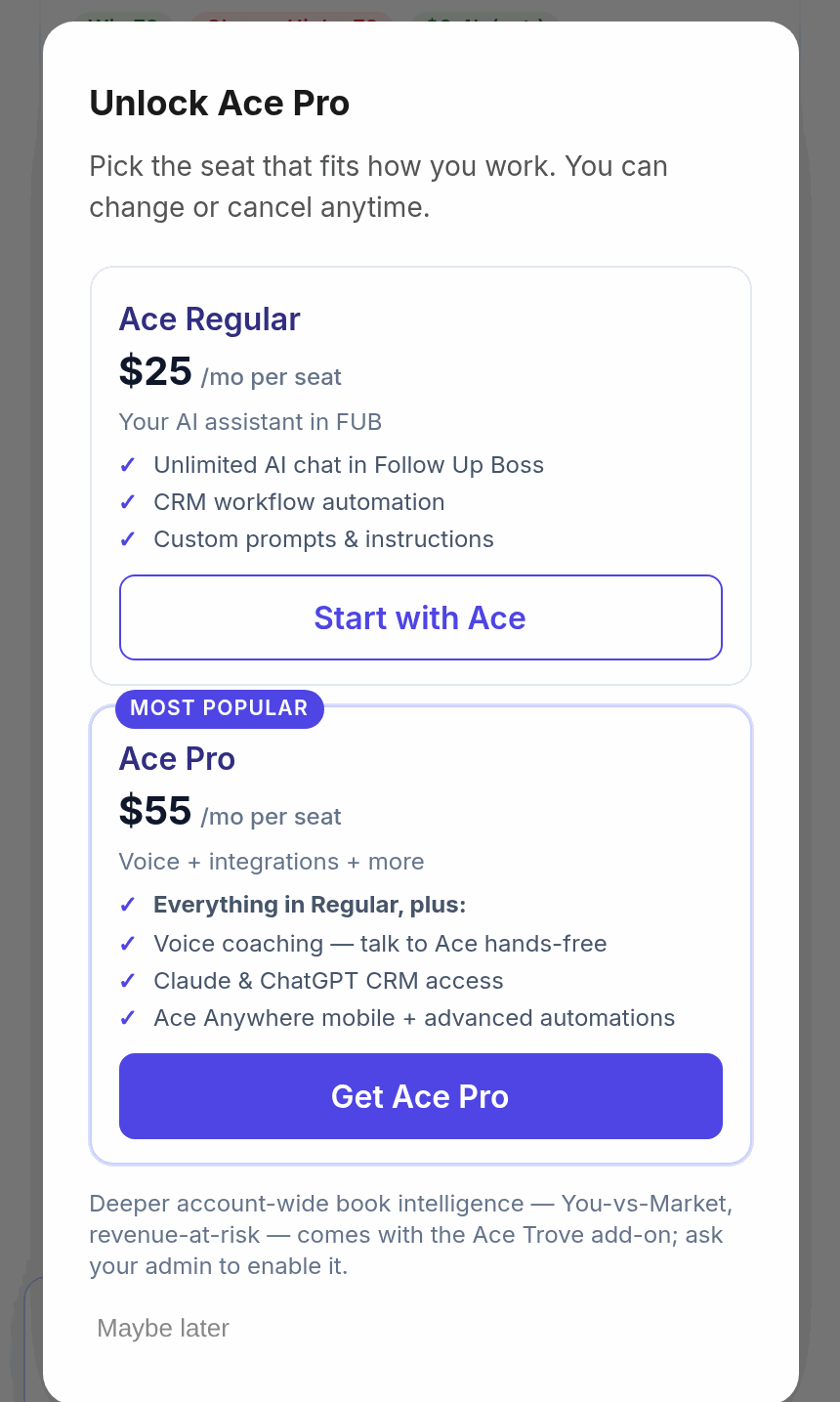
- You're on a free seat. If your team hasn't put you on a paid seat yet, you can upgrade yourself right inside Follow Up Boss — pick Ace ($25/seat/month) or Ace Pro ($55/seat/month) and pay with your own card. Steps are below.
- You bought your own seat (self-pay). You manage your own subscription: switch between Ace and Ace Pro, cancel, or reactivate from the Subscription section of your Ace settings (in the Companion or the embed). The charge is always previewed before you confirm.
- Your team pays for your seat (team-pay). Your admin owns the plan. To move between Ace and Ace Pro, ask your admin to change your seat from the Seats page — the switch is immediate and you don't need to do anything. Billing options in your own view will read "Ask your admin" rather than a checkout.
Upgrading yourself from a free seat
- Open Ace inside Follow Up Boss. Any Pro-locked feature shows an Upgrade prompt, and the launchpad carries an upgrade link.
- Click Upgrade to open the plan comparison — Ace at $25/seat and Ace Pro at $55/seat, side by side.
- Choose a plan and complete checkout with your card.
- Your access turns on immediately — reopen Ace and the Pro features (voice, integrations, the longer NEXT list) are unlocked.
How many messages do I get?
This is the question we're asked most often, and there's a myth worth clearing up: the number people remember — 15 — belongs to the free tier only.
- Free: 15 messages per day, resetting daily at midnight UTC (early evening in the US).
- Ace ($25/seat) and Ace Pro ($55/seat): no daily limit and no monthly limit. There is no allowance to run out of and nothing to wait to reset.
Paid plans do have pacing guards, which exist to stop runaway automation — not to ration your day. On Ace Pro that's up to 15 messages a minute, 150 an hour, and no more than 5 in any 10 seconds (on Ace: 8 a minute, 50 an hour). Normal client work never comes close. If you ever did reach one, it clears itself within the minute or the hour — there's no lockout and no lost day.
Two things that commonly get miscounted:
- Ace's own work doesn't count against you. When you ask one question and Ace pulls the contact's notes, calls, texts and appointments to answer it, that's one message from you — not five.
- Your daily brief and your AI-assistant connector are separate. The pacing guards above apply to the chat window inside Follow Up Boss. Your ChatGPT or Claude connector usage and your automatically generated daily brief are not counted against it.
Related articles
- Voice Mode: Talking to Ace Hands-Free (Pro)
- Connect FollowUpAce to Claude, ChatGPT & Other AI Assistants via MCP
- Billing & Seat Management: Complete Guide
Last updated: August 2026
Thanks for the feedback — it helps us improve.