
The 30-Day Adoption Playbook (for Team Leads)
Updated July 3, 2026
Buying seats is easy. Getting your whole team to use Ace every day is what actually moves your numbers — and it is the difference between a tool you keep and one you quietly cancel. This playbook is a week-by-week plan for team leads to drive adoption from day one to a self-sustaining habit in 30 days. The through-line is time-to-first-value: the faster each agent feels Ace save them a call or rescue a lead, the faster the habit sticks.
New to the rollout mechanics (installing, buying seats, activating Trove)? Start with the Getting Started admin guide first, then come back here.
Week 1 — Anchor the daily habit
The goal this week is not "learn every feature." It is one habit: every agent starts their day in Ace.
- Set the morning anchor. Ask every agent to open the companion NOW tab first thing each morning and work the top item. NOW shows one person to work now, why, and a ready-to-send draft — it is the single fastest "aha" in the product.
- Add the triage habit. After NOW, they scan NEXT (the ranked queue — the order is the priority) and clear the top three. In Follow Up Boss, the Ace Today panel gives the same decisions in the contact view.
- You model it. Open Command Center in your own morning routine and act on one row in front of the team.
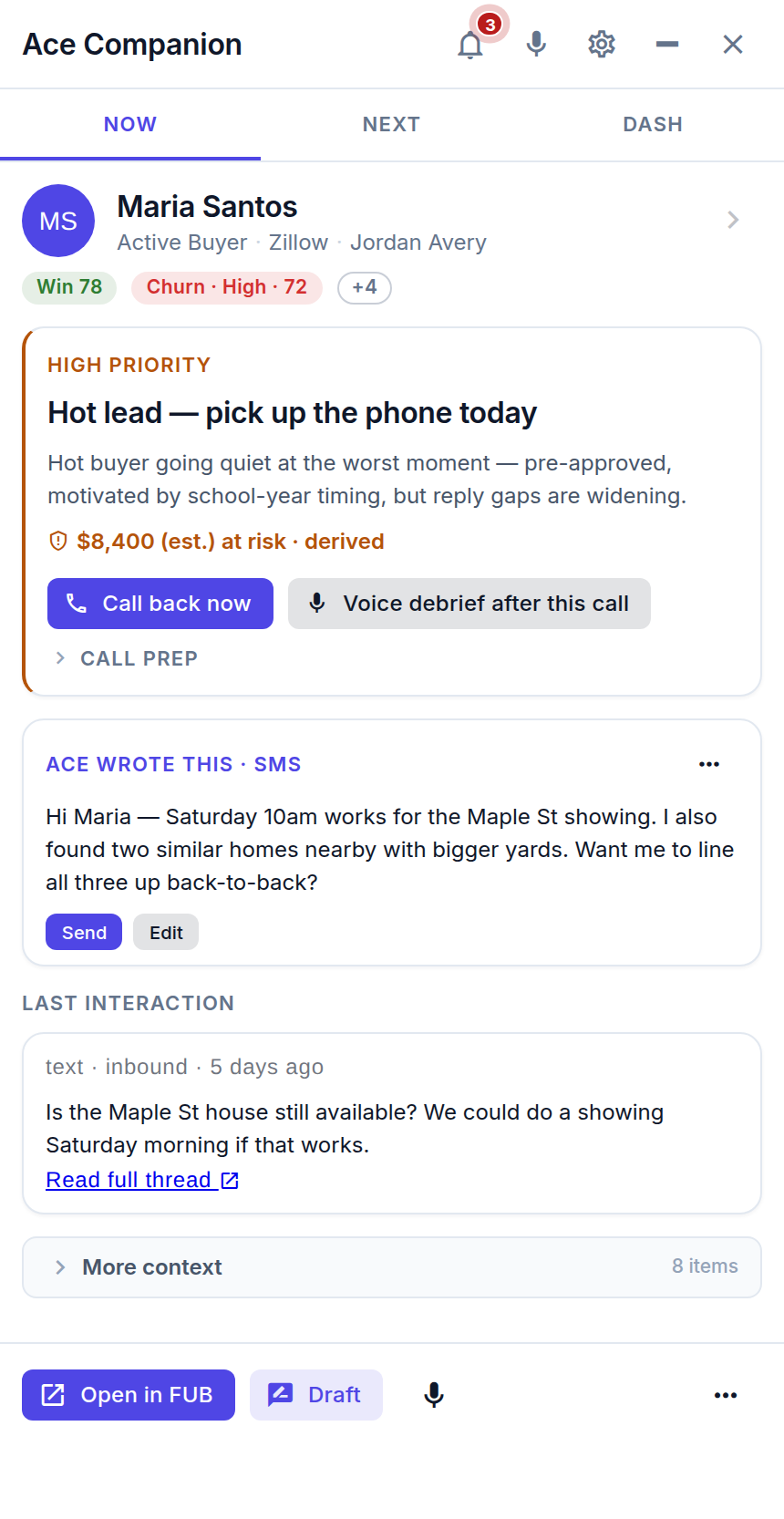
Week 1 win to celebrate: the first lead an agent rescued because NOW surfaced it. Call it out by name in your team channel.
Week 2 — Make Ace sound like your team
Agents trust an assistant that sounds like them and knows their playbook. This week you personalize what Ace draws on.
- Sync and curate your Knowledge Base. Ace mirrors your Follow Up Boss stages, templates, action plans, and appointment types so it reasons over your real workflow. Open Manage → Knowledge Base and toggle off anything Ace should never use — an off-limits item can't reach the assistant even by name.
- Load your best templates. Make sure your winning email and text templates are in FUB so Ace drafts from them.
- Tune tone and branding. Set Ace's voice so drafts match how your team writes (Configuring Ace's Behavior, Tone, and Branding).
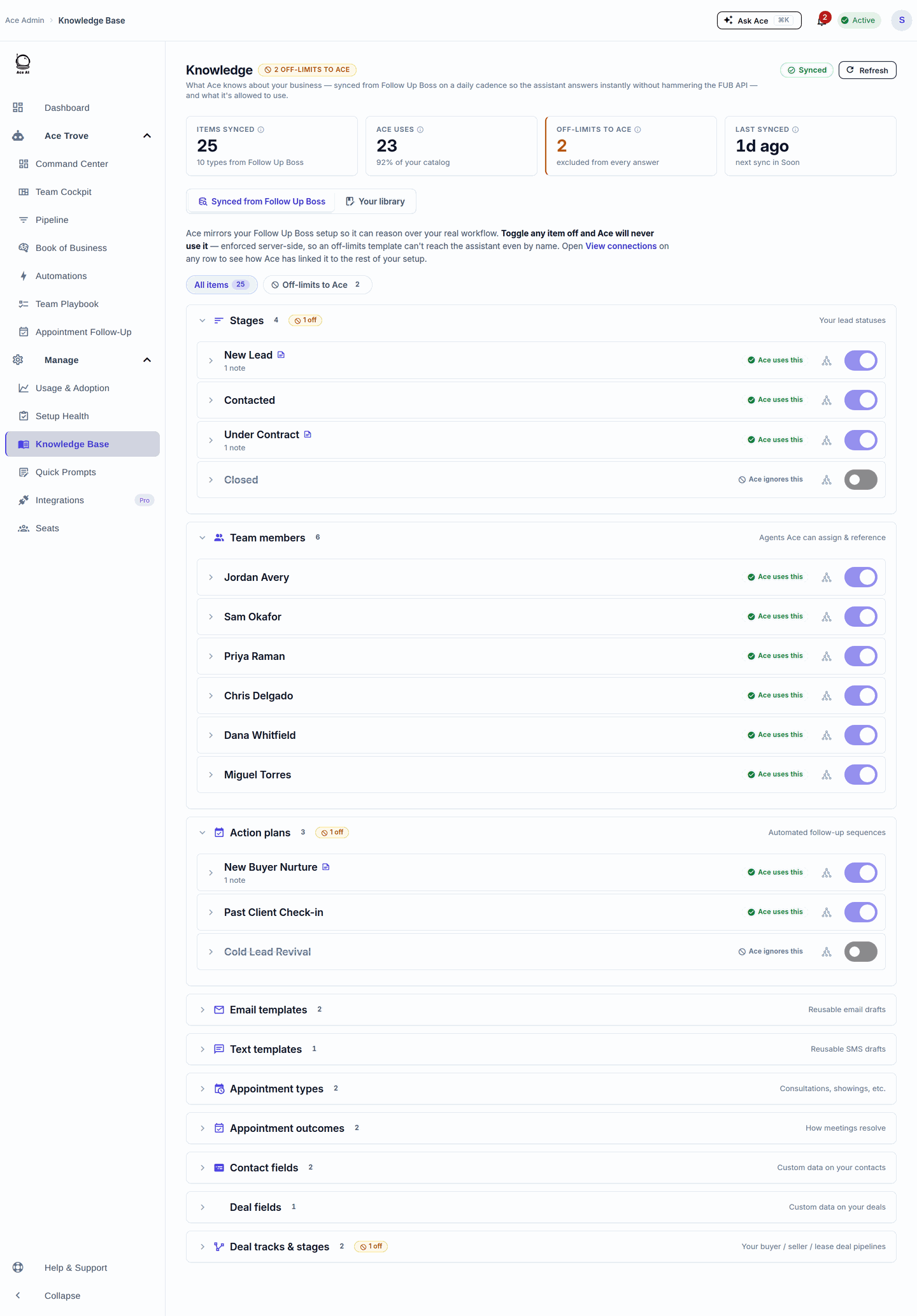
Week 2 win: an agent says "the draft actually sounded like me." That's trust — and trust is adoption.
Week 3 — Turn on the automation and the appointment loop
Now that the daily habit holds, let Ace carry more of the load so the value compounds without extra clicks.
- Turn on one automation. In Automations, start with the Assignment SLA → Reassign template: a new lead that's assigned but never worked in time gets handed to someone who will. Add Speed-to-Lead next. Start with one or two rules, not ten.
- Close the appointment loop. Ask agents to hit Debrief with Ace after every appointment. On your side, Appointment Follow-Up shows who still owes a debrief, and one click nudges them.
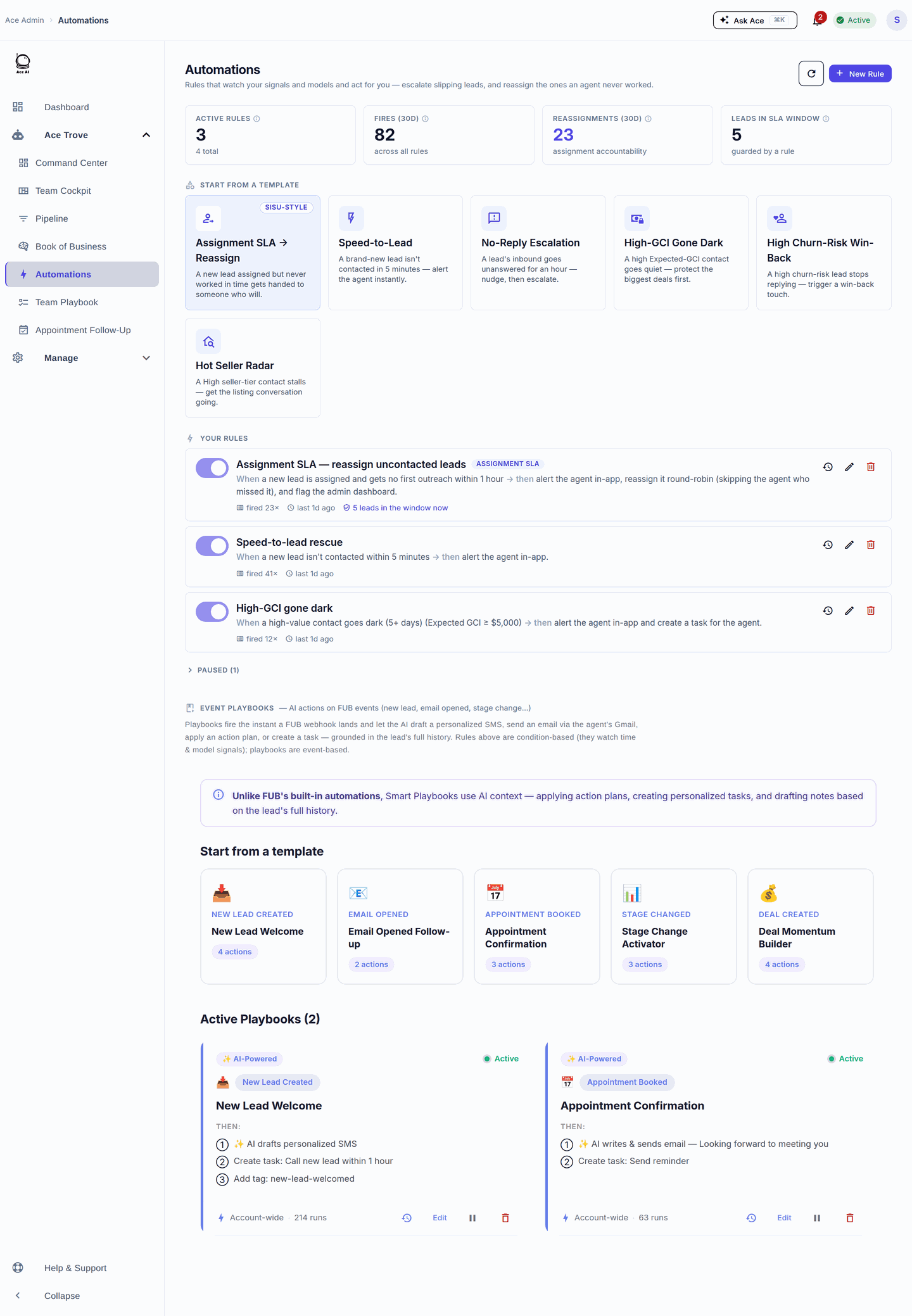
Week 3 win: the first lead an automation reassigned or rescued before anyone noticed it was slipping.
Week 4 — Review adoption and coach the gaps
By week four you can see who's getting value and who needs a nudge — with data, not guesswork.
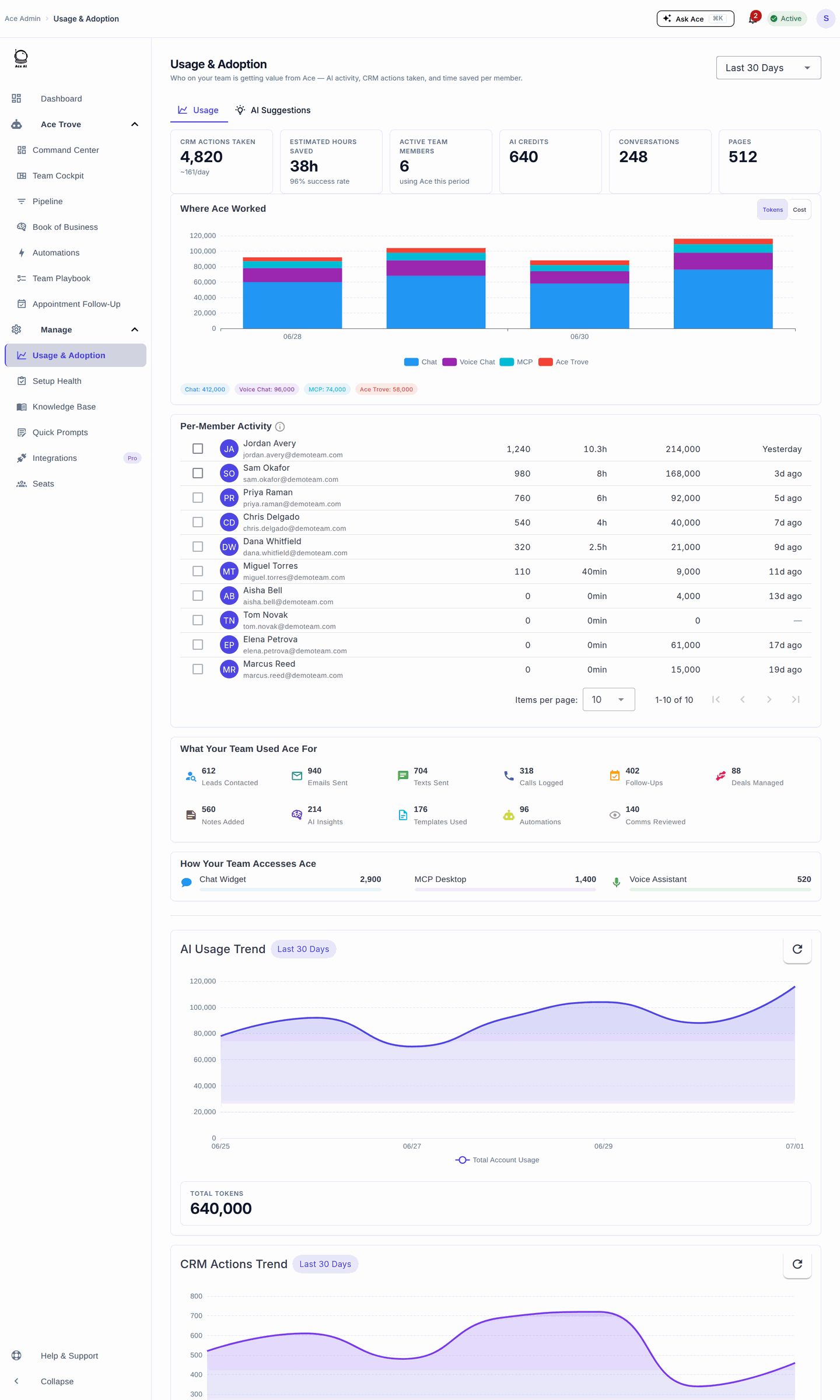
- Open Usage & Adoption. The per-member table shows AI activity, CRM actions taken, and last-active date. Sort by last active to spot anyone who hasn't logged in.
- Coach from Command Center. For any agent with slipping leads, use the one-click Coach action — it sends a coaching message, creates a follow-up task, and drops a note in the agent's Ace Inbox.
- Right-size seats. If a Pro seat isn't using voice, consider moving it to Regular; if a Regular agent wants hands-free, upgrade them.
The champion model
Pick one enthusiastic agent as your Ace champion — ideally someone respected who "got it" in week 1. Their job is light: answer quick questions in the team channel, share one win a week, and demo their NOW-tab routine in a huddle. Peer proof beats top-down mandates every time. Rotate the spotlight so wins come from across the team, not just the champion.
The three most common adoption stalls (and the fix)
Stall 1 — "I forget to open it." The habit never anchored. Fix: make NOW the literal first thing at the morning standup for two weeks. Have each agent read their top NOW item aloud. Once it's muscle memory, drop the ritual.
Stall 2 — "The drafts don't sound like me." Knowledge and tone weren't personalized. Fix: revisit Week 2 — sync templates, set tone, and turn off knowledge items that don't fit. A single tuned template usually flips a skeptic.
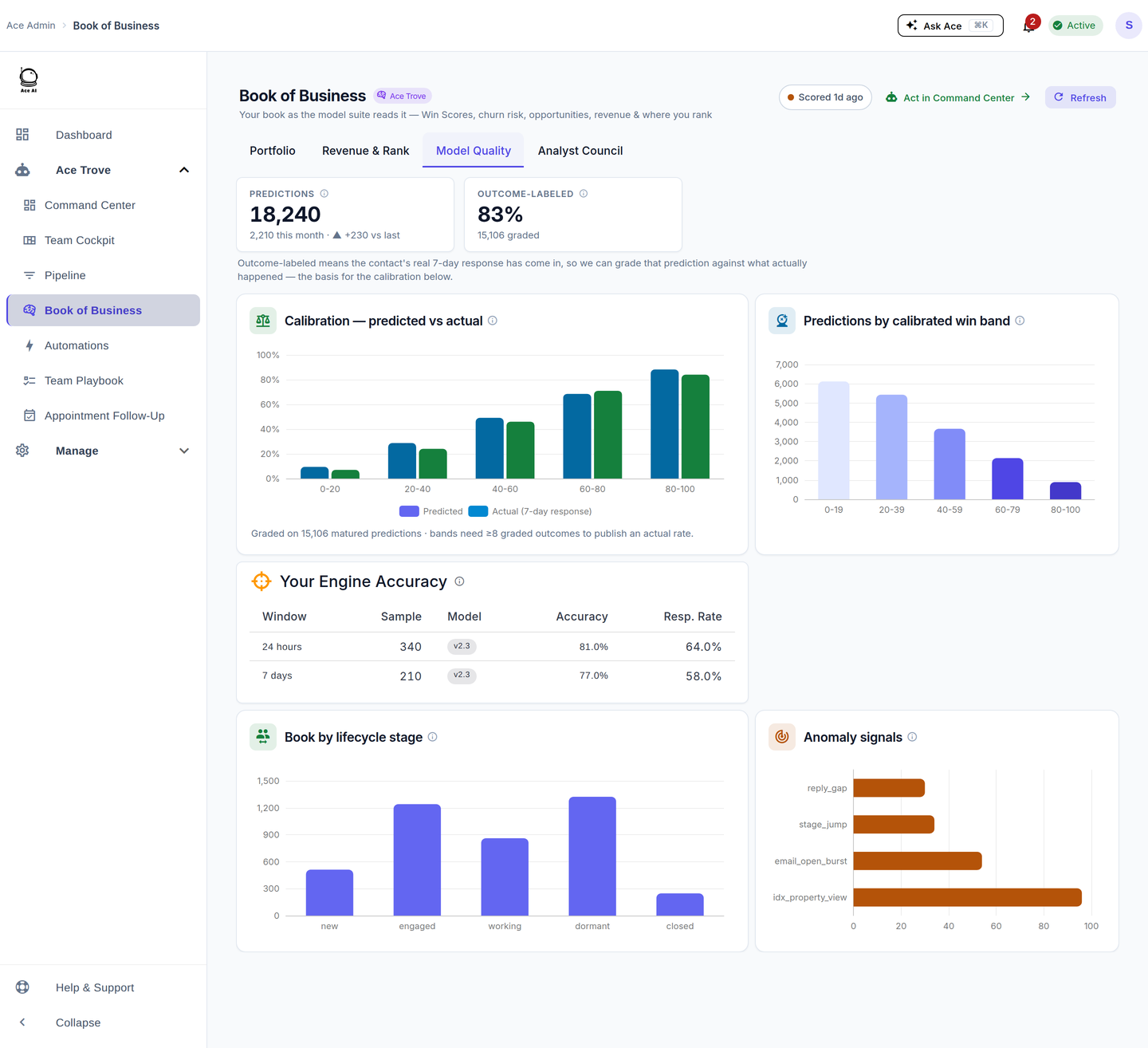
Stall 3 — "I don't trust the scores." Fix: show them the receipts. Book of Business → Model Quality grades Ace's own predictions against what actually happened and shows the calibration chart. "Win Score 30 really means about 30%" lands better as a picture than a promise.
What "adopted" looks like at day 30
- Every active agent opens NOW/Today most mornings (check Usage & Adoption).
- Median first response is trending down in Team Cockpit.
- At least one or two automations are quietly running.
- Appointment debriefs are getting logged without you chasing them.
- Agents talk about Ace as "how we work," not "the new tool."
Related articles
- Getting Started with Follow Up Ace — Admin Complete Guide
- Using the Ace Companion
- Managing Your Ace Knowledge Base
- What Is Ace Trove? Overview and Pricing
Last updated: July 2026
Thanks for the feedback — it helps us improve.