
Moving to Ace from Another System: What Imports and How Consent Works
Updated August 13, 2026
Moving tools is usually a data problem. Moving client tools is a consent problem wearing a data problem's clothes — and that is the part most migrations get wrong. This article covers what carries over into Ace, what you re-create, and the one rule that governs all of it: an import moves records, never permission.
What you'll have when you're done
- A clear picture of which of your existing lists can come across, and in what shape.
- An understanding of why every imported contact lands in a non-sending state, and what unlocks it.
- The import → review → invite sequence, so you know what will and will not happen when you press the button.
- A realistic expectation for what the first week after a migration looks like.
The one rule
This is not caution for its own sake. A migrated list that starts mailing on day one is the single fastest way to get an agent's domain flagged as spam, and — depending on what the other product's opt-in actually said — it is the kind of thing that draws a complaint. Ace is built so that the safe path is also the default path.
What carries over, tool by tool
| Coming from | Into | What you get — and what you don't |
|---|---|---|
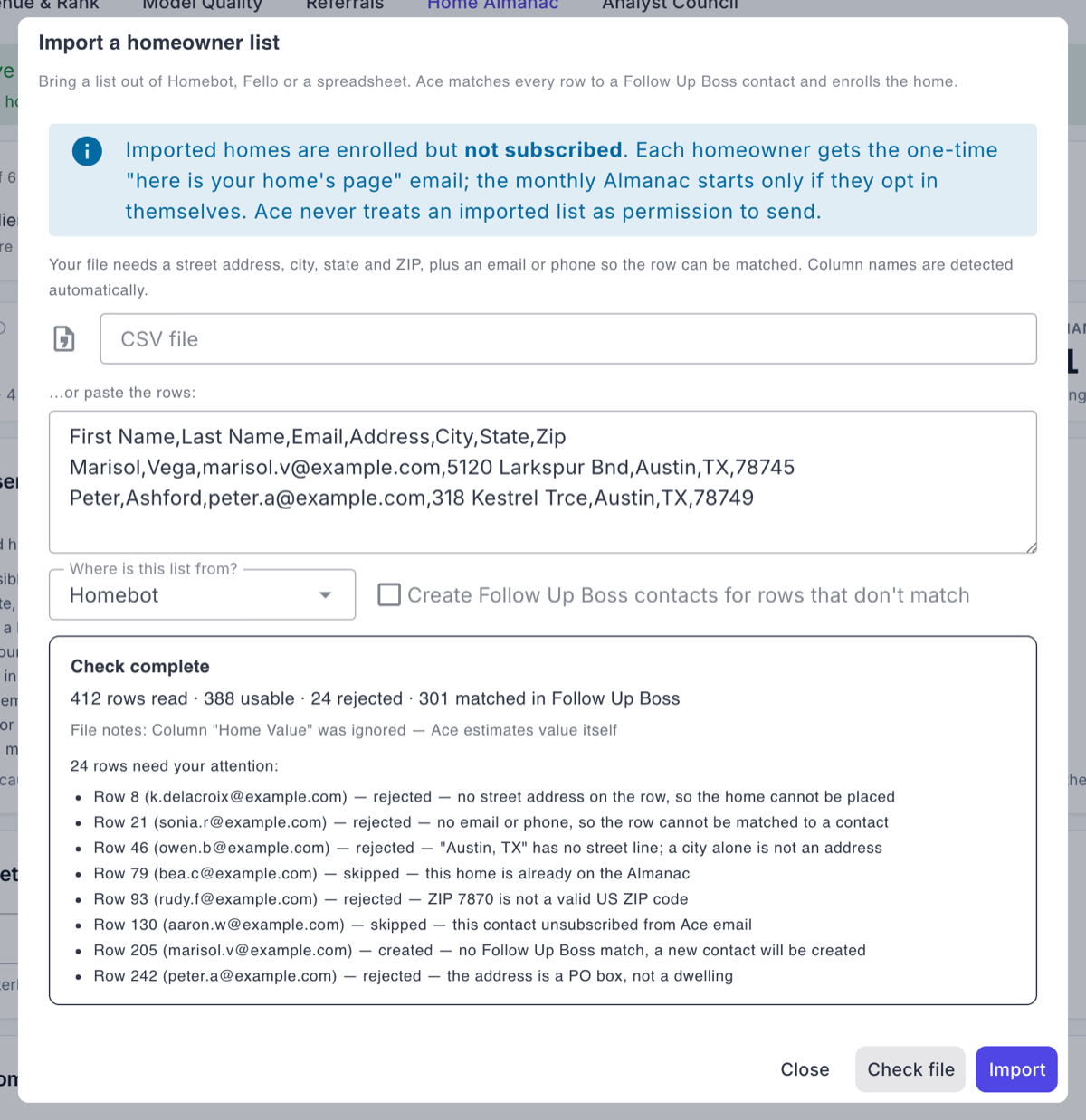
| Homebot or another home-value product | Home Almanac | Homeowners and addresses import; each gets a page and one invite. Not imported: their subscription. Every home starts unsubscribed and stays there until the homeowner opts in on their own page. |
| Curb Hero, Spacio, or paper sign-in sheets | Ace Forms | Sign-ins backfill into a form you choose and reach Follow Up Boss. Not imported: any consent to automated email. Backfilled sign-ins are excluded from automated sends entirely — you work them by hand. |
| Zillow or another agent-profile directory | Ace Pages | Nothing to import: pages build themselves from your Follow Up Boss roster and your own deals. You paste your bio and your testimonials. Not imported: your star rating — Ace does not scrape review sites and publishes no rating. |
| A spreadsheet of agent commission terms | Back Office | Plans import with a required effective-from date per row, and a dry run shows the ledger delta before you commit. No consent implications — this is internal data. |
| Your Follow Up Boss database itself | Everything | Already there. Ace reads your contacts, deals, activity and stages through the Follow Up Boss connection — there is no contact import step, and there never was. |
Import → review → invite
Every importer in Ace has the same three beats. There is no variant where step four is "and then it emails everyone."
- Import. You upload a CSV. Ace matches each row to a Follow Up Boss contact — by email — and creates the contact when there is no match, so Follow Up Boss stays the system of record and nothing ends up living only inside Ace.
- Review. You see a per-row outcome before anything is committed: matched, created, skipped, or rejected with the reason. A row Ace can't validate is shown to you, not quietly coerced into something that looks valid. Where an import needs a human to vouch for where the data came from, you attest by name and that attestation is stored with the records.
- Invite — or nothing. The Home Almanac import sends the same single transactional invite a hand-enrolled home would get. The open-house backfill sends nothing at all. Neither one starts a campaign.
What the first week actually looks like
Set expectations with yourself before you import, because the numbers will look worse than the migration went:
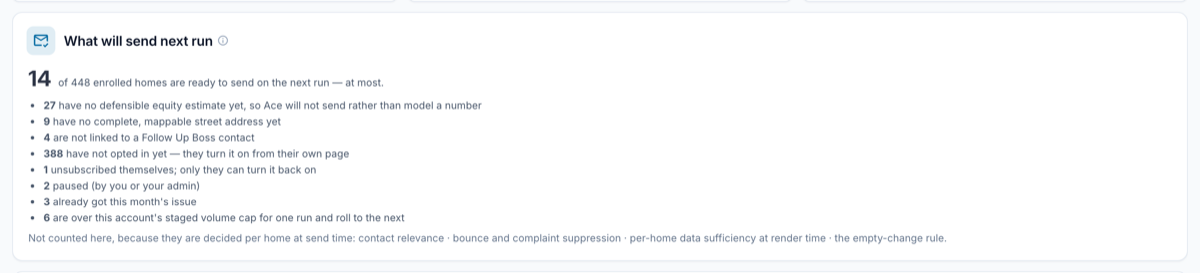
- Your readiness summary will be mostly un-opted-in. If you import 300 homes, expect roughly 300 rows sitting in have not opted in yet the next morning. Opt-ins arrive over days as invites are opened.
- Some homes will never become eligible. A home with no defensible equity estimate — common in non-disclosure states where no purchase price is public — will not send rather than have Ace model a number. That is permanent unless you have your own closed transaction on the property.
- New accounts ramp. Ace deliberately does not blast a whole book on the first run; volume builds up over successive runs. Homes over a run's cap roll to the next one.
- Backfilled open-house sign-ins will never appear in a send count, because they are not in the sending population at all. They are CRM records you work personally.
Honest limitations
- There is no direct connector to any competing product. Migration is CSV in, reviewed, committed. Nothing logs into your old tool on your behalf.
- Ace does not buy, scrape or append third-party data — no purchased life-event lists, no divorce or probate filings, no scraped reviews. The home profile comes from public records and from what the homeowner fills in themselves.
- An import cannot manufacture consent, and no setting changes that. There is deliberately no toggle that marks imported homeowners as subscribed. If you find yourself wanting one, the honest move is a personal message pointing your client at their page.
- Stored lead records do not expire on a timer. They carry an expiry marker, but nothing automatically purges them — deletion requests are handled by hand. Never tell a client their data auto-deletes on a schedule.
Frequently asked questions
My old product says these people opted in. Why do I have to ask again?
Because they opted in to that product's mail, from that sender. Consent doesn't transfer with a CSV. The invite makes asking again cheap: one message, and the ones who want it say yes.
Can support flip my imported homeowners to subscribed?
No. There is no mechanism, and it isn't a permissions question — nothing in the product writes that consent on a homeowner's behalf.
Will importing create duplicate contacts in Follow Up Boss?
Rows are matched by email first and only create a contact when there's no match. Review the per-row outcomes before committing — that is exactly what the dry run is for.
Do I lose my history if I don't import?
Your Follow Up Boss history is already in Ace. What an importer adds is the external stuff Follow Up Boss never held: homeowner addresses, and sign-ins collected in another product.
Can I import my Zillow reviews?
No. Ace does not scrape or ingest review-site content. Enter testimonials yourself; they are labeled as agent-provided.
Related articles
- Your First Week with Ace's Client Tools
- Home Almanac: Enrollment, Homeowner Opt-In, and Why an Issue Did Not Send
- What Ace Reads, Writes, and Syncs in Follow Up Boss
Last updated: August 2026
Thanks for the feedback — it helps us improve.