Capture: Every Lead from Magnets, Forms, Pages and Packets in One Inbox
Updated September 4, 2026
Capture is one row in the admin sidebar that holds all four of Ace's lead-capture builders as tabs, plus a single inbox showing everyone who has come in through any of them. If you're looking for Lead Magnets, Ace Forms, Client Packets, or Ace Pages, they all live here now.
What you'll have when you're done
- One inbox open in front of you showing every lead your account has captured, whichever tool captured them.
- A read on which of the four builders is actually working — the tool chip on every row tells you.
- Certainty about whether each lead reached Follow Up Boss, and if not, why — delivery is tracked separately from the saved capture.
- Your old Lead Magnets / Ace Forms / Client Packets / Ace Pages bookmarks landing on the right tab.
Your first win, in about 3 minutes
Nothing to configure — Capture is free on every account and there is no gate to clear. This is a five-minute orientation you do once.
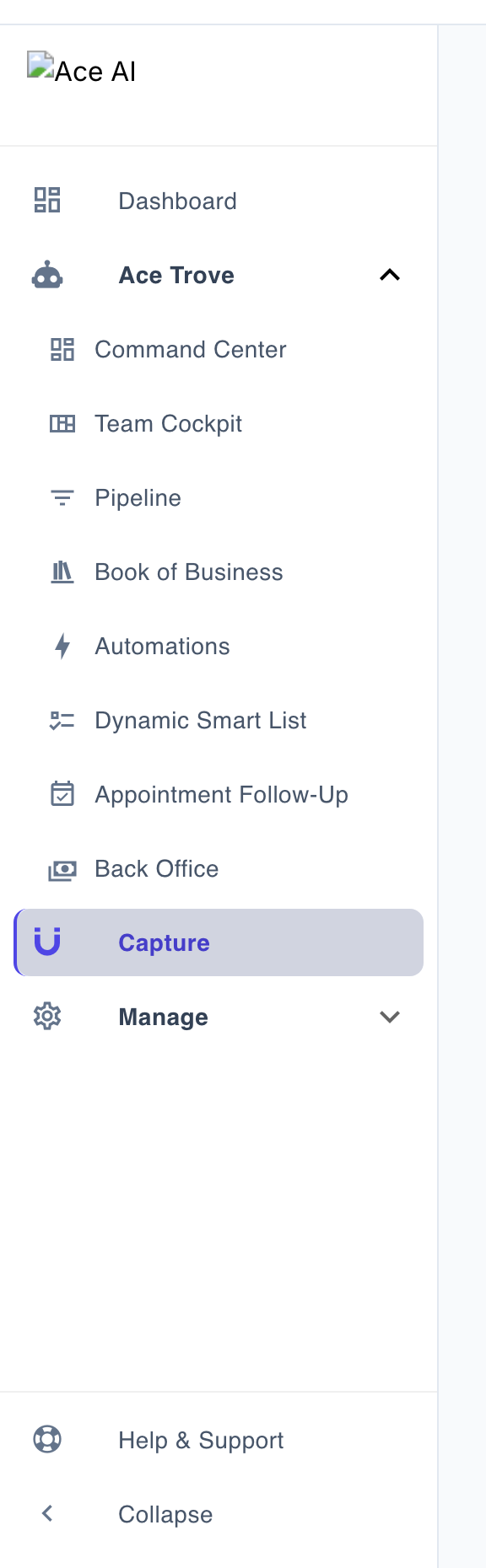
- Open Capture in the admin sidebar. It sits just above the Manage group, outside the Ace Trove cluster, and opens on the Leads tab.
- Scan the In FUB column. If you see No FUB anywhere, stop and connect Follow Up Boss first — new captures need that connection. Reconnecting does not replay previously skipped deliveries automatically.
- Click the Lead Magnets chip, then Ace Forms, then Ace Pages, then Client Packets. An empty result means no matching captures were loaded; check the filter and any incomplete-data notice before deciding the tool has not been used.
- Switch to that empty tool’s tab and build the first one. If you only do one thing this week, choose Lead Magnets → Interactive tools → Open House Sign-In. The Ace Forms tab is for custom embeddable forms.
- Copy the address bar and send it to your team — the URL updates as you switch tabs, so it deep-links to the exact builder.
Where the four menu items went
They used to be four adjacent rows in the sidebar with four separate leads viewers and no way to see them together. They are one motion — getting a stranger to raise their hand — so they became one row with four tabs. Nothing was removed and nothing was rebuilt; each builder is exactly the tool it was.
| If you're looking for… | It's now at |
|---|---|
| Lead Magnets | Capture → Lead Magnets tab |
| Ace Forms | Capture → Ace Forms tab |
| Ace Pages | Capture → Ace Pages tab |
| Client Packets | Capture → Client Packets tab |
Who can use it
Capture itself is free for every account and adds no gate of its own — that's why it sits outside the Ace Trove group in the sidebar. Each tool inside keeps its own entitlement:
- Lead Magnets — report magnets and interactive tools have separate allowances. Free includes 1 active report magnet and 1 active form/tool; Open House Sign-In, Quick Connect Card, Mortgage Calculator, and custom forms share that form/tool allowance. A paid seat or Ace Trove unlocks more.
- Ace Forms — free tier for every account (1 active form); Regular and Pro unlock more, and conditional routing is Pro-only.
- Ace Pages — every agent gets one profile page free; the team roster page, brand colors, and per-member links are paid.
- Client Packets — paid only. There is no free tier: Regular gets 5, Pro gets 50.
Where to find it
Capture in the admin sidebar, above the Manage group. It opens on the Leads tab.

Reading the Leads inbox
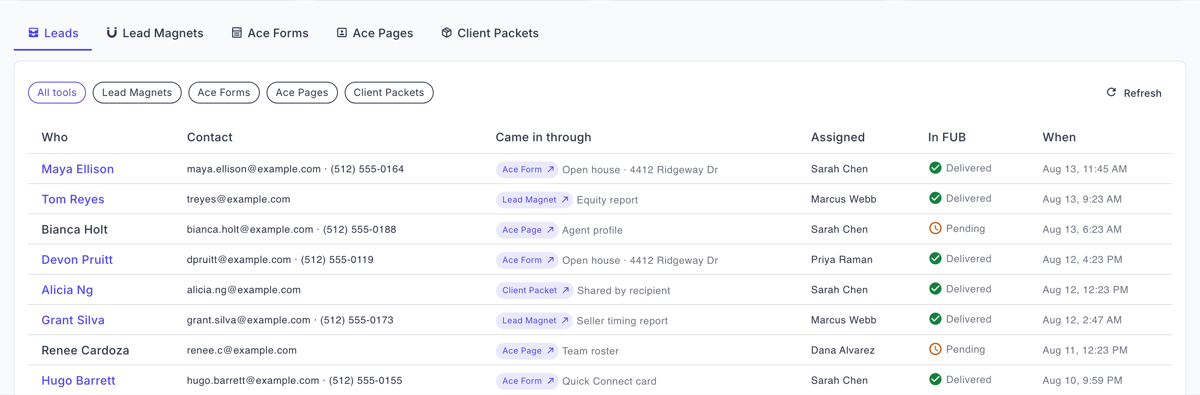
The inbox merges everyone who came in through a lead magnet, a form, an Ace Page, a client packet, or a Home Almanac. Each row shows who they are, how to reach them, which tool they came in through, who they're assigned to, whether they made it into Follow Up Boss, and when.
- Filter by tool using the chips: All tools · Lead Magnets · Ace Forms · Ace Pages · Client Packets.
- Click a row's tool chip to jump straight to the surface that captured them.
- Click a name to open them in Follow Up Boss — the link appears only when the contact actually exists there.
- Load more pages back through older leads.
The "In FUB" column
Ace always saves the lead to your Ace account first, then tries Follow Up Boss, then sends notifications. A failure at step two or three never loses the lead. The column has four states:
- Delivered — the contact is in Follow Up Boss.
- Pending — the write hasn't completed yet.
- Failed — the write was attempted and did not succeed.
- No FUB — your account has no Follow Up Boss connection, so that lead will never be delivered. Reconnect Follow Up Boss for future captures. Keep the saved lead and ask support to check delivery; reconnecting alone does not retry the old record. Repeating a sign-in may be deduplicated and is not a recovery procedure.
What the inbox deliberately does not do
- It can tell you it's incomplete. If one tool's records can't be read, the inbox says so at the top rather than quietly showing you a short list.
- The count tiles can under-count. They scan a bounded number of records per tool, and the banner says so — the excluded ones are not zero, they're just not counted.
- Conversion rate shows "—", not 0%, when no page views have been observed. A missing number is never rendered as a zero.
- Home Almanac leads appear under "All tools" but have no filter chip of their own yet; their chip links to Book of Business.
Frequently asked questions
Do I need Ace Trove for Capture?
No. Capture is deliberately outside the Trove group because the tools inside it are available to every account at some level.
Can I share a link straight to one builder?
Yes — the address bar updates as you switch tabs, so you can copy and send it.
Why is a lead in Ace but not in Follow Up Boss?
Check the "In FUB" column. "No FUB" means the account isn't connected; "Failed" means the write was tried and didn't land — support can help.
Does a lead get captured if the Follow Up Boss write fails?
Yes, always. The lead is saved first and never discarded because a downstream step failed.
Related articles
Last updated: September 2026
Thanks for the feedback — it helps us improve.