Book of Business: Your Whole Database, Scored
Updated September 5, 2026
Book of Business is your whole database as Ace's model suite reads it — Win Scores, churn risk, opportunity classes, revenue, and where you rank. It answers: what is my book actually worth, who's about to churn, and where are the opportunities I'm sitting on? It has four tabs: Portfolio, Revenue & Rank, Model Quality, and Analyst Council.
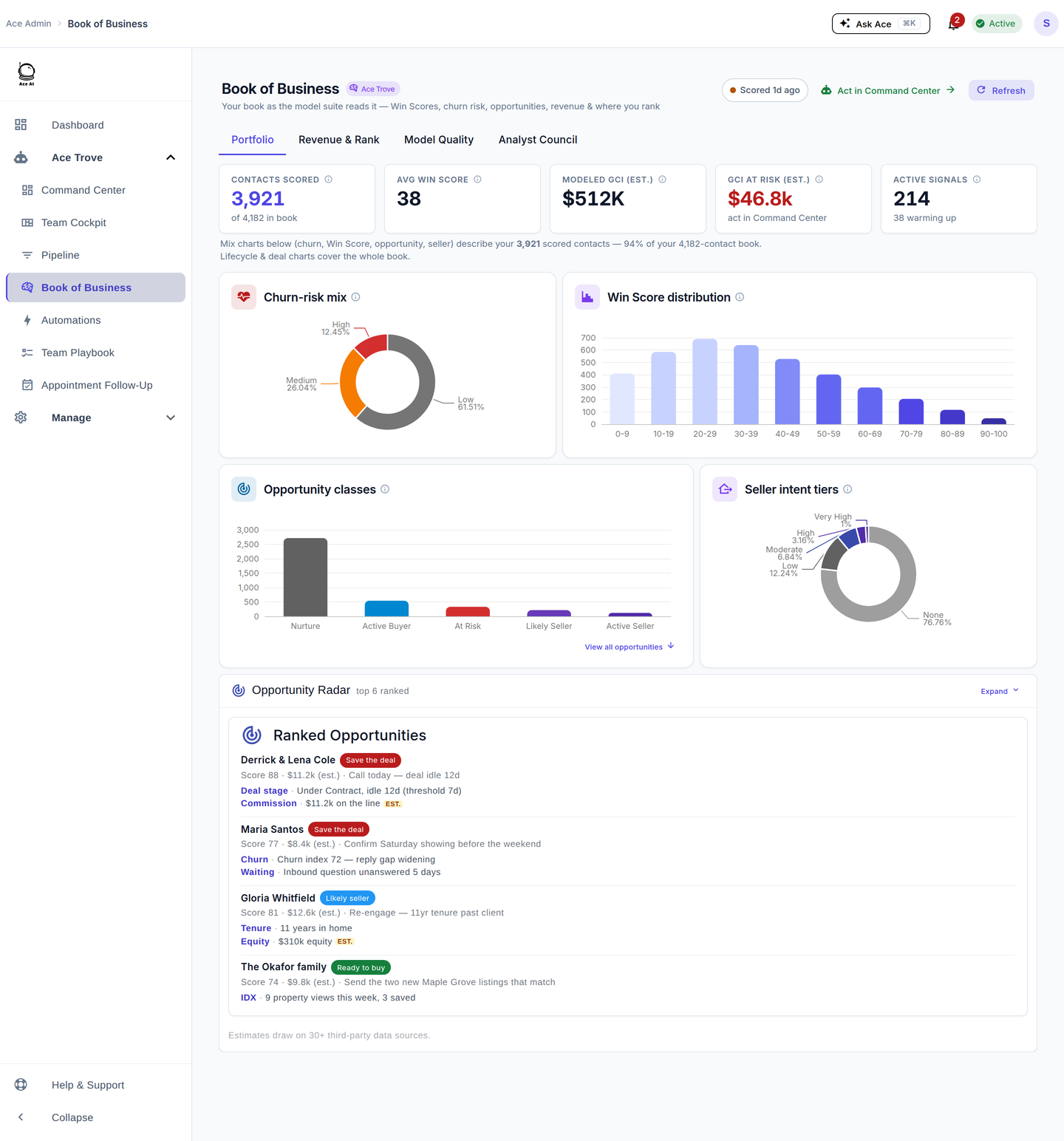
Portfolio tab
The top tiles show how much of your book is scored ("Contacts scored N of M in book — full book"), your average Win Score, modeled GCI (est.), GCI at risk (est.), and active signals. Below, four charts break down churn-risk mix, Win Score distribution, opportunity classes (At Risk, Active Buyer, Active Seller, Likely Seller, Nurture), and seller-intent tiers. Click a bar to open the Opportunity Radar drill.
The Opportunity Radar drill
The radar ranks the opportunities included in the account rollup, with available reasons, recommended actions, and estimates. Some contacts do not yet have both an Opportunity Score and an estimated GCI. Seller-intent scoring can use tenure, estimated home equity, market appreciation, area signals, and CRM seller notes; inspect each contact's itemized evidence to see which signals were available. Values marked est. are modeled estimates.
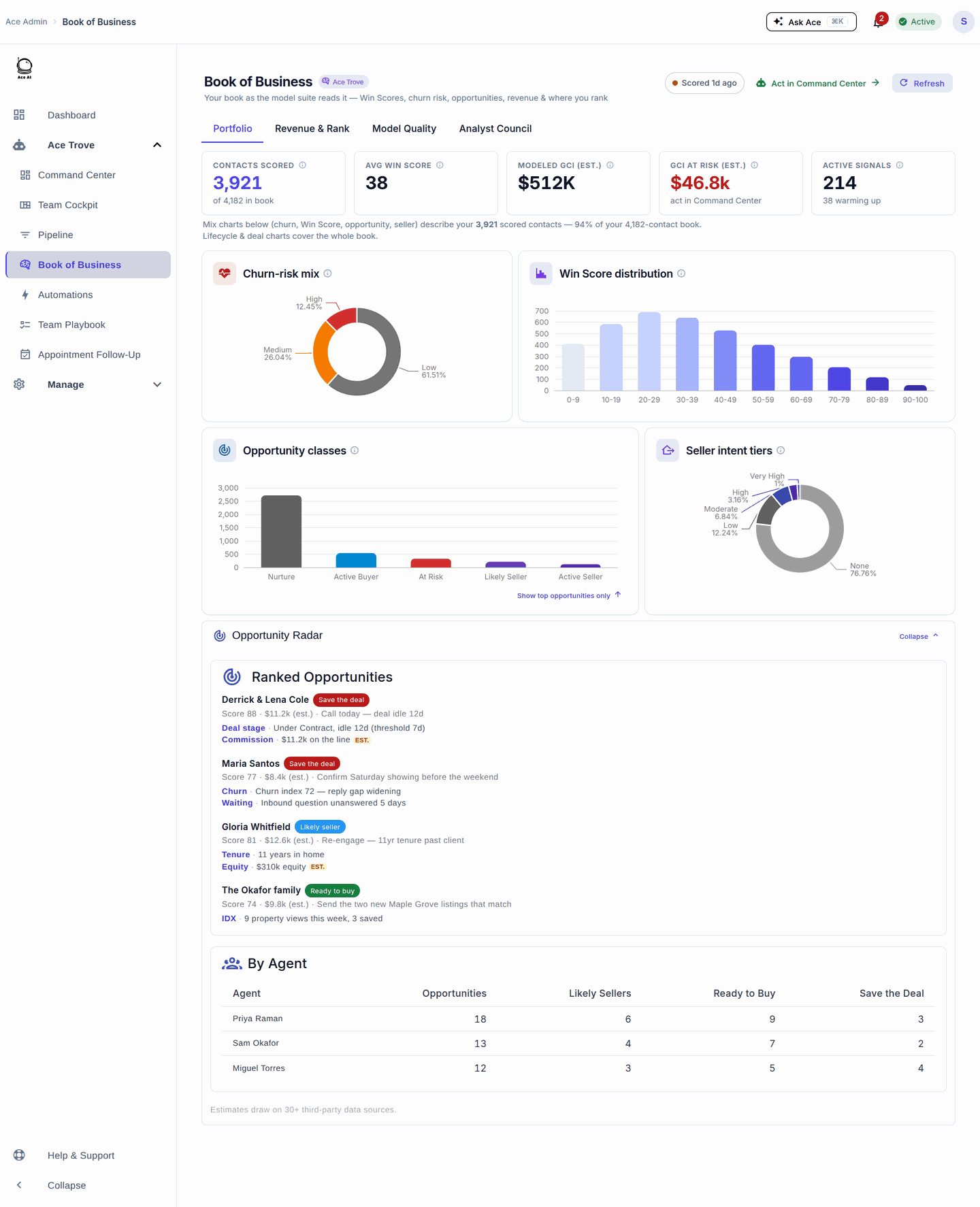
Explore the Opportunity Map
In the updated radar, See where to focus plots Opportunity Score from 0–100 horizontally and estimated GCI vertically. Opportunity Score is a prioritization measure; this chart does not plot Win Score or a probability of closing. GCI estimates are not guaranteed revenue.
- Start with the scope. Open Book of Business → Portfolio → Opportunity Radar. The docked preview uses the top-ranked slice currently loaded. Choose Expand for the rest of the loaded ranked list. A Portfolio class chip or lifecycle filter still applies; clear its chip to broaden that scope. Expanding does not remove a Sampled rollup limit.
- Explore a class. Map buttons narrow both the map and ranked list within that slice. Save the deal groups At Risk, Ready to buy groups Active Buyer, and Likely seller includes Active Seller and Likely Seller opportunities. Other classes appear under Other opportunities. All restores the current loaded slice, without clearing Portfolio or lifecycle filters. Class counts describe that slice, and class selection does not fetch replacement contacts.
- Inspect the evidence. Select a point or choose Inspect in a ranked row. The detail panel shows the available measures, recommended action, and evidence, with estimate labels preserved. Open contact in Follow Up Boss opens the source record for your review. Inspecting an opportunity does not contact the person or change their record.
Read the coverage line: only contacts with both valid measures appear as points. The caption states how many of the currently explored opportunities can be plotted. Contacts with missing measures remain in the ranked list, where Inspect can show Unavailable or Estimate unavailable. Missing evidence is explicitly labeled. The vertical scale stays fixed while switching map classes, so an unchanged estimate does not appear to grow because of a filter.
Keyboard: Tab into the map, then use the arrow keys to move through its points. Home and End jump to the first and last point. You can also Tab to a row's Inspect button and use Enter or Space, including for contacts that have no plotted point. The selected contact's details are announced as they change.
If the map is absent: an Ace Trove preview or a computing message has not supplied an unlocked opportunity list yet. A loading error offers Retry. If contacts are listed but no points appear, read the missing-measures notice and inspect their available evidence. A Sampled rollup notice means the scan was capped; neither the map nor its totals represents the full database.
Model Quality tab — honesty as a feature
This tab shows total predictions, how many are outcome-graded, a predicted-vs-actual calibration chart, and predictions-by-win-band. In short: Ace grades its own predictions against what actually happened, while the published Win Score remains a within-account rank rather than a close probability. It's the fastest way to build trust in the scores with a skeptical agent.
Five things to do here
- See your book's shape. Read the Win Score distribution — a heavy left tail means a lot of lower-ranked contacts to nurture or retire.
- Catch churn early. Use the churn-risk mix to size how many engaged contacts are about to go quiet.
- Work the radar. Open the Opportunity Radar and act on the top-ranked moves.
- Find likely sellers. Check the seller-intent tiers for re-engage-worthy past clients.
- Trust the scores. Show an agent the Model Quality calibration chart.
Frequently asked questions
Where did Opportunities / Opportunity Radar go? Into this Portfolio tab as the radar drill; the old /opportunity-radar and standalone Seller Radar admin page redirect here. See Where Did My Menu Items Go?
Is home equity a real appraisal? No — it's a conservative modeled estimate, always labeled "(est.)", never lien-level or appraisal-grade data.
Does the 0–100 seller score sync to Follow Up Boss? No. Only the Seller Tier is written to a FUB field, rolling nightly; the 0–100 score and its evidence live here in Seller Radar.
Related articles
- Where Did My Menu Items Go? The 2026 Dashboard Update
- Activating Ace Trove and Understanding Your Ace Fields
- The 30-Day Adoption Playbook (for Team Leads)
- What Is Ace Trove? Overview and Pricing
Last updated: September 2026
Thanks for the feedback — it helps us improve.