
Appointment Follow-Up: Closing the Debrief Loop
Updated July 3, 2026
Appointment Follow-Up closes the loop on every team appointment — upcoming ones, and past ones with their disposition and follow-up state. It answers: which appointments still don't have an outcome logged, and is the follow-up actually happening? An appointment with no debrief is a lead you paid to meet and then forgot — this view makes sure that doesn't happen.
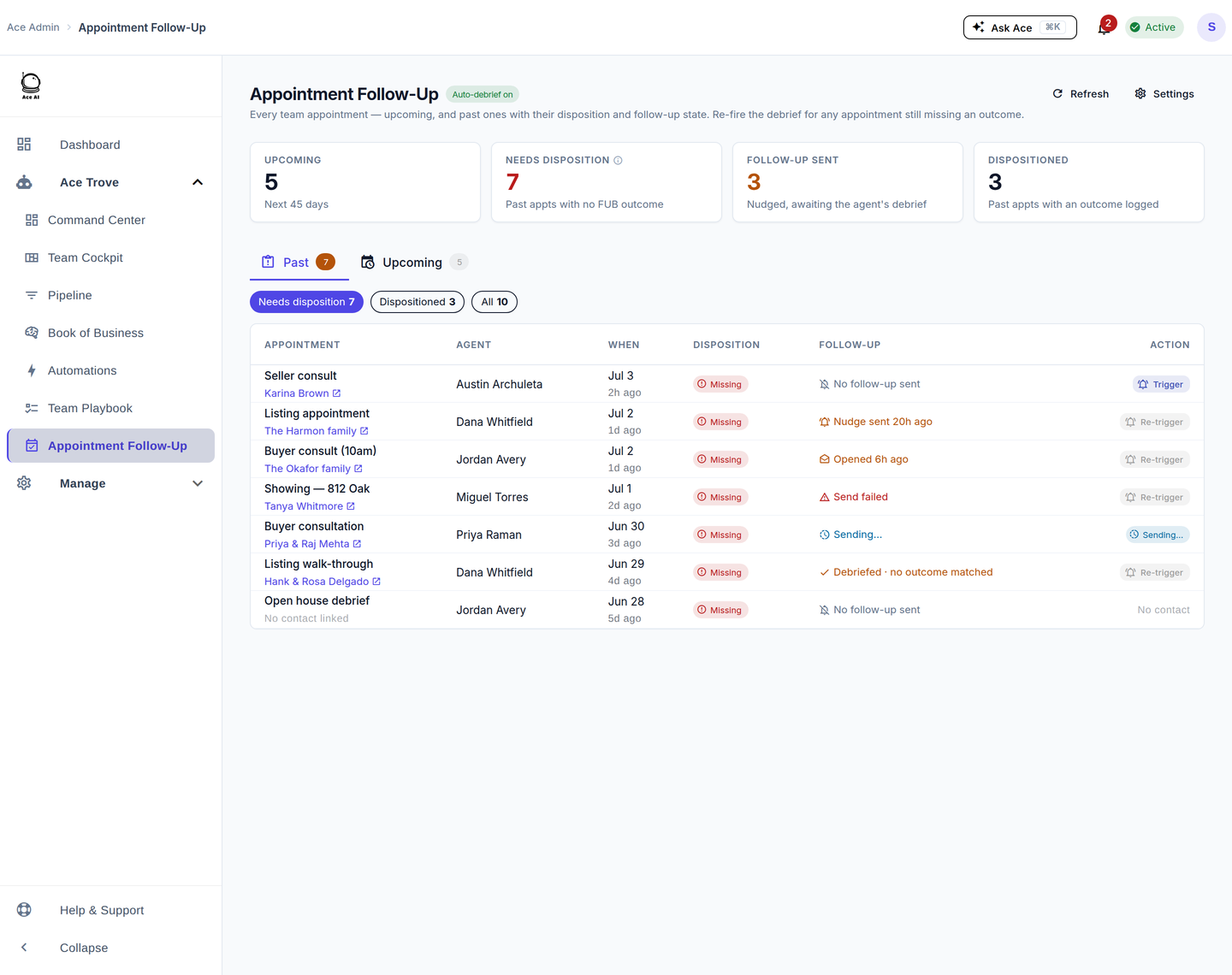
What the tiles tell you
- Upcoming — the team's appointments in the next 45 days.
- Needs disposition — past appointments with no outcome logged in Follow Up Boss. This is the money tile.
- Follow-up sent — nudged, awaiting the agent's debrief.
- Dispositioned — past appointments with an outcome logged.
The debrief loop
After an appointment, the agent taps Debrief with Ace in the FUB embed to log the outcome and let Ace plan the follow-up. On your side, any appointment still missing an outcome gets a one-click Trigger (or Re-trigger) that sends the agent a nudge — a FUB note, a follow-up task, and an in-app notification. The follow-up column shows the live state: no follow-up sent, nudge sent, opened, debriefed, or send failed.
Five things to do here
- Clear "Needs disposition." Filter to it and trigger a nudge on every row.
- Re-trigger the stale ones. If a nudge was opened but not acted on, re-trigger it.
- Check upcoming coverage. Switch to the Upcoming tab to see the week ahead grouped by timeframe.
- Spot chronic no-debriefers. If the same agent keeps showing "Missing," coach the debrief habit.
- Confirm auto-debrief is on. The header shows whether the automatic debrief prompt is enabled; the Settings panel toggles it.
Frequently asked questions
What does "Missing" disposition mean? The appointment happened but no outcome was logged in Follow Up Boss yet — so Ace can't plan the right follow-up.
What does the agent see when I trigger a nudge? A note and task in Follow Up Boss plus an in-app notification, and a "Debrief with Ace" prompt in their embed and companion Inbox.
Does the Team Cockpit show debrief compliance too? Yes — the agent drawer in Team Cockpit shows how many debriefs each agent has completed versus pending, from the same data.
Related articles
- Where Did My Menu Items Go? The 2026 Dashboard Update
- Using the Ace Companion
- The 30-Day Adoption Playbook (for Team Leads)
- Team Startup Guide: Rolling Out Follow Up Ace to Your Team
Last updated: July 2026
Thanks for the feedback — it helps us improve.