Usage & Adoption: Who's Getting Value from Ace
Updated September 4, 2026
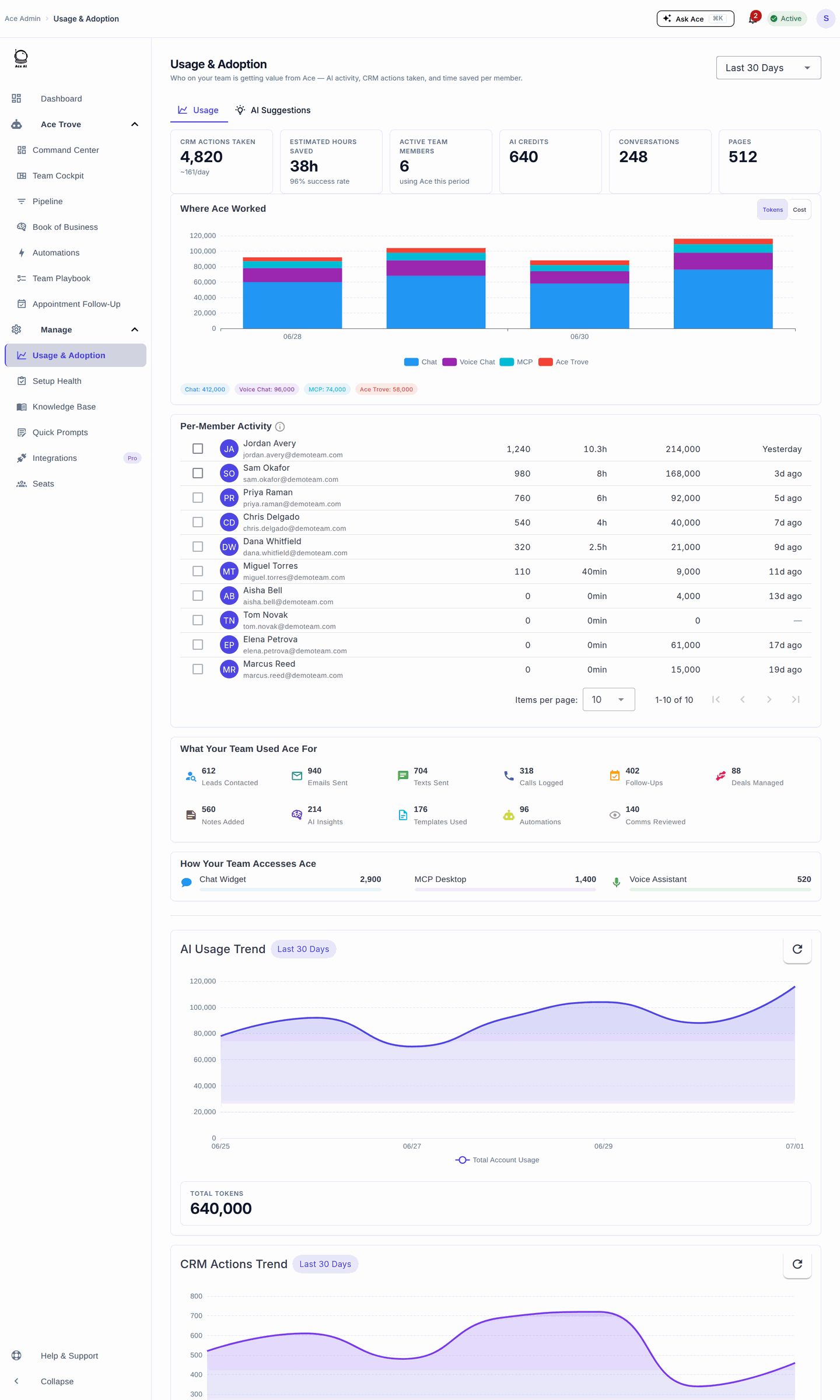
Usage & Adoption helps a team lead see who is using Ace, what they use it for, and where a short coaching conversation could help. Start with one period and compare the same people and activity types over time.
Your first useful review
- Open Usage & Adoption in the admin dashboard and choose a period. Last Month means the previous calendar month; All Time uses available history rather than substituting a recent window.
- Review Per-Member Activity. Compare CRM activity, AI usage and Last Active, then choose a member to overlay their AI activity on the trend chart.
- Use Where Ace Worked to see which surfaces are being used. Switch between token volume and recorded cost; expensive activity does not necessarily use the most tokens.
- Open the AI Suggestions tab to review proactive suggestions and engagement.
- Choose one practical follow-up: show a teammate a useful workflow, ask an active member to share an example, or compare adoption with production in Team Cockpit.
What the numbers mean
- CRM activity counts tracked tool calls. Lookups and reads are activity too; a call is not proof that a message was delivered or a deal advanced. For example, contact activity includes lookups and updates, and communication activity can include template work. Check the underlying CRM record when the outcome matters.
- AI usage and surface cost come from recorded usage events and daily rollups. The daily cost chart uses each surface's recorded cost, rather than estimating it from its share of tokens. Cost is usage accounting, not a subscription invoice.
- AI Credits translate tokens into a readable unit: about 1,000 tokens per credit. Conversation Equivalents and Page Equivalents are estimates of text volume, not counts of actual conversations or documents.
- Estimated Hours Saved uses a fixed activity-based estimate. It is not a measured timesheet or a guarantee of time saved.
- Last Active is the last day with recorded AI usage in the selected period. A blank date does not prove an agent was absent from Follow Up Boss or did no other work.
- Per-member activity combines the available usage and team activity sources. Surface rollup detail may be missing for older activity.
When a panel is empty or unavailable
If an activity source fails to load, the page shows Some activity could not be loaded and a Try again action. A failed source is not evidence of zero activity. Wait for the selected period to finish loading before comparing panels. If an empty panel remains after a successful refresh, try a recent period and confirm your team used that surface.
Usage belongs to the account selected in the dashboard. Switching accounts reloads the dashboard so the next review starts in the selected account.
Frequently asked questions
Where did Team Performance go?
It is now Usage & Adoption, focused on how the team uses Ace.
Where did Suggestions go?
Open the AI Suggestions tab here. Existing /ai-suggestions bookmarks redirect to it.
Is usage the same as production?
Usage describes activity with Ace. Team Cockpit covers production such as GCI and units. Compare them when coaching; one is not a substitute for the other.
Related articles
Last updated: September 2026
Thanks for the feedback — it helps us improve.