
What Is Ace Trove? Overview and Pricing
Updated July 3, 2026
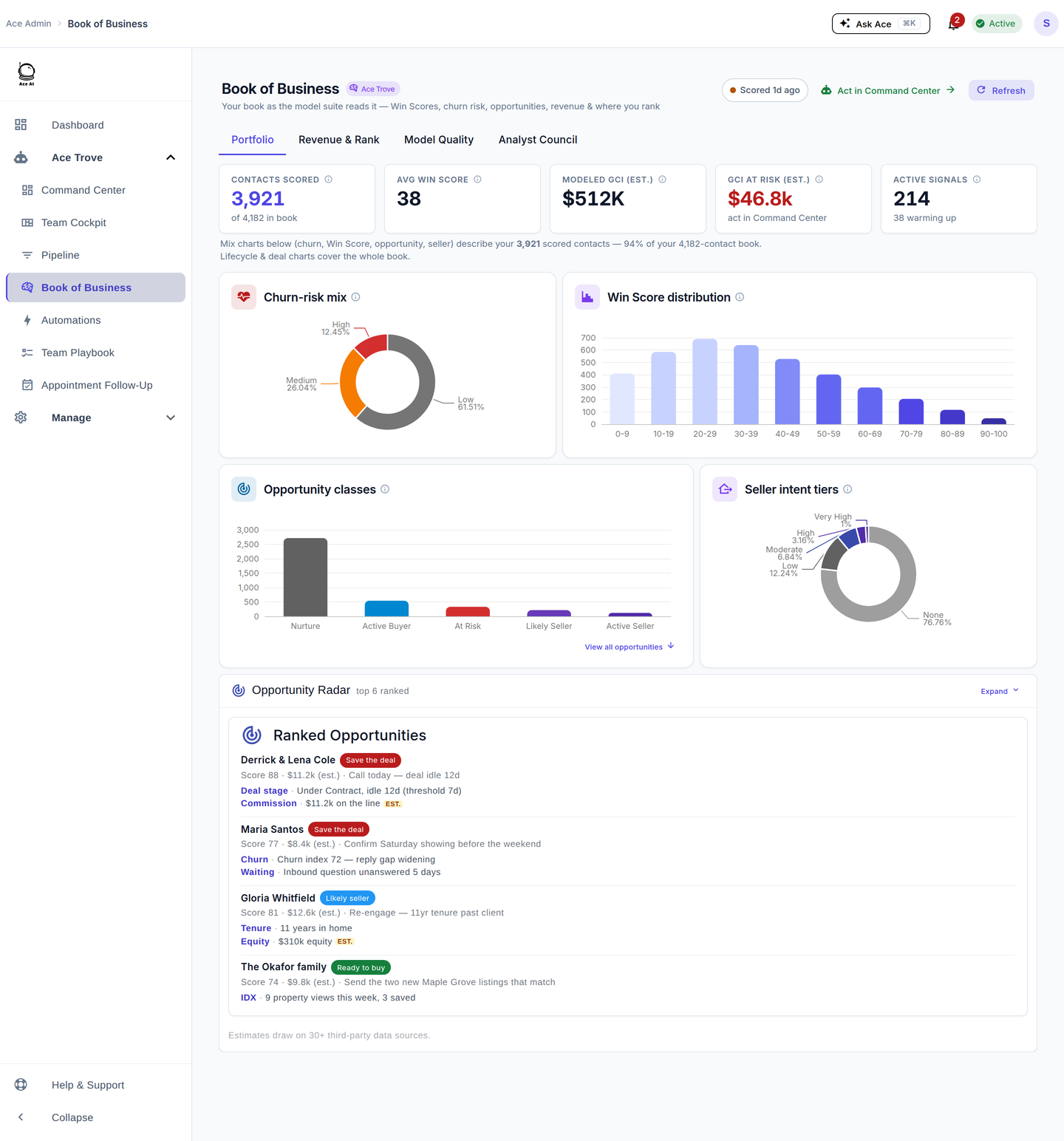
Ace Trove (Trove for short) is an account-level add-on for team leads and brokers. It watches your entire Follow Up Boss database, scores every contact for win probability and churn risk with calibrated models, sizes the commission you're at risk of losing in your own dollars, grades your agents on responsiveness, and puts everything the team must act on now into one queue.
The simplest way to hold it in your head: base Ace is your agents' AI assistant; Ace Trove is your command center.
The core problem it solves
Most CRMs accumulate thousands of contacts nobody looks at unless they raise their hand. Trove reads every contact in your FUB database, scores relationship and win probability, and puts the most at-risk and highest-potential contacts in front of the team — automatically.
- Without Trove: you rely on filters, memory, or luck to decide who to follow up with, and revenue slips quietly out of the pipeline.
- With Trove: the team sees exactly which contacts and deals need attention now, ranked by dollars and urgency, with the reason spelled out on every row.
What it does (in plain terms)
- Scores every contact in your book — a calibrated 0–100 Ace Win Score (probability the contact converts to a closed deal) plus a Churn Risk read, refreshed as new activity comes in and re-checked against what actually happened.
- Sizes revenue at risk in your own dollars — one account-wide "GCI at risk (est.)" number, sized from your team's own median commission per closed deal, not a generic industry figure.
- Writes intelligence back to Follow Up Boss — a lean set of predictive custom fields lands on your contacts overnight (see the field table below), so scores are visible everywhere in FUB, not just in Ace chat.
- Grades your agents — per-agent production, median first-response time, and flagged-agent detection in Team Cockpit.
- Puts everything to act on now in one queue — Command Center, with a Severity lens and a "$ at risk" lens (the capability formerly called Revenue Guard).
- Scans for likely sellers nightly — Seller Radar surfaces move signals across the whole database.
Pricing
Trove is a flat monthly price, tiered by your total Follow Up Boss contact count. Every tier unlocks the same feature set — the tiers differ only by how many contacts your database can carry. The tier is auto-quoted from your live FUB contact count; you never pick one by hand.
| Tier | FUB contact count | Flat monthly |
|---|---|---|
| Starter | Up to 5,000 | $49/mo |
| Growth | Up to 20,000 | $99/mo |
| Team | Up to 50,000 | $199/mo |
| Brokerage | Up to 100,000 | $349/mo |
| Scale | Up to 250,000 | $549/mo |
| Enterprise | Up to 500,000 | $899/mo |
| Custom | Over 500,000 | Contact sales (in-app custom quote) |
Trove requires at least one active paid Ace or Ace Pro seat — it can't be activated on a free-only account. There is no setup fee.
Your price moves gently, and never surprises you
If your database grows past a tier cap, the upgrade is designed to never catch you off guard:
- Your account has to sit more than 10% over the cap for a full week before an upgrade is even scheduled.
- You get a pre-notice email when it's scheduled and a reminder the day before it applies.
- You can defer once for 14 days, and the prorated difference just rolls into your next normal invoice — no surprise immediate charge.
- Tiers never auto-downgrade. If your database shrinks, your price stays put until you ask us to move it.
You'll also see a proration preview of the exact charge before you confirm any change — "$X.XX today, $Y/mo from {date}" for an upgrade, or "No charge today, applies {date}" for a downgrade.
How Trove and Ace chat work together
They're complementary, not redundant:
- Ace chat — conversational and contact-specific. Ask about one person, get a detailed answer, take the action.
- Ace Trove — account-wide. Scores your whole book, sizes revenue at risk, grades the team, and writes results back to FUB so everything is queryable.
Related articles
- Ace Trove: What It Is and How to Get Started
- Activating Ace Trove and Understanding Your Ace Fields
- Team Startup Guide: Rolling Out Follow Up Ace to Your Team
- Command Center: Your Team's Act-Now Queue
Last updated: July 2026
Thanks for the feedback — it helps us improve.