
Using Ace Chat in Follow Up Boss
Updated August 3, 2026
The complete reference for using Ace inside Follow Up Boss — what it does, how to get good answers, what each plan includes, and how to take action safely. This guide is for agents who want the full picture.
What Ace does
Ace is an AI chat assistant embedded in Follow Up Boss. It answers questions about your contacts, recommends next actions, drafts messages, creates tasks, and coaches your next move — without leaving Follow Up Boss. It reads your CRM live: contact history, notes, pipeline stage, tags, deal status, and recent activity. It does not access your personal email inbox, calendar, or any data outside Follow Up Boss.
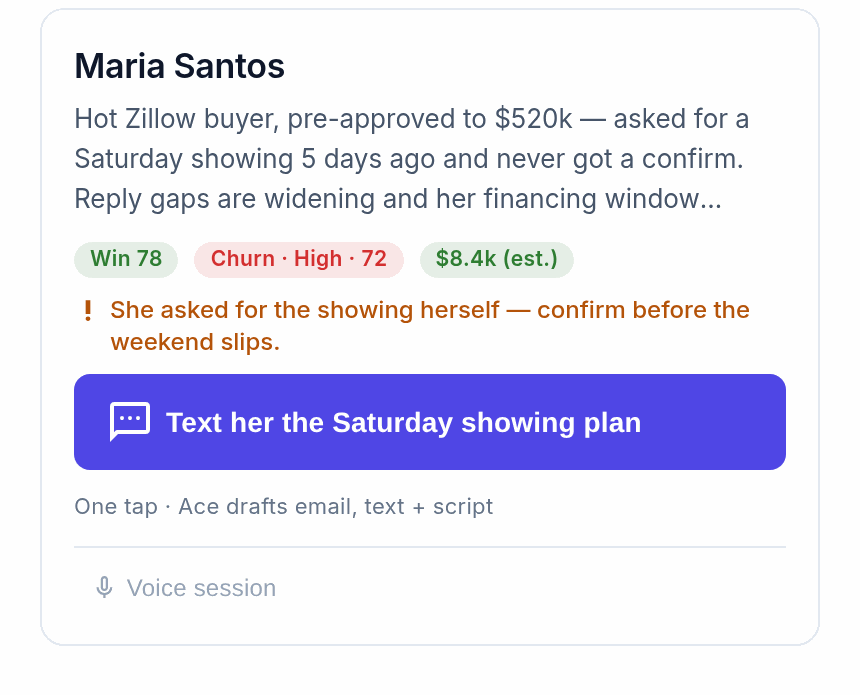
Opening Ace
Click the Ace icon in the bottom corner of any Follow Up Boss page; the panel opens on the right. If you see a "Connect Follow Up Boss" screen, your session token expired — click it once to reconnect in seconds, no password. With a contact open, Ace answers in that person's context; switch contacts and Ace switches with you.
Getting good answers
Specific questions get specific answers. The more context you give, the better Ace responds.
| Instead of… | Try… |
|---|---|
| "Tell me about my leads" | "Who are my hottest buyer leads who haven't been contacted in 14 days?" |
| "Write a follow-up" | "Draft a re-engagement text for Sarah Johnson — she toured last week and went quiet" |
| "What's overdue?" | "Show me all overdue tasks for this week, most-overdue first" |
| "Summarize my pipeline" | "How many contacts are in each active pipeline stage? Which stage has the most leads?" |
About call transcripts and message content: Ace cannot read call recordings, call transcripts, or email bodies — on any plan, including Ace Pro. Follow Up Boss does not expose that content through its API, and as of 2026-08-13 Ace has no other way of getting it (the Ace Chrome Bridge, which used to capture it from your browser session, has been retired). For texts, Ace can read Follow Up Boss's single most recent text on a contact when Follow Up Boss supplies it, but nothing further back in the thread. What Ace can otherwise read is the activity record: who called or texted, when, in which direction, how long, the outcome — plus notes in full. If the substance of a conversation matters, put it in a note; that is the most reliable way to get your words in front of Ace.
About sending: Ace drafts emails and texts for you to review and send from Follow Up Boss. It does not send messages directly on your behalf.
Prompts that consistently work well:
- "Which leads haven't been contacted in 14 days and have an overdue task?"
- "What's the last thing I said to Marcus Rivera?"
- "Which active buyers don't have a showing scheduled?"
- "Draft a check-in email to a seller whose listing has been on the market 30 days with no offers."
- "Who has been in the Nurture stage for over 90 days with no activity?"
What each plan includes
| Feature | Free | Ace | Ace Pro |
|---|---|---|---|
| Chat with Ace | Limited credits/day | Unlimited | Unlimited |
| Contact lookup & research | Yes | Yes | Yes |
| Task & note creation | Yes | Yes | Yes |
| Email drafting | Yes | Yes | Yes |
| Message history kept | Last 20 | Last 30 | Last 50 |
| Call / text / email content | — | — | — (not available on any plan — see below) |
| AI timeline summaries | — | — | Yes |
| Voice mode | — | — | Yes |
Message history is how many messages Ace keeps in context within one session; it resets when you close and reopen the panel, and each session starts fresh with current CRM data. Not sure what plan you're on? Ask Ace: "What plan am I on?"
Voice mode (Pro)
On Pro seats, tap the microphone in the Ace Companion to speak instead of type. Speak in complete questions, pause briefly before and after, and if Ace mishears you can type a correction — mixing voice and text in a session works fine. Full guide: Voice Mode.
Creating tasks and notes safely
Ace always shows a draft and asks before creating anything:
- "Create a call task for Thursday at 10am" → Ace shows the task, you confirm or edit.
- "Add a note: buyer wants to be in before school starts in August" → Ace previews the note, you approve.
- "Apply the Active Buyer action plan" → Ace shows which plan and asks you to confirm.
To cancel anything in progress, say "stop" or "never mind."
What Ace can't do
- Send messages without your approval (on Ace) — or send anything at all on Free.
- Create, edit, or delete contacts, or make phone calls.
- Access your personal email inbox or calendar, or any data outside Follow Up Boss.
- Remember previous chat sessions — each session starts fresh.
- Reach contacts your Follow Up Boss permissions don't allow.
Troubleshooting
Ace can't find a contact I know exists. They may be assigned to another agent — Ace follows Follow Up Boss's access rules. If you should have access, ask your admin.
Ace gave wrong information about a contact. Ace reflects what Follow Up Boss contains; if notes or tags are missing or stale, update them and ask again.
The panel isn't loading. Refresh Follow Up Boss; if it persists, log out and back in, then contact support.
Related articles
- Cheat Sheet: Using Ace in Follow Up Boss
- Getting Started as an Ace User — Agent Quickstart
- Understanding Your Ace Plan: Regular vs. Pro
Last updated: July 2026
Thanks for the feedback — it helps us improve.