
Team Cockpit: Per-Agent Production and Coaching
Updated August 3, 2026
Team Cockpit answers the question every team lead lives with: who is producing, who needs coaching, and what is each agent's slippage actually worth? It's one per-agent table backed by the model suite's read of each agent's book, so you can see production and risk side by side instead of exporting spreadsheets.
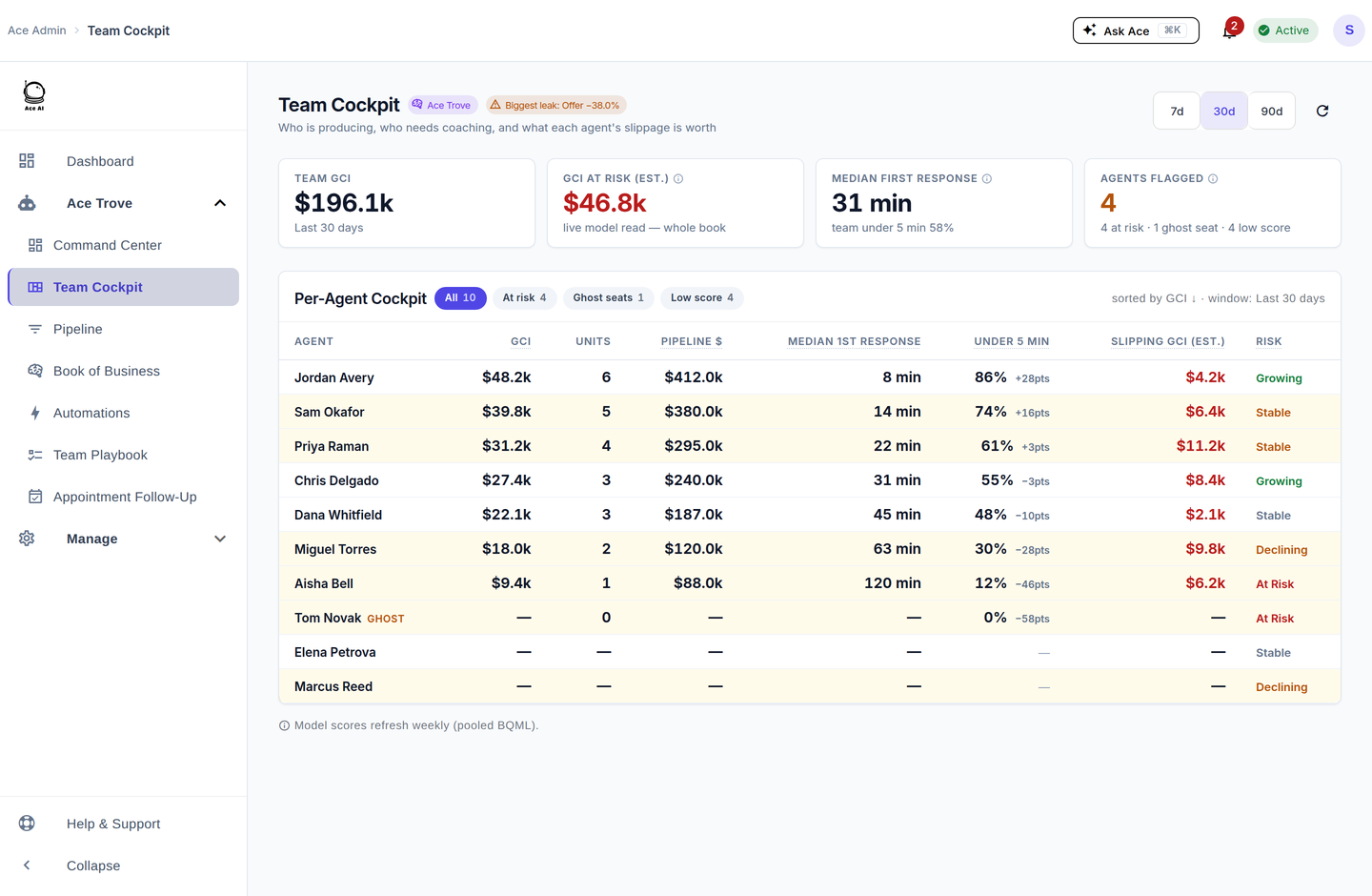
What each column tells you
- GCI & Units — closed production over the selected period.
- Pipeline $ — open deal value the agent is carrying.
- Median 1st response — the agent's typical speed to a new lead, with the percentage under 5 minutes and how that compares to the team's own baseline.
- Slipping GCI (est.) — commission on that agent's open deals past their projected close date; a modeled estimate.
- Risk — Growing, Stable, Declining, or At Risk, based on the trend.
Flagged agents — one definition, everywhere
An agent is "flagged" when they're At Risk, sitting on a ghost seat (a paid seat that has run fewer than 5 Ace actions in the last 30 days), or scoring low. This is the same flagged-agent definition the Command Center "Agents flagged" tile uses, so the count and the people behind it match across both screens. Use the filter chips (At risk, Ghost seats, Low score) to jump straight to who needs attention.
Five things to do here
- Spot a ghost seat. Filter to Ghost seats — a paid seat with zero production usually means the agent never onboarded; reassign or coach them in.
- Fix speed-to-lead. Sort by median first response and coach anyone well above the team baseline; speed-to-lead is the highest-leverage habit you can change.
- Chase the slippage. Sort by Slipping GCI (est.) to see whose open deals are quietly aging past close date.
- Open the agent drawer. Click a row for the agent's detail, including appointment-debrief compliance.
- Compare periods. Use the 7d / 30d / 90d switch to tell a one-off week from a real trend.
Frequently asked questions
Where did "Agent BI" go? It's here — Team Cockpit is the one per-agent table now. See Where Did My Menu Items Go?
Why is one agent's number blank? A blank means no data in the window (e.g. a ghost seat or a brand-new hire), not a zero performance — the two are shown differently on purpose.
What's the difference between "Slipping GCI" here and "GCI at risk" on Command Center? Slipping GCI is per-agent commission on open deals past projected close; GCI at risk is the account-wide dollars-at-risk number. Related, but deliberately named differently.
Related articles
- Where Did My Menu Items Go? The 2026 Dashboard Update
- The 30-Day Adoption Playbook (for Team Leads)
- Team Startup Guide: Rolling Out Follow Up Ace to Your Team
- What Is Ace Trove? Overview and Pricing
- The Recruiting Pipeline and Retention Check-Ins
- Your Queue: How Ace Sorts Your Day (and Why a Contact Resurfaces)
Last updated: July 2026
Thanks for the feedback — it helps us improve.