
Configuring Ace's Behavior, Tone, and Branding
Updated July 3, 2026
Assistant Settings control how Ace represents your team and how it writes for every agent on your account — your branding and the assistant's voice. This guide is for admins; the settings live under Assistant Settings in the admin dashboard.
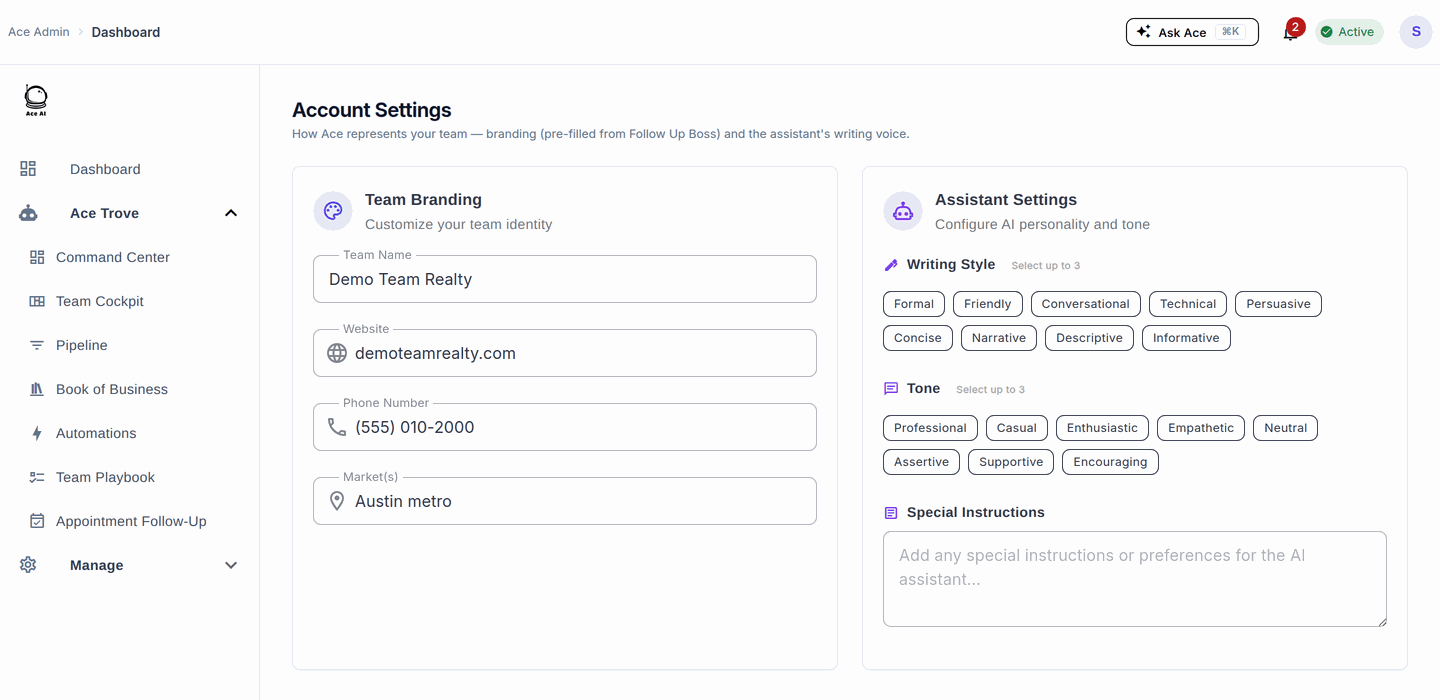
Team branding
This is the identity Ace uses when it writes on behalf of your team. It's pre-filled from Follow Up Boss, and you can edit it any time:
- Team Name — how Ace refers to your team in contact-facing drafts.
- Website and Phone Number — used where a natural sign-off or callback reference fits.
- Market(s) — the area you serve, so Ace's market references land correctly.
Writing style and tone
Shape the assistant's voice so drafts sound like your team wrote them. Pick up to three writing styles (Formal, Friendly, Conversational, Technical, Persuasive, Concise, Narrative, Descriptive, Informative) and up to three tones (Professional, Casual, Enthusiastic, Empathetic, Neutral, Assertive, Supportive, Encouraging). A common combination is Conversational + Concise with a Professional, Supportive tone — warm but efficient.
Special instructions
Use the Special Instructions field for standing rules Ace should follow in every draft — phrases to always or never use, compliance notes, and brand-voice guidelines. Keep them concrete. Some examples:
Best practices
- Keep special instructions concrete and to the point — a focused paragraph works better than a long list.
- Write from the perspective of "what should Ace always know?" rather than one-off cases.
- Avoid pinning pricing in the instructions — it goes stale. Point agents to a Knowledge Base article instead.
- Test a change yourself: open Ace, ask it to draft a message, and confirm the voice before rolling it out.
- Individual agents can set personal preferences that take precedence over these account defaults where they've set them.
Related articles
- Managing Your Ace Knowledge Base
- Ace Admin Configuration Reference
- Quick Prompts: Team, Personal & Custom Prompts
Last updated: July 2026
Thanks for the feedback — it helps us improve.