
Billing & Seat Management
Updated July 29, 2026
Everything about Follow Up Ace billing in one place: how plans work, purchasing and assigning seats, upgrading and downgrading, cancellation, and the questions we hear most. This guide is for the account admin.
Plans and pricing
| Plan | Price | What's included |
|---|---|---|
| Free | $0 | Limited daily AI credits — enough to explore. Upgrade for full, unlimited access. |
| Ace | $25/mo per seat | Unlimited Ace chat, full CRM access, contact research, task and note creation, email drafting, Knowledge Base, daily briefings |
| Ace Pro | $55/mo per seat | Everything in Ace, plus a premium AI model, voice mode, contact memory (cross-session facts), and MCP integrations (Claude, ChatGPT) |
The Ace Trove add-on is billed separately as a flat monthly tier based on your total Follow Up Boss contact count ($49–$899/mo) — it isn't included in any seat plan. See What Is Ace Trove? Overview and Pricing.
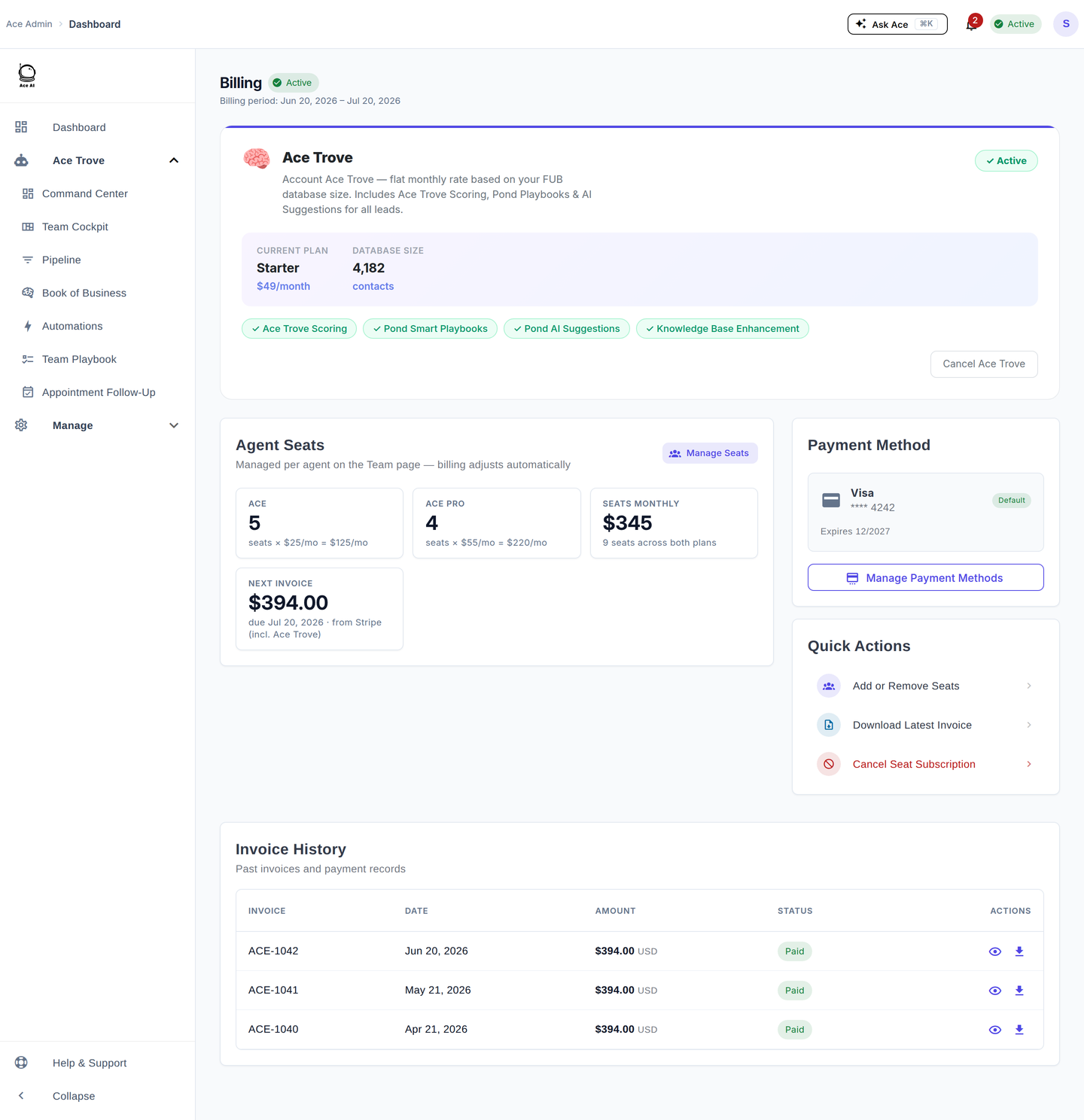
Two billing models
Ace supports both admin-managed and self-pay billing, and they can coexist on one account.
- Admin-managed seats — the admin buys seats and assigns them to team members; the admin's payment method covers them. The admin can activate, deactivate, and change these seats at any time, with prorated billing. Best for teams.
- Self-pay seats — an individual agent subscribes on their own from within Follow Up Boss, and their own card is charged. They manage their own subscription — the admin can't modify or cancel it. To remove a self-pay user, contact support.
Purchasing seats
- Go to followupace.com/admin and sign in.
- Click Billing, then under Add or Remove Seats choose Add Ace Seats or Add Pro Seats.
- Enter the number to add and confirm — a prorated charge applies immediately for the rest of the current period.
Seats are pooled; assign them to specific users from the Seats page.
Assigning seats to team members
- Go to Seats — your Follow Up Boss users appear automatically after the connection.
- Turn on a user's toggle to activate them and draw a seat from your pool.
- The badge shows their tier: Free, Ace, or Ace Pro.
Deactivate a user any time to free the seat; their data and history are retained.
Upgrading, downgrading, and removing seats
To move a user between Ace and Ace Pro, change their plan on the Seats page (add a Pro seat first if you have none available). The change takes effect immediately, with prorated billing. To reduce your total seat count, use Billing → Add or Remove Seats — deactivate users first so you never have more active users than seats. Reductions generate a prorated credit on your next invoice.
No trial — the free tier is your evaluation
Follow Up Ace doesn't use time-limited trials. The Free plan has no expiration — use it as long as you like to evaluate Ace before upgrading. When you subscribe to Ace or Ace Pro (self-pay or admin-purchased), your card is charged immediately for the first period. You can downgrade back to Free or cancel any time — see Cancellation below.
Cancellation
Go to Billing → Cancel Subscription.
| Option | What happens |
|---|---|
| Cancel at period end (default) | Access continues until the current period ends; no further charges. Shows as "Scheduled for Cancellation" — undo any time before the period ends with Keep My Subscription. |
| Cancel immediately | Access ends right away. No refund for unused time. |
Cancellation does not delete your account or Follow Up Boss data, does not cancel self-pay users' subscriptions, and does not trigger an automatic refund — contact support if you believe you're owed one.
Common billing questions
I added seats mid-month — what do I pay?
The prorated amount for the rest of the period, charged immediately. The full monthly rate starts at your next renewal.
I removed seats mid-month — do I get a credit?
Yes, a prorated credit on your next invoice. It offsets future charges rather than issuing a cash refund.
Why can't I deactivate a specific user?
A greyed-out toggle means the user is self-pay. Admin controls apply only to admin-assigned seats — contact support for self-pay changes.
Where are my invoices?
Under Billing → Invoice History; click Download for a PDF.
The billing page shows an error or won't load.
Usually a transient payment-processor issue — wait a minute and refresh. If it persists, contact support.
Related articles
- Team Management: Adding, Assigning & Removing Seats
- Understanding Your Ace Plan: Regular vs. Pro
- What Is Ace Trove? Overview and Pricing
Last updated: July 2026
Thanks for the feedback — it helps us improve.