
Ace Trove: What It Is and How to Get Started
Updated July 3, 2026
What is Ace Trove?
Ace Trove is an account-level add-on for Follow Up Ace that turns your whole Follow Up Boss database into a working intelligence layer for the team lead. While Ace chat works on one contact at a time, Trove works across every contact — scoring win probability and churn risk with calibrated models, sizing the commission you're at risk of losing, grading your agents, and writing predictive fields back to FUB your whole team can use.
It's the difference between asking "how is this one contact doing?" and "show me every contact most likely to transact — and every dollar quietly slipping out of my pipeline."
What Ace Trove does
- Full-book scoring: every contact in your database carries a calibrated Ace Win Score (0–100 probability of converting to a closed deal) and a Churn Risk read — refreshed as activity comes in and checked against what actually happened.
- Revenue at risk, in your own dollars: one account-wide "GCI at risk (est.)" number, sized from your team's own median commission per closed deal — always labeled "(est.)" because it's a modeled estimate, not booked revenue.
- Command Center: one queue for everything the team must act on now, with a Severity lens and a "$ at risk" lens (the capability formerly called Revenue Guard), a reason on every row, and "Open in FUB" as the primary action.
- Team Cockpit: per-agent production, median first-response time vs. your own baseline, and flagged-agent detection.
- Book of Business: whole-book Win Score distribution, churn mix, opportunity classes, deal economics with peer percentiles, and a Model Quality tab that grades our own predictions against outcomes.
- Pipeline: funnel, per-stage deal lanes with projected close (est.) and a model-weighted forecast, and source analytics.
- Seller Radar: a nightly account-wide scan for likely sellers, scored from tenure, estimated equity, market signals, and your own CRM seller notes — suggestions are always agent-reviewed, never auto-sent.
- Automations & Appointment Follow-Up: admin-configurable rules that fire workflow actions, plus a debrief-compliance loop with one-click nudges.
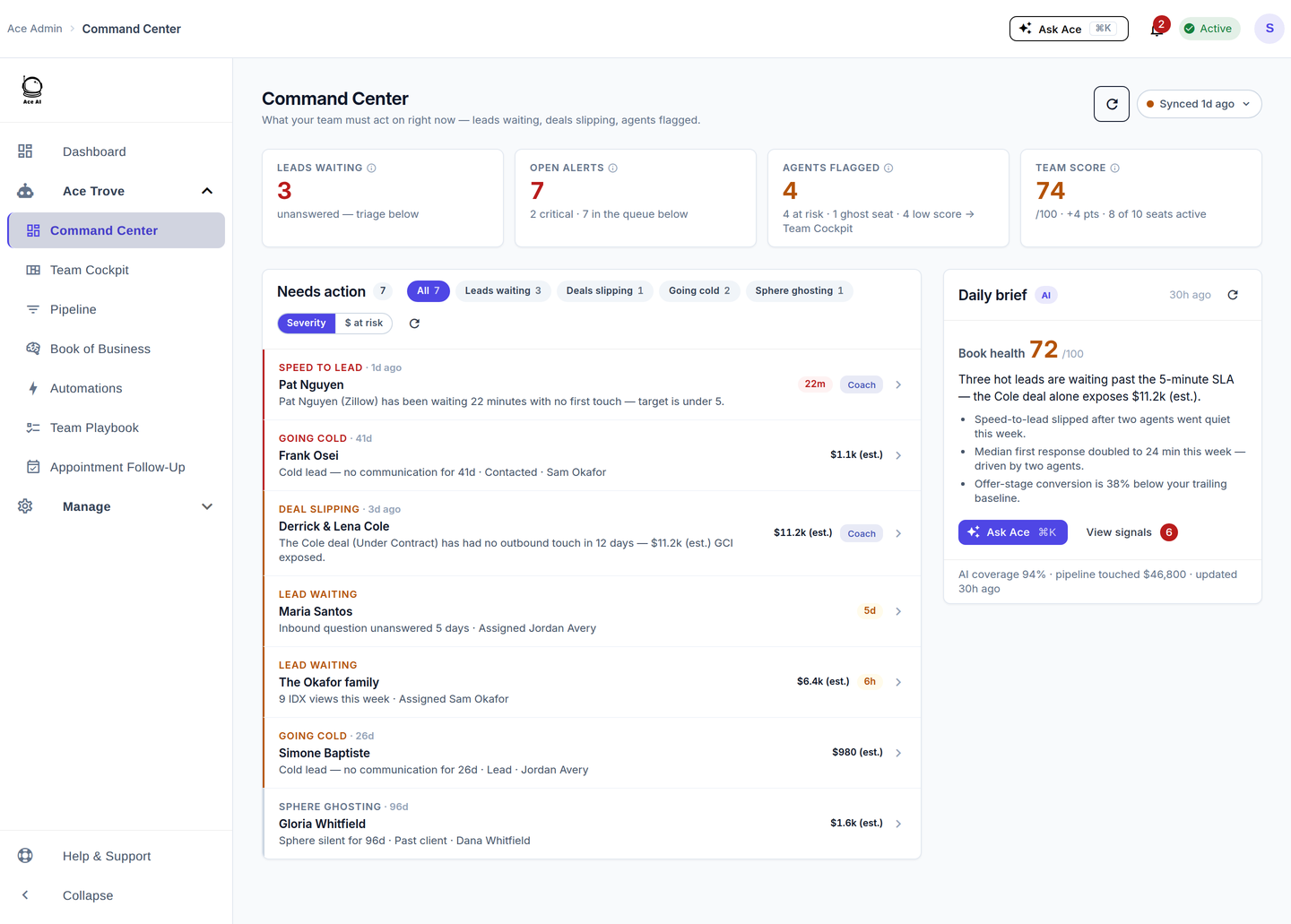
Want a guided tour of each Trove screen? See the Command Center guide and the rest of the Ace Trove Dashboard Guides.
Is Ace Trove right for you?
Trove adds the most value when:
- You have a database large enough that reviewing every contact by hand is impractical.
- You want prioritized, dollars-ranked worklists without exporting and sorting.
- You're leading a team and want visibility into relationship health and responsiveness across all agents.
- You want your CRM to surface revenue at risk automatically, rather than waiting for someone to notice the gap.
Pricing
Trove is billed at the account level, separate from seat pricing, as a flat monthly price tiered by your total FUB contact count. Every tier unlocks the same feature set.
| Tier | FUB contacts | Monthly price |
|---|---|---|
| Starter | Up to 5,000 | $49/mo |
| Growth | Up to 20,000 | $99/mo |
| Team | Up to 50,000 | $199/mo |
| Brokerage | Up to 100,000 | $349/mo |
| Scale | Up to 250,000 | $549/mo |
| Enterprise | Up to 500,000 | $899/mo |
| Custom | Over 500,000 | Contact sales |
Your tier is auto-quoted from your current FUB contact count at activation. Requires at least one active paid Ace or Ace Pro seat. For the full pricing story — including how the gentle auto-tier upgrade works and the proration preview you see before any charge — see What Is Ace Trove? Overview and Pricing.
Activating Ace Trove
- Sign in to the admin dashboard at followupace.com/admin (you must be an admin).
- Go to Billing and open the Ace Trove card (or use the tier picker on the Payment page).
- Review your auto-quoted tier and monthly price, and the proration preview of today's charge.
- Confirm and activate.
After activation, the first full-book analysis runs automatically — for most accounts this completes within a few minutes, longer for very large databases. Your Ace fields start appearing on contacts in FUB as analysis completes, and the Trove dashboards unlock in the admin nav.
Your Ace fields in Follow Up Boss
Trove writes a lean, consolidated set of six predictive fields to your contacts (scores land in your FUB fields overnight — no export, no import). Two populate free on every connected account; the other four require Trove:
| Field | Tier | What it says |
|---|---|---|
| Ace Win Score | Free | Calibrated probability (0–100) the contact converts to a closed deal |
| Ace Churn Risk | Free | Low / Medium / High model risk an engaged contact goes cold |
| Ace Expected GCI (est.) | Trove | Win probability × your account's own median commission |
| Ace Opportunity | Trove | At Risk / Active Buyer / Active Seller / Likely Seller / Nurture |
| Ace Seller Tier | Trove | Seller-intent tier, refreshed on a rolling nightly basis |
| Ace Last Analyzed | Trove | Timestamp of the last analysis |
Note: the older heuristic fields (Ace Score, Ace Tier, Ace Status, Next Action, and similar) were retired in the June 2026 field consolidation and are being removed from FUB so there's no stale junk. If a customer asks where those went, see Activating Ace Trove and Understanding Your Ace Fields. Only Ace Seller Tier syncs to a FUB field for seller intent — the full 0–100 seller score and its evidence live in Seller Radar.
Using Trove data in Ace chat
Once Trove is active, Ace chat can answer account-wide questions:
- "Who has an Ace Win Score above 70 and no task scheduled?"
- "Show me contacts flagged High churn risk who haven't been contacted in 30 days."
- "Which of my buyers had new property-search activity this week but haven't been contacted?"
Deactivating Ace Trove
Cancel from Billing in the admin dashboard. Deactivation takes effect at the end of the current billing period. Your Ace fields remain on contacts in FUB (they stop updating), and reactivating at any time restores full functionality with a fresh analysis.
Related articles
- What Is Ace Trove? Overview and Pricing
- Activating Ace Trove and Understanding Your Ace Fields
- Getting Started with Follow Up Ace — Admin Complete Guide
Last updated: July 2026
Thanks for the feedback — it helps us improve.