Your CRM logs the activity. Now it knows which deal it's pushing.
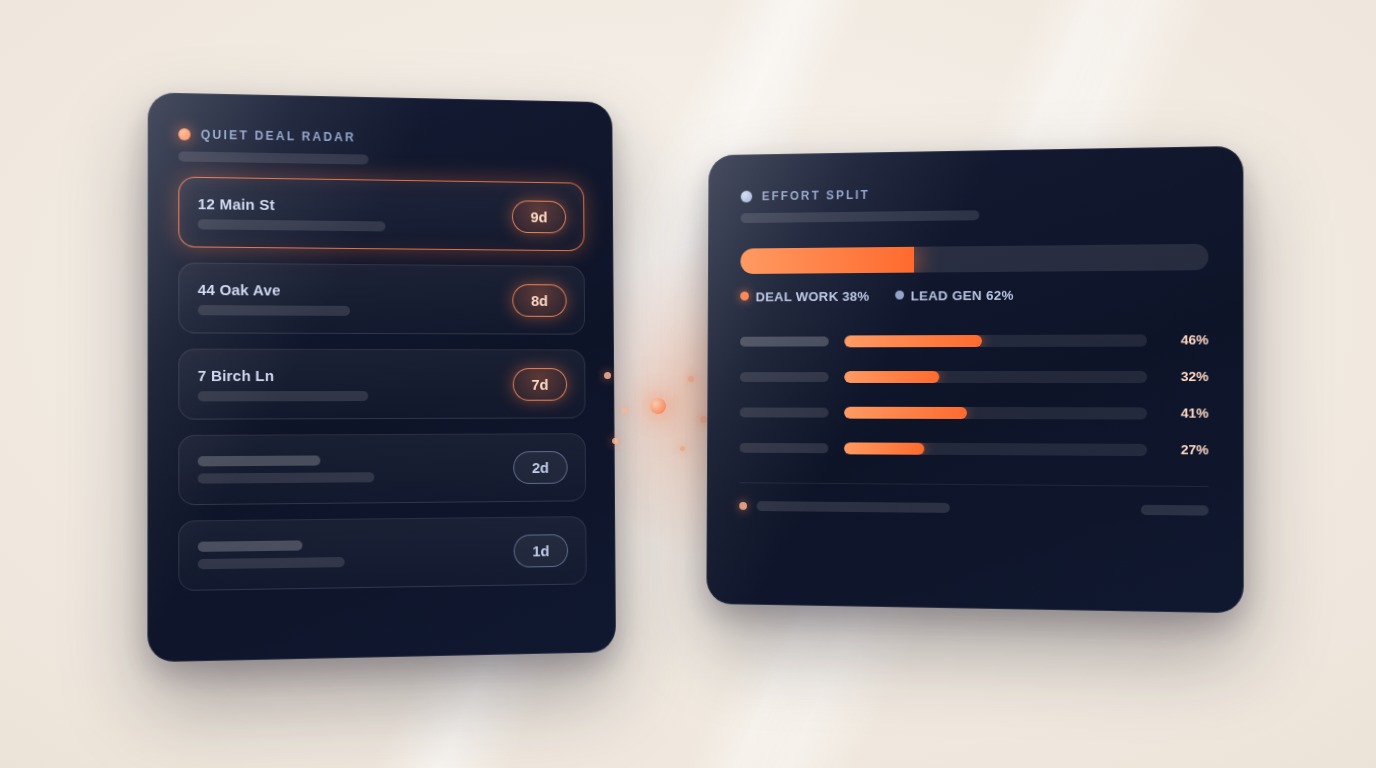
Ace now attributes every Follow Up Boss activity — calls, texts, emails, notes, appointments — to the deal it lands under. Activity inside an open deal's window is deal work pushing a closing; everything else is lead-gen work. That powers a Quiet Deal Radar for open deals gone silent and a per-agent Effort Split, both part of Ace Trove.
Follow Up Boss is excellent at logging what your team does. Every call, every text, every note lands on the contact's timeline. But a timeline can't answer the question a team lead actually asks on Monday morning: is this activity closing deals, or just generating motion?
The gap is structural. Activity attaches to a person. Deals attach to a person. But activity never attaches to a deal — so the same call looks identical whether it's pushing a closing across the finish line or chasing a lead who went cold in March. Every report built on that data inherits the blur.
As of this week, Ace closes that gap for every Ace Trove account.
How deal-aware attribution works
A deal's window opens when it's created in Follow Up Boss and closes when it's won or lost. When an activity arrives for a contact, Ace checks whether that contact had a deal open at that moment:
- Activity inside an open deal's window is attributed to that deal — it's deal work, pushing a closing.
- Activity outside any deal window counts as lead-gen work — pushing toward the next deal or appointment.
- A contact with two overlapping open deals? Ace attributes to the most recently active one and flags the ambiguity. It never silently guesses.
Attribution is additive: nothing changes about how activity credits the contact or the agent. The deal is a third dimension on top — and it unlocks two views that weren't possible before.
Quiet Deal Radar: the deals nobody is losing loudly
Most "at risk" reports key off the projected close date — a deal is flagged once the date slips. But the date slipping is a lagging signal. The leading signal is silence: an open deal where nobody has made a call, sent a text, logged a note, or held an appointment in a week.
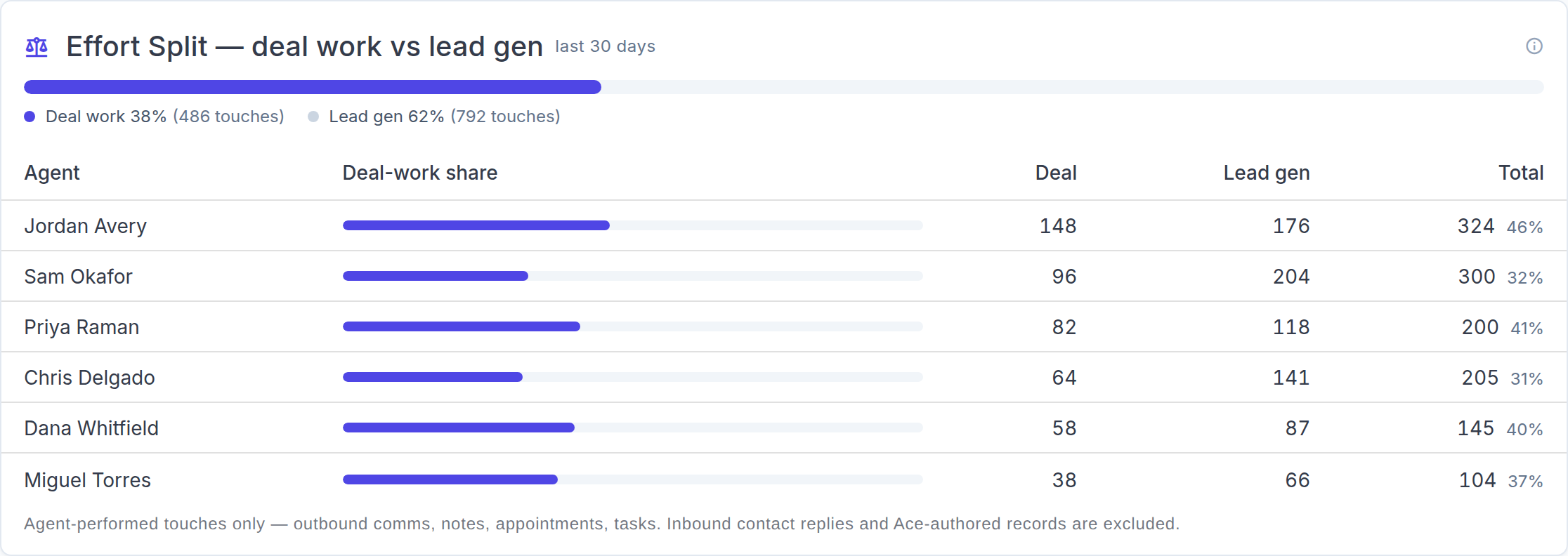
The Quiet Deal Radar (on the Pipeline view's Deal Pipeline tab) lists open deals with no attributed activity in 7, 14, or 30+ days, with the estimated commission sitting untouched on each. A transaction can be months from its close date and still be quietly dying — the radar catches it while there's still time to act.
It's honest about its own limits, too: a deal with no attributed activity recorded yet runs its quiet clock from when it entered its current stage, and the row says "since stage entry" instead of pretending the silence was measured.
Effort Split: deal work vs lead gen, per agent
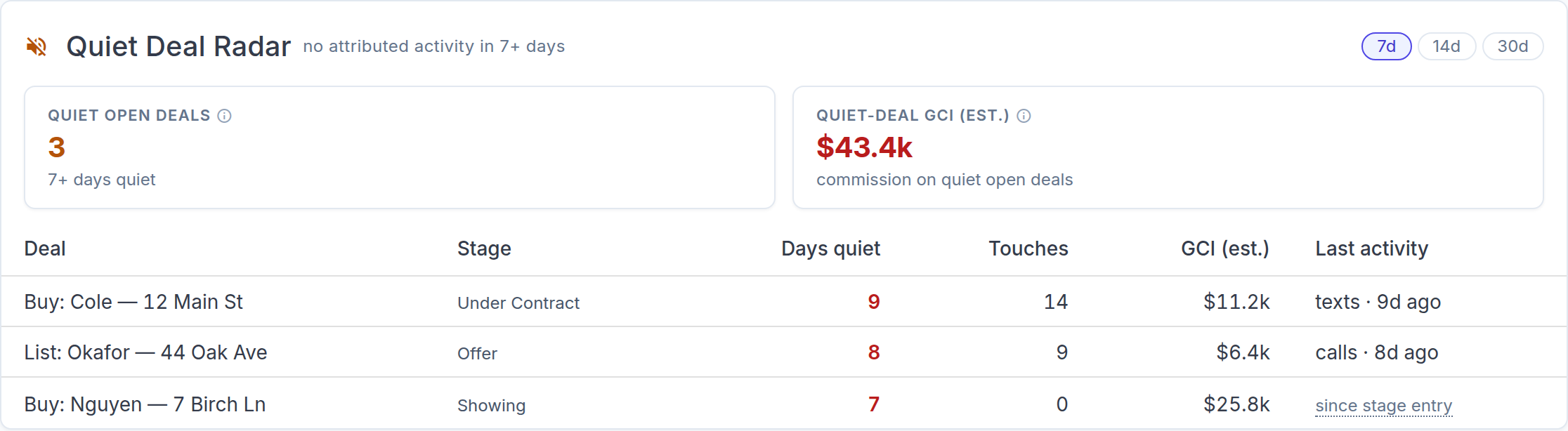
Team Cockpit now shows an Effort Split — the share of each agent's activity that's attributed to open deals versus lead generation, over the cockpit's 7 / 30 / 90-day window. One bar for the team, one row per agent.
It's a coaching lens, not a leaderboard. An agent at 80% deal work with a thin pipeline has a prospecting problem next quarter. An agent at 5% deal work with six open deals has closings at risk right now. Either way, the Monday conversation is specific.
The split only counts agent effort: outbound calls, texts and emails, notes, appointments, and completed tasks. Inbound replies from contacts don't count (that's their behavior, not your agent's work), and anything Ace itself authored is excluded — the AI never inflates the numbers it reports on.
Smarter alerts for clients mid-transaction
Knowing who's in an active deal also fixes a long-standing annoyance in CRM automation: treating a client three weeks from closing like a cold lead.
- Tighter gone-quiet thresholds — a contact with a deal in flight escalates sooner than an ordinary lead. A closing in progress can't afford a quiet week.
- No off-key nudges — "re-engage, you went quiet" suggestions are suppressed for under-contract contacts. They're not cold; they're closing. Inbound-response alerts still fire normally.
What this means for your reports
Nothing you already use changes. The lead funnel, the deal pipeline, production by agent, at-risk deals — all read the same data they always did. Attribution adds the deal dimension without moving any existing number. What's new:
- At-risk deal rows now carry attributed touches and days-since-last-deal-activity alongside the days-overdue figure
- Open deals surface in the Quiet Deal Radar before the close date slips
- Team Cockpit shows each agent's deal-work share
Availability
Deal-aware attribution, the Quiet Deal Radar, and the Effort Split are live now for every account with Ace Trove — the account-wide add-on priced flat by database size ($49–$899/month). Attribution counters accrue from July 2026 forward; the radar is useful on day one thanks to the stage-entry fallback, and the Effort Split fills in after a few days of normal team activity.
For the full how-to, see the Help Center guide.
Try Follow Up Ace in your Follow Up Boss
Free to start, no sales call. Connect Follow Up Boss in one click and Ace works inside your CRM.
Get Started Free