How to Train Your AI Assistant (Ace AI) for Better Results in Follow Up Boss

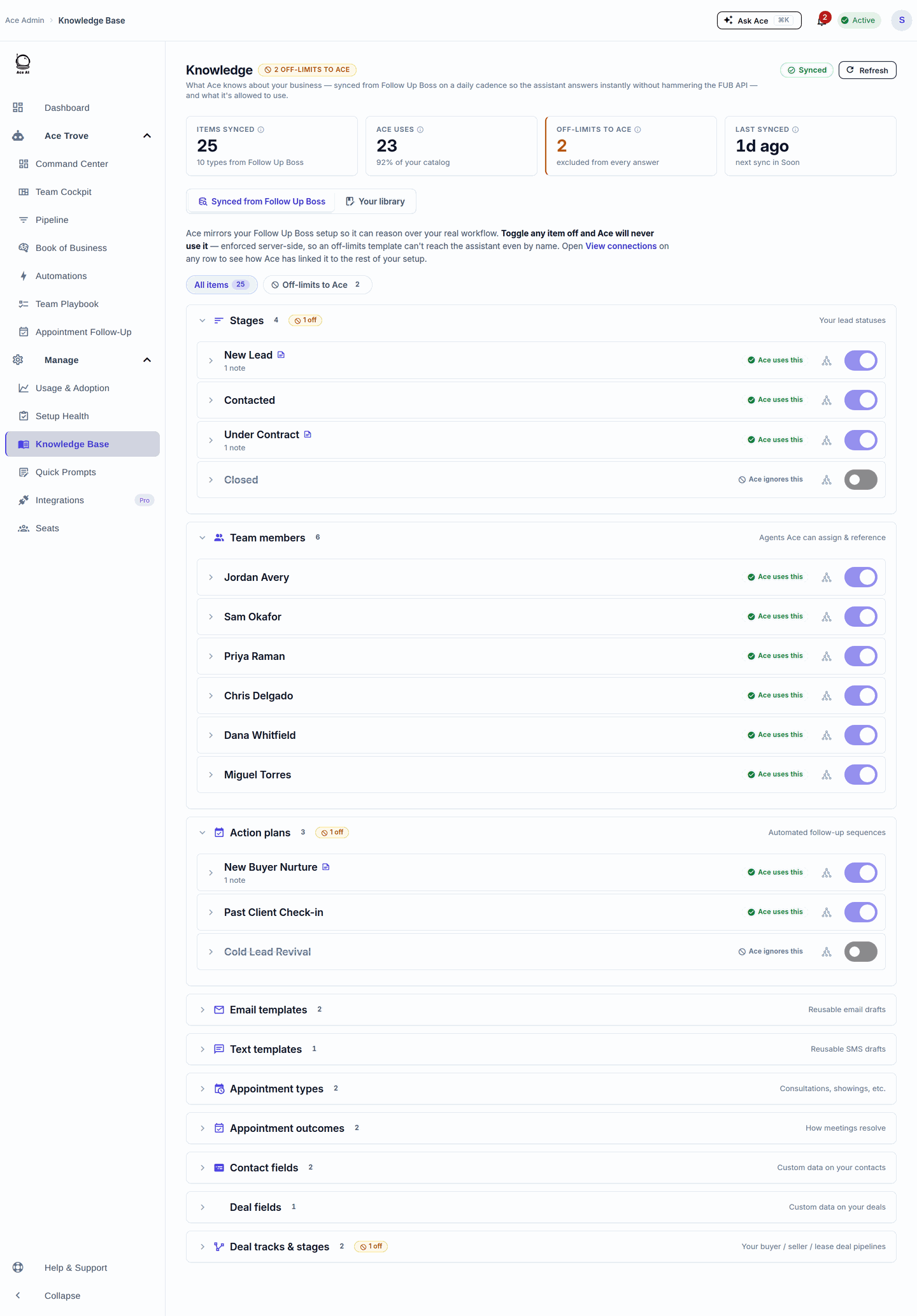
To get better results from Ace in Follow Up Boss, write specific custom instructions that reflect your market, communication style, and lead priorities; let the knowledge base learn your brokerage context; and configure ACE Score fields so the AI can surface your most actionable contacts automatically. The more context Ace has about how you work, the more useful its drafts, scoring, and workflow suggestions become.
Out of the box, an AI assistant connected to your CRM can answer questions and draft messages. But the agents who get the most from Ace are the ones who invest 20–30 minutes upfront to configure the system around their specific market and workflow. This guide walks through each lever — custom instructions, knowledge base setup, lead scoring fields, and Ace Trove recipes — so you can stop getting generic output and start getting replies that actually sound like you.
What does "training" an AI assistant actually mean?
Training a consumer AI model (like retraining GPT-4) requires massive compute and is not something individual users do. What you can do — and what makes a measurable difference — is personalize the context the AI sees before it generates any response. Think of it as briefing a very capable new assistant on your practice, your clients, and your preferences before their first day.
For Ace specifically, that context flows from three sources:
- Custom instructions — freeform text you write that gets prepended to every AI conversation
- Account knowledge base — structured data Ace builds from your Follow Up Boss account (tags, action plans, team info)
- ACE Score and Intelligence fields — custom fields written back to FUB contacts that tell Ace which leads to prioritize
Each layer is cumulative. Better instructions make every message draft sharper. A richer knowledge base makes workflow suggestions more accurate. Populated ACE fields let the AI surface hot leads without you asking.
How do I write good custom instructions for Ace AI?
Custom instructions are the highest-leverage thing you can do. They feed directly into the AI's system prompt on every request (verified: embed.js:3093, 1665), which means they influence every draft, every analysis, and every recommendation Ace generates for you.
Good instructions answer these questions for the AI:
- Who am I? — Your market, specialty (buyer's agent, listing agent, team lead), and brokerage name
- How do I communicate? — Tone (conversational vs. professional), length preference, phrases you always/never use
- What are my lead priorities? — Which stages, sources, or behaviors you care most about
- What are my constraints? — Anything Ace should avoid (e.g., "never mention competitor portals," "always include my license number in email footers")
- What's my market? — City, price range, property types, and any local nuances
Weak vs. strong custom instructions — a comparison
| Weak instruction | Strong instruction |
|---|---|
| Be professional | Match a warm but concise tone — like a trusted neighbor who happens to be a real estate expert. Avoid corporate jargon. |
| Focus on buyers | My primary clients are first-time buyers in the $400k–$650k range in Denver's northwest suburbs. Interest rate concerns come up constantly — acknowledge them directly. |
| Keep messages short | For SMS, keep it under 160 characters. For email, lead with one clear ask, then context. Never use bullet lists in SMS. |
| Don't say anything wrong | Never quote a price or days-on-market figure unless I include it in my prompt. If I ask about market trends, remind me to verify with current MLS data. |
Step-by-step: saving custom instructions in Ace AI
- Open Follow Up Boss and launch the Ace sidebar.
- Navigate to Settings within the assistant.
- Find the Custom Instructions field and click to edit.
- Paste your instructions (plain text — no special formatting required).
- Save. The instructions take effect immediately on your next message.
You can update instructions any time. Many agents iterate over the first two weeks — write a draft, notice where Ace still misses the mark, and refine. Think of it as an onboarding checklist you update as you learn what the AI gets right and what it gets wrong.
How does the Ace AI knowledge base work?
The knowledge base is a structured snapshot of your Follow Up Boss account — tags, action plans, team structure, pipeline stages — that Ace builds and stores automatically (verified: knowledgeBaseBuilder.js:668, embed.js:3101). When you ask Ace to suggest an action plan or categorize a lead, it checks this context to give you an answer grounded in the workflows you've already built, not generic suggestions.
The knowledge base improves automatically as your FUB account grows. But you can accelerate its usefulness by being deliberate about your FUB data hygiene:
- Use consistent tags. Tags like "Buyer-Active," "Seller-Watching," and "Past Client" help Ace understand what each segment means to you.
- Name your action plans clearly. "30-Day Buyer Nurture" tells the AI more than "AP-14."
- Keep pipeline stages up to date. Stale stages create stale recommendations.
- Add notes regularly. Notes on contacts give Ace more signal when drafting personalized follow-ups.
What are ACE Score fields and how do I set them up?
ACE Score fields are custom fields that Ace writes directly to your Follow Up Boss contacts. They let the AI surface priority leads inside your existing FUB views and smart lists — without you having to run a separate analysis each time.
There are two tiers of fields:
Free ACE Score fields (all plans)
These seven fields are available on every account and update automatically based on engagement signals (verified: aceIntelligenceFieldsConfig.js:19–107):
- Ace Score — Numeric lead score (higher = more engaged)
- Ace Tier — Categorical label (Hot, Warm, Cool, Cold, or Dormant)
- Ace Status — Current engagement status (New, Contacted, Engaged, Active Client, Closed, Nurturing, or Dormant)
- Ace Response Time — Minutes to first response after lead creation
- Ace Velocity Score — Trend in engagement derived from 7-day and 30-day event volume
- Ace Days Since Inbound — Days since the contact last reached out to you
- Ace Preferred Channel — SMS, email, or call based on recency-weighted interaction history
Paid Ace Trove fields (Trove add-on)
With the Ace Trove enabled, Ace runs deeper analysis on tagged contacts and populates eight additional fields (verified: aceIntelligenceFieldsConfig.js:111–208):
- Ace Lead Type — Buyer, Seller, Investor, Buyer-Seller, or Unknown
- Ace Property Profile — AI-synthesized property preferences from notes and IDX search data
- Ace Search Area — Geographic focus areas this contact has shown interest in
- Ace Buyer Readiness — Ready Now, Actively Looking, Researching, Passive, or Unknown
- Ace Lead Summary — AI-generated summary of the contact's situation and intent
- Ace Next Action — Recommended next step based on the full contact history
- Ace Seller Score — Propensity-to-sell score (0–100) from property and behavioral signals
- Ace Seller Tier — Seller-intent tier (Very High, High, Moderate, Low, or None) banded from the Ace Seller Score
These fields turn your FUB database into a continuously prioritized work queue. Once populated, you can build smart lists like "Ready Buyers → Fast Track" directly from these values — no manual review required.
How do Ace Trove recipes help me get more from Ace?
Ace Trove recipes are pre-built workflow configurations that turn ACE Score fields into smart list logic. Rather than building filter logic from scratch, you apply a recipe and Ace generates the recommended FUB smart list conditions for you.
Available recipes include (verified: aiEngineRecipes.js:110–265):
- Hot Leads → Call Queue — Surfaces contacts with Ace Score ≥ 80 and Ace Tier = Hot
- Stale High-Value → Re-Engagement — Score ≥ 60 but silent for 14+ days
- Ghost / At-Risk → Owner Alert — Dormant tier contacts with 30+ days since inbound
- Speed-to-Lead → Slow Responders — Contacts where your response time exceeded 30 minutes
- Ready Buyers → Fast Track (Ace Trove) — Ace Lead Type = Buyer and Ace Buyer Readiness = Ready Now
- Investor Segment (Ace Trove) — Contacts where Ace Lead Type = Investor
Free recipes use the always-on score fields and require no Ace Trove subscription. Paid recipes require the Ace Trove add-on because they depend on Intelligence fields that need deeper per-contact analysis. See the Ace Trove page for pricing and contact thresholds.
How do I connect Ace AI to Claude or ChatGPT via MCP?
For agents on Ace Pro, Follow Up Ace exposes your entire FUB account through a Model Context Protocol (MCP) connector — meaning you can query and update your CRM directly from Claude Desktop or ChatGPT without switching apps. The MCP server surfaces 189 tools covering contacts, notes, tasks, deals, email, SMS, action plans, smart lists, and more (verified: mcp-server/src/index.ts:3818).
Connection URLs (verified: embed.js:4308–4309):
- Claude (Streamable HTTP):
https://followupace.com/mcp - ChatGPT (full streamable HTTP):
https://followupace.com/mcp?tools=full
Once connected, you can type instructions in natural language — "Find all buyers who haven't heard from me in 10 days and draft a check-in text" — and Claude or ChatGPT will execute the FUB lookups and draft the messages without you touching the CRM interface. The same custom instructions you set in the Ace sidebar also inform MCP sessions, keeping your AI's voice and priorities consistent across both surfaces.
Does Ace AI have built-in compliance guardrails?
Yes. Before any draft message or AI-generated text is surfaced to you, Ace scans it through a compliance layer that checks for Fair Housing Act violations and licensing boundary issues (verified: complianceGuard.js:293, scanForComplianceViolations()). The scanner covers:
- Language that implies steering or discrimination under the Fair Housing Act (42 U.S.C. 3601–3619)
- Coded neighborhood descriptors that carry discriminatory meaning even without explicit protected-class language
- Licensing boundary violations — statements that cross from real estate practice into legal or financial advice
This does not replace your professional judgment or your broker's compliance review process. But it does catch common AI-generated mistakes before you copy-paste them into a client email. See the compliance page for more on how Ace handles Fair Housing in practice.
What plan do I need for each feature?
| Feature | Free | Ace ($25/seat/mo) | Ace Pro ($55/seat/mo) |
|---|---|---|---|
| AI chat in Follow Up Boss | Yes | Yes | Yes |
| Custom instructions | Yes | Yes | Yes |
| Free ACE Score fields (7 fields) | Yes | Yes | Yes |
| Voice chat | No | No | Yes |
| MCP connector (Claude & ChatGPT) | No | No | Yes |
| Ace Trove (Intelligence fields + recipes) | No | Add-on from $49/mo | Add-on from $49/mo |
Plan types (free/regular/pro) verified at embed.js:2595–2604. Voice requires Pro verified at embed.js:2647. Ace Trove pricing verified at accountAiBillingConfig.js:64–70.
What are the most common mistakes agents make when setting up Ace AI?
Based on the patterns the most productive Ace users share, here are the setup mistakes that lead to the most frustration — and what to do instead:
- Leaving custom instructions blank. Without any instructions, Ace uses only the contact record and your prompt as context. The output will be technically correct but generic. Even two or three sentences about your market and tone makes a measurable difference.
- Using vague tone descriptors. "Be professional" and "sound friendly" are not actionable for an AI. Describe a specific situation: "When a lead has gone cold for 30 days, lead with curiosity rather than pressure. Acknowledge the gap without apologizing for it."
- Not configuring ACE Score fields. If the custom fields are not enabled, Ace cannot surface your hottest leads automatically. Set up the free score fields first — they require no Ace Trove subscription and take under ten minutes.
- Ignoring the Zillow speed-to-lead workflow. If you take Zillow leads, response time is a critical metric. Ace can track response time per contact via the Ace Response Time field. See the Zillow playbook for the full setup.
- Expecting Ace to know things you haven't told it. The AI works from the context available — contact notes, your instructions, and CRM data. If a lead's history lives only in your head or in a text thread, Ace cannot factor it in. Log key notes in FUB consistently.
How often should I update my custom instructions?
Most agents find that instructions need a meaningful update every one to three months, usually triggered by a market shift, a change in their lead mix, or a new workflow they've started using in FUB. A few practical signals that it's time to revisit:
- You're consistently editing Ace's drafts in the same way (e.g., always shortening the closing paragraph)
- You've added a new specialty (luxury, investment, relocation) that isn't reflected in your current instructions
- Your market has shifted and old framing no longer fits (e.g., a pivot from a seller's market to a buyer's market)
- You've hired an ISA or coordinator who uses Ace and needs a different tone than your personal style
Because instructions update instantly and take effect on the next message, there is no downside to iterating frequently. Treat them like a living document, not a one-time configuration task.
Can my team share the same AI configuration?
Custom instructions are per user — each agent on your team has their own. This is intentional: a buyer's agent and a listing specialist have different communication needs, and a one-size instruction set tends to serve both of them poorly.
Account-level context — the knowledge base of your shared FUB tags, action plans, and pipeline — is shared across the whole account. So every agent gets the benefit of your consistently named workflows and tags, while still having personal AI instructions that reflect their individual style and focus area.
Team leads and admins can also use Ace Trove to run account-wide contact analysis — not just for their own leads, but across the entire FUB database. That account-wide view is particularly useful for broker-owners who want to monitor pipeline health without pulling individual reports from each agent.
For a full comparison of how Ace stacks up against other AI tools for real estate teams, see the competitor comparison page.
Try Follow Up Ace in your Follow Up Boss
Free to start, no sales call. Connect Follow Up Boss in one click and Ace works inside your CRM.
Get Started FreeMore on: the AI real estate assistant built for Follow Up Boss.