Real Estate Agents: Meet Your New AI Co-Pilot That Never Takes a Day Off
Update (July 2026): the custom fields mentioned in this article — Ace Score, Ace Tier, Ace Status, and the other heuristic fields — were consolidated in June 2026 into a leaner, model-grounded set: Ace Win Score and Ace Churn Risk (free on every account), plus Ace Expected GCI (est.), Ace Opportunity, Ace Seller Tier, and Ace Last Analyzed with Ace Trove. The workflows described below all still work — sort and filter on Ace Win Score where the article says Ace Score. Field-by-field guide: Ace custom fields explained.

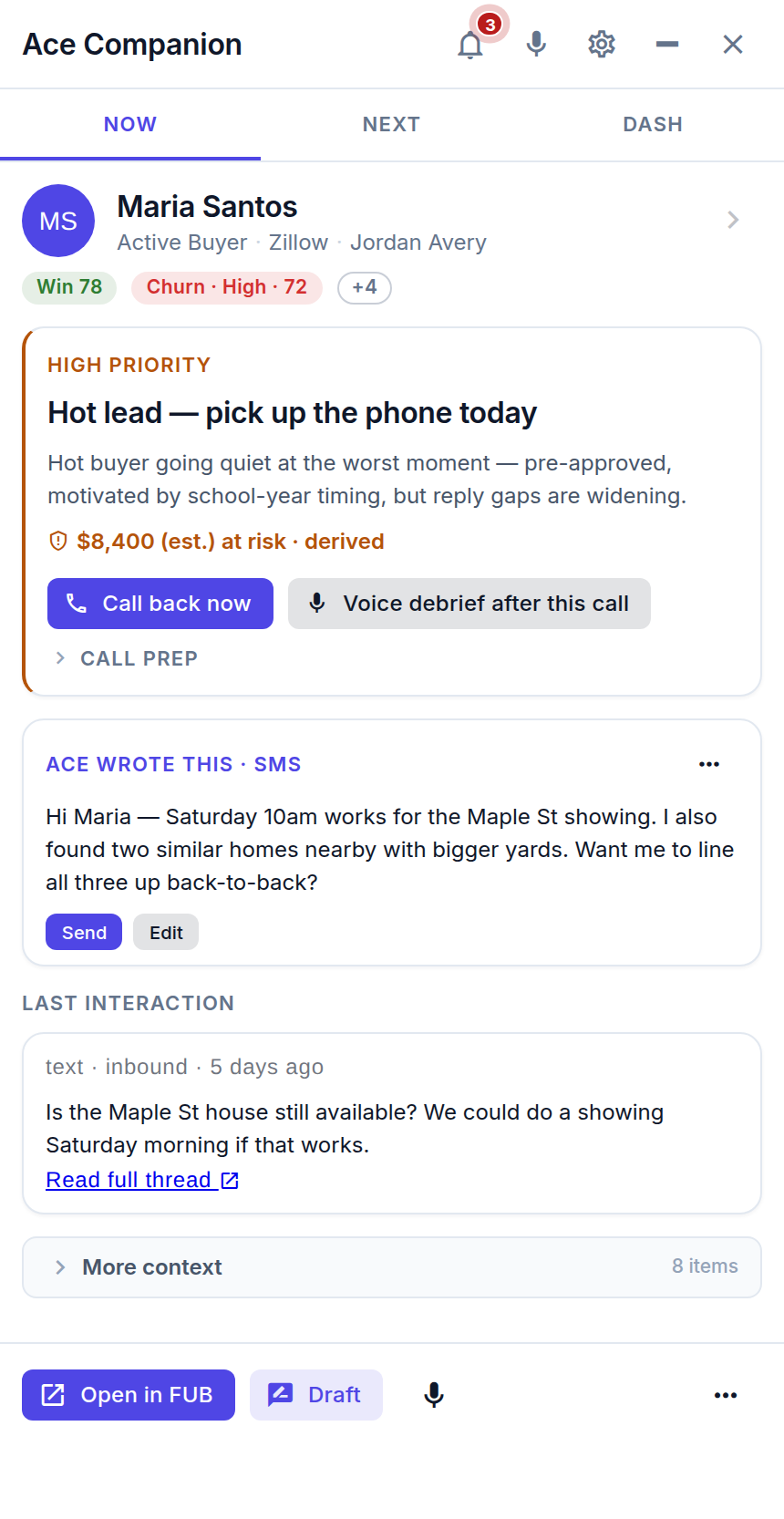
An AI co-pilot for real estate agents works inside your existing CRM — scoring leads, drafting outreach, flagging compliance risks, and surfacing the contacts most likely to convert — around the clock. The best ones live inside Follow Up Boss and require no data migration or new software to learn.
What does an AI co-pilot actually do for real estate agents?
The phrase "AI co-pilot" gets thrown around a lot. In the context of real estate, it means software that handles the repetitive cognitive work of CRM management — so you spend your hours on the conversations and appointments that actually earn commission.
A well-built AI co-pilot covers four distinct categories of work:
- Lead intelligence — scoring every contact on engagement signals and surfacing the hottest ones for immediate action.
- Communication drafting — generating personalized first-touch texts, follow-up emails, and objection-handling responses based on the contact's history in your CRM.
- Compliance screening — reviewing outbound messages for Fair Housing and licensing language risks before they leave your account.
- CRM automation — creating tasks, logging notes, updating deal stages, and routing new leads to action plans without manual data entry.
Notice that none of those categories require replacing Follow Up Boss or migrating to a new platform. The most effective AI co-pilots work as an intelligence layer on top of the CRM your team already relies on.
How does AI lead scoring work in a real estate CRM?
AI lead scoring reads the behavioral signals already living in your CRM — call logs, email opens, text replies, portal activity, appointment history — and converts them into a ranked score that updates automatically as new events come in. You don't label training data. You don't configure rules. The system learns from your contacts' own actions.
In Follow Up Boss, Ace Trove populates a set of custom fields on every contact — no manual tagging required. The fields that drive action in practice:
- Ace Win Score — a 0–100 within-account modeled win rank delivered on the account scoring cadence, not on every webhook.
- Ace Tier — a heat label (Hot / Warm / Cool / Cold / Dormant) banded from the score, safe for Smart List filtering.
- Ace Velocity Score — a separate 0–100 signal derived from event volume in the last 7 and 30 days, catching momentum before the base score catches up.
- Ace Buyer Readiness — an AI-assessed field ("Ready Now," "Actively Looking," "Researching," "Passive," or "Unknown") drawn from behavioral patterns.
- Ace Response Time — minutes to first response after lead creation, so you can measure speed-to-lead performance objectively.
- Ace Next Action — an AI-recommended action for each contact based on their current signals.
Because these fields sit natively in Follow Up Boss, you can build Smart List recipes on top of them immediately — without any export, spreadsheet, or third-party dashboard. A "Hot Leads — Call Queue" Smart List filtered to Ace Score ≥ 80 and Ace Tier = Hot gives you a prioritized call list that rebuilds itself every time engagement changes.
What tasks can AI automate inside Follow Up Boss right now?
The honest answer depends on which plan tier you are on. Here is what is available at each level, verified against current configuration:
| Capability | Free / Ace ($25/seat) | Ace Pro ($55/seat) | Ace Trove (from $49/mo) |
|---|---|---|---|
| Live lead scoring (Ace Score + Tier) | Yes | Yes | Yes |
| AI-drafted emails and texts | Yes | Yes | Yes |
| Voice-controlled CRM updates | — | Yes | — |
| MCP connector (Claude & ChatGPT) | — | Yes | — |
| AI Buyer Readiness + Lead Type fields | — | — | Yes |
| Nightly batch analysis + Ace Next Action | — | — | Yes |
Pricing for Ace Trove is based on your account's total contact count: $49/mo (up to 5,000 contacts), $99/mo (up to 20,000), $199/mo (up to 50,000), $349/mo (up to 100,000), $549/mo (up to 250,000), and $899/mo (up to 500,000) (source: chat-app/config/accountAiBillingConfig.js, lines 64–70). Per-seat pricing ($25 Ace / $55 Ace Pro) applies per agent and is independent of the Ace Trove account subscription.
How do you set up an AI co-pilot in Follow Up Boss?
The fastest path from zero to active AI assistance is a three-step process that takes most agents under 15 minutes:
- Connect your Follow Up Boss account. Follow Up Ace installs as an embedded app inside FUB — no data export or new CRM login required. Authorize the OAuth connection and your contacts, notes, and activity history are immediately available to the AI layer.
- Let Ace Trove run its initial analysis. The system runs a nightly batch across your contact database, populating custom fields (Ace Score, Ace Tier, Ace Buyer Readiness, Ace Next Action, and others) for every contact. After the first pass you will have a fully scored database.
- Build your first Smart List recipe. Filter on Ace Tier = "Hot" and Ace Score ≥ 80 to create a prioritized call queue. The list updates itself — contacts move in and out as their engagement signals change. See the Guides section for step-by-step recipe walkthroughs.
For Pro plan users, there is an optional fourth step: activating the MCP connector. This exposes 189 Follow Up Boss tools to Claude or ChatGPT via a single URL. The Claude endpoint is https://followupace.com/mcp; the ChatGPT-compatible streamable-HTTP endpoint is https://followupace.com/mcp?tools=full. With MCP active, you can type natural-language instructions ("pull all my hot leads from the past 7 days and draft a re-engagement text for each one") and the AI executes them directly against your live CRM data.
Does AI help with speed-to-lead for Zillow and other portals?
Speed-to-lead is one of the highest-leverage problems AI can solve in residential real estate. Multiple industry studies (including research from the Harvard Business Review on B2B sales and replicated by portal operators) show that response time within the first five minutes of lead submission dramatically increases contact rates. The window is narrow, and it does not care what time zone you are sleeping in.
Follow Up Ace's Zillow Playbook includes a dedicated tool — lead_speed_to_lead_check — that evaluates whether a specific contact is still inside the critical response window, surfaces your average first-response time, and reports your percentage of leads contacted within five minutes. The data feeds directly into the Ace Response Time custom field in FUB, giving team leaders an objective view of follow-up performance across agents without relying on self-reported numbers.
Paired with agentic workflows, this becomes genuinely autonomous: new Zillow lead arrives, AI scores it, drafts a first-touch text personalized to the property the lead viewed, logs a task for a 24-hour call follow-up, and routes the contact to the appropriate action plan — all before you pick up your phone.
How does AI help real estate agents avoid Fair Housing compliance risks?
Fair Housing compliance is non-negotiable, but the language violations that draw regulatory scrutiny are often unintentional — a word choice in a template email, a neighborhood description that implies exclusion, a promotional phrase that crosses a line the agent did not see. AI can catch these before the message sends.
Follow Up Ace includes a scanForComplianceViolations() function (verified at chat-app/utils/complianceGuard.js:293) that screens outbound communication drafts for Fair Housing red flags and licensing language risks. The compliance module is available to all plan tiers and runs in the background whenever the AI drafts or reviews a message.
What this does not replace: legal review of your brokerage's templates, state-specific licensing rules, or mandatory disclosures. AI compliance screening is a first-pass safety net, not a substitute for your broker's legal counsel.
What pipeline and deal-level AI tools are available?
Beyond individual contact scoring, AI can surface systemic gaps in your pipeline that are easy to miss when you are managing dozens of active clients. Two MCP-level tools address this directly:
- pipeline-health-check — analyzes your active pipeline for deals that have gone quiet, stages where velocity is slower than historical norms, and contacts who have not had meaningful outreach in a defined window. Available via MCP on Pro accounts (verified at
mcp-server/src/index.ts:4198). - lead-nurture-optimizer — evaluates your current nurture cadence against engagement data and surfaces specific contacts where the timing or channel mix is underperforming (verified at
mcp-server/src/index.ts:4230).
These tools are best accessed through the MCP interface — either Claude or ChatGPT's full-tool connector — because their output benefits from conversational follow-up. After a pipeline health check runs, you can ask the AI to draft re-engagement messages for flagged contacts, prepare tasks for stalled deals, or generate a summary for review.
Is an AI co-pilot worth it for a solo agent, or only for teams?
The ROI argument is actually stronger for solo agents than for teams. A team can hire a transaction coordinator or ISA to handle the follow-up gap. A solo agent has no one else — which means every lead that slips through uncontacted represents a closed deal that went to a competitor who responded faster.
The economic math is simple. The national median commission for a residential sale in 2024 was approximately $9,000–$15,000 depending on price point and market (based on NAR commission data and median sale price reporting). If an AI co-pilot recovers one additional closed deal per year from leads that would otherwise have gone cold — a conservative assumption for an active solo agent with a database of 500+ contacts — the $25–$55/month cost covers itself many times over.
The specific wins most solo agents report:
- Knowing which contact to call first each morning without reviewing every record manually.
- Drafting follow-up messages while driving between appointments using voice commands (Pro plan).
- Catching the "Warm" contacts who re-engaged after six months of silence — the AI flags the velocity change before the agent would notice it in a manual review.
- Building a seller pipeline automatically using Ace Seller Score data without running separate market reports.
How is an AI co-pilot different from a traditional CRM automation tool?
This is worth being precise about, because the marketing language around "AI" and "automation" is often used interchangeably when the underlying technology is very different.
| Dimension | Traditional CRM automation | AI co-pilot |
|---|---|---|
| Logic source | Rules you define ("if X then Y") | Learned from behavioral patterns |
| Scoring | Point-based on form fields | Multi-dimensional (velocity, recency, channel preference, buyer readiness) |
| Message drafting | Templates with merge fields | Generated per-contact from CRM history |
| Compliance review | None | Active scan before send |
| Updates required | Manual rule maintenance | Continuous from live events |
Traditional action plans and drip sequences remain valuable — they handle the structured cadence side of follow-up reliably. AI co-pilot tools handle the judgment layer on top: which contact actually deserves a phone call right now, what that call's opening should reference, and whether the email draft you are about to send has language that could create a Fair Housing exposure.
What should agents look for when evaluating AI tools for real estate?
Five evaluation criteria that separate genuinely useful AI tools from AI-branded feature lists:
- CRM-native operation. AI tools that require data export or a parallel system create double-entry debt. Look for tools that run inside your existing FUB workflow.
- Transparent scoring logic. You should be able to look at a contact's Ace Score and understand what drove it — not treat the number as a black box. Custom fields that surface to FUB meet this bar; opaque "AI scores" that live in a separate dashboard do not.
- Compliance coverage. Any AI that helps draft outbound communication should include Fair Housing screening. If it does not, you are taking on regulatory risk in exchange for productivity.
- Verifiable feature claims. Ask vendors to show you, in the product, every feature they list on their website. The gap between marketing claims and live functionality is wider than it should be in this category.
- Interoperability. The MCP standard is making it possible for your CRM's AI layer to work with external AI models (Claude, ChatGPT) through a single connector. Tools that adopt open standards give you more flexibility than proprietary-only AI assistants.
For a detailed side-by-side comparison of how Follow Up Ace stacks up against other AI-enabled CRM tools, see the Compare section.
What is the fastest way to get started with an AI co-pilot in Follow Up Boss?
The free tier of Follow Up Ace includes live lead scoring, Ace Score and Tier fields, and AI-assisted message drafting with no credit card required. Here is the shortest path to seeing value:
- Sign up at followupace.com and connect your Follow Up Boss account.
- Wait for the first nightly analysis cycle (or trigger a manual run from the admin dashboard). Your contacts will appear with Ace Score, Tier, and response-time data populated.
- Build the "Hot Leads — Call Queue" Smart List: filter Ace Tier = Hot, sort by Ace Score descending. This is your AI-prioritized call list.
- Open any contact and use the AI draft button to generate a follow-up message based on their activity history. Review it, edit as needed, send.
Most agents find that the prioritized call list alone — knowing which five contacts to call before anything else each morning — changes how they start the day within the first week. The deeper features (nightly batch analysis, MCP integration, pipeline health tools) compound on top of that foundation over time.
Try Follow Up Ace in your Follow Up Boss
Free to start, no sales call. Connect Follow Up Boss in one click and Ace works inside your CRM.
Get Started FreeSee also: AI real estate assistant — what it does and how to set it up.