Ace AI vs. ChatGPT: Follow Up Boss Integration
Ace is a purpose-built intelligence layer that lives inside Follow Up Boss — scoring every lead, running voice commands, and writing AI-scored fields directly back to your CRM. ChatGPT can connect to Follow Up Boss via the Ace MCP connector (streamable-HTTP URL: https://followupace.com/mcp?tools=full), giving it live read/write access to your FUB data. Both paths are available on the Ace Pro plan.

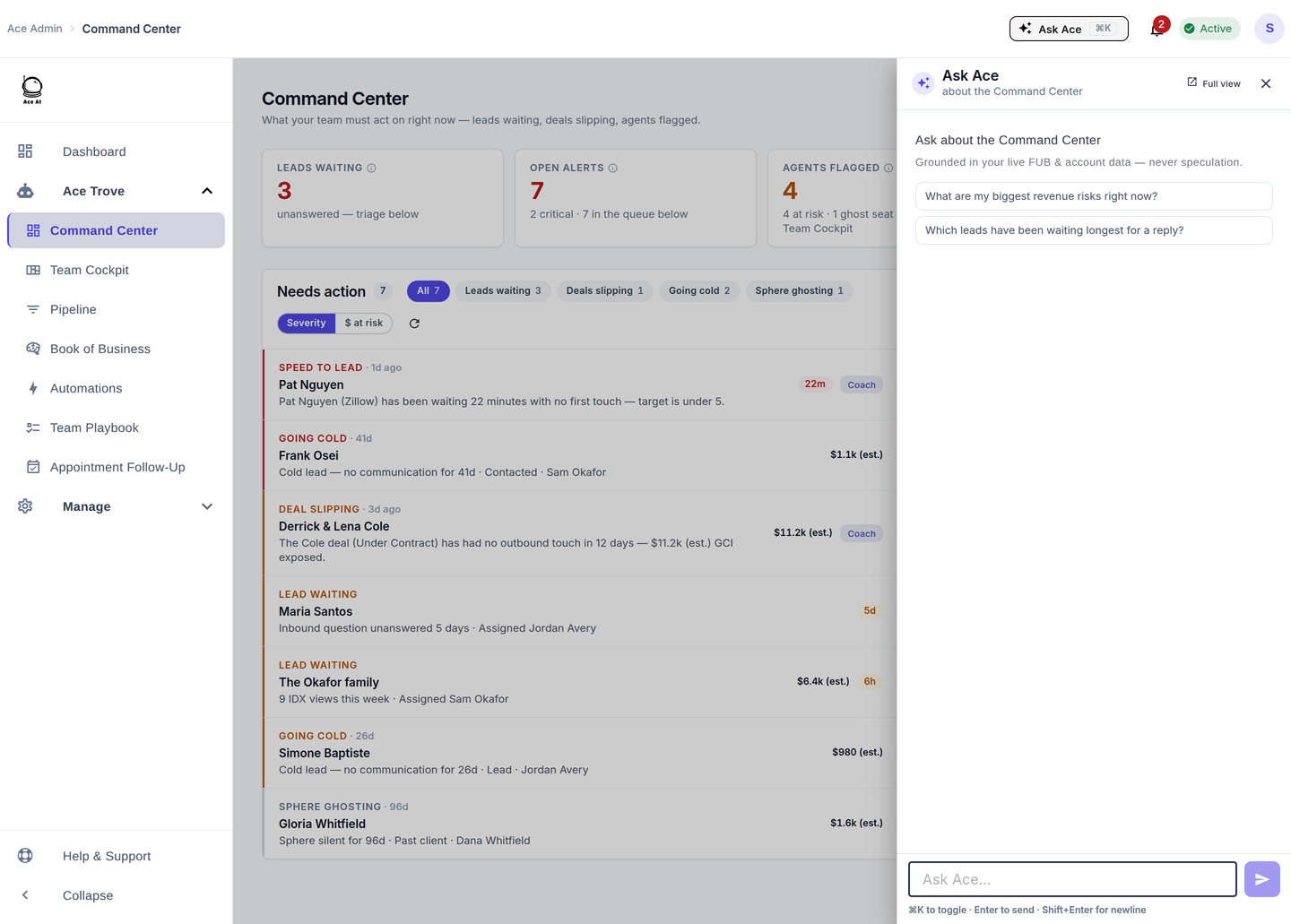
What is the difference between Ace AI and ChatGPT for Follow Up Boss?
Ace and ChatGPT are complementary, not competing. Ace is an embedded CRM intelligence layer that scores contacts, writes custom fields, and surfaces prioritized call queues without agents leaving Follow Up Boss. ChatGPT is a general-purpose AI model that can query and update FUB data conversationally once an MCP connector is in place. The right question is not which one to use — it is which job each does best.
| Capability | Ace (native) | ChatGPT via MCP |
|---|---|---|
| Embedded in FUB sidebar | Yes — no tab switching | No — separate browser window |
| AI lead scoring (Ace Score 0–100) | Yes — auto-writes FUB custom fields | Can read scores via MCP; cannot originate them |
| Voice commands | Yes — Pro plan | Not natively |
| Fair Housing compliance scan | Yes — built-in | Via MCP tool (same engine) |
| Free-form natural language queries | Yes — chat interface | Yes — full GPT reasoning |
| Live FUB read + write access | Yes | Yes — 189 MCP tools |
| Setup complexity | Zero — auto-connects on signup | Paste one streamable-HTTP URL into ChatGPT settings |
How does Ace AI integrate with Follow Up Boss natively?
Ace embeds directly into the Follow Up Boss interface as an intelligent sidebar. Once a user connects their FUB account, Ace reads contact activity, calculates a multi-dimensional lead score, and writes the results back as FUB custom fields — no export, no copy-paste, no separate dashboard required.
Ace writes seven custom fields into Follow Up Boss — two free on every account and five more with Ace Trove:
- Ace Win Score (free) — a 0–100 rank within your book; a rank, not a probability
- Ace Churn Risk (free) — a Low / Medium / High read on whether an engaged contact is about to go quiet
- Ace Expected GCI (est.) — a forward revenue estimate from the modeled chance of winning and your account’s median commission
- Ace Opportunity — At Risk, Active Buyer, Active Seller, Likely Seller or Nurture
- Ace Seller Tier — seller-intent tier (equity is estimated)
- Ace Buyer Tier — modeled propensity to buy, a relative ranking and not a guarantee
- Ace Last Analyzed — when Ace last analyzed the contact
Because these fields live natively in FUB, agents can build Smart Lists and filters on them — for example, a "Hot Leads Call Queue" that surfaces every contact with Ace Win Score ≥ 80 and Ace Buyer Tier = High, sorted by score descending. The values update as Ace re-scores contacts.
What plan do you need for Ace AI in Follow Up Boss?
Ace offers three user-level plan tiers (verified in chat-app/shared/planCatalog.js):
- Free — basic chat access inside FUB
- Ace ($25/seat/mo) — unlimited Ace chat inside FUB, the daily brief, Next Moves and AI memory
- Ace Pro ($55/seat/mo) — everything Ace includes, plus voice commands and Claude / ChatGPT connector access
Voice and MCP connector access are gated at the Pro plan level (voiceChatEnabled: toPlan === 'pro' in adminSeatPlanChange.js; proRequired: planType !== 'pro' in embed.js). Admins can purchase seats on behalf of agents (team-pay) or agents can self-pay — both modes are supported.
For account-wide Ace Trove features (the Command Center, team views, pipeline health, Automations and Autopilot), teams use the Ace Trove flat-rate subscription, which starts at $49/mo for up to 5,000 contacts and scales to $899/mo for up to 500,000 contacts.
How do you connect ChatGPT to Follow Up Boss?
The Ace MCP connector gives ChatGPT (and Claude) direct read/write access to your FUB account through 189 pre-built tools. You do not need to write any code. The connector works on the Pro plan and requires pasting a single URL into your AI client's settings.
Step-by-step: connecting ChatGPT to Follow Up Boss via MCP
- Upgrade to the Ace Pro plan at followupace.com/#pricing.
- In your Ace dashboard, navigate to the MCP Integrations panel. Your MCP setup instructions will be shown there.
- In ChatGPT, open Settings → Security and login and enable Developer mode, then open ChatGPT Plugins and select the plus button.
- Paste the streamable-HTTP URL:
https://followupace.com/mcp?tools=full - Authorize the connection. ChatGPT can now query contacts, log notes, update stages, check pipeline health, and run compliance scans — all within FUB — using plain English.
For Claude (Anthropic), use the Streamable HTTP URL instead: https://followupace.com/mcp. Both endpoints are served by chat-app/routes/mcpServer.js.
What can ChatGPT actually do inside Follow Up Boss via MCP?
Once connected, ChatGPT has access to 189 tools covering the full breadth of your FUB account. Practical examples:
- Query contacts by name, stage, tag, or Ace Score
- Log call notes or update a contact's stage in natural language
- Run a pipeline health check to surface deals at risk of stalling (
pipeline-health-check, mcp-server/src/index.ts:4198) - Trigger the lead nurture optimizer to identify contacts overdue for follow-up (
lead-nurture-optimizer, mcp-server/src/index.ts:4230) - Scan a draft message for Fair Housing violations before sending (
scan_message_for_compliance, complianceTools.ts via COMPLIANCE_TOOL_DEFINITIONS) - Ask for a team summary ("What are my top 10 hottest leads this week?")
The MCP path lets you use ChatGPT's general reasoning on top of your real CRM data — writing outreach drafts grounded in a lead's actual activity history, or combining multiple FUB queries into a single coherent answer that no built-in FUB filter could produce alone.
Does Ace AI score leads automatically, or do I have to trigger it?
You do not need to trigger anything. Every connected account gets Win Score and Churn Risk written to Follow Up Boss nightly, and a contact’s fields are refreshed sooner when its activity changes materially. Ace Trove adds the Expected GCI (est.), Opportunity, Seller Tier and Buyer Tier fields.
The scores come from machine-learning models trained on real CRM outcomes, not a fixed formula. Win Score is a 0–100 rank within your own book (100 is your hottest contact), not a probability, so the Smart Lists you build on it stay current without manual curation.
How does Ace handle Fair Housing compliance in Follow Up Boss messages?
Every AI-drafted message in Ace passes through a built-in compliance scanner before it reaches the agent. The scanForComplianceViolations() function (verified in chat-app/utils/complianceGuard.js:293) checks text against prohibited Fair Housing terms and patterns, flags any violation at severity level high, and surfaces an inline warning rather than silently sending the message.
The same scan is available through the MCP connector, so ChatGPT users can call it on any draft before sending. This is not a workaround — it is the same code path used by the Ace native interface. Learn more about the compliance scanner and what it checks.
What are Ace Trove Recipes, and why do they matter for Follow Up Boss power users?
Ace Trove Recipes are pre-configured Smart List blueprints that turn Ace's custom fields into actionable FUB workflows with a few guided steps. Because FUB does not allow external tools to create Smart Lists via its API, Ace provides the exact filter configuration so the admin can paste it in and save the list in seconds.
Current verified recipes (from chat-app/utils/aiEngineRecipes.js):
- Hot Leads → Call Queue — filters Ace Score ≥ 80 and Ace Tier = Hot, sorted descending. Becomes the team's daily priority dial list.
- Stale High-Value → Re-Engagement — contacts with Ace Score ≥ 60 and no inbound touch for 14+ days. Auto-enrolls in your existing FUB re-engagement action plan.
- Ghost / At-Risk → Owner Alert — Ace Tier = Dormant and no inbound for 30+ days. Flags for team-lead review or reassignment.
These recipes turn raw AI scores into FUB-native list management that agents recognize and trust, without requiring agents to understand how the scoring model works.
When should you use Ace AI, and when should you use ChatGPT with MCP?
The two approaches address different needs. Use this as a rough guide:
| Use case | Best tool |
|---|---|
| Daily lead prioritization inside FUB | Ace — always-on, zero friction |
| Voice commands while driving or on the go | Ace Pro — built-in voice support |
| Writing personalized outreach from contact history | Either — Ace chat or ChatGPT with MCP context |
| Complex multi-step analysis across many contacts | ChatGPT via MCP — deeper reasoning on CRM data |
| Account-wide pipeline health monitoring | Ace Trove (pipeline-health-check tool) |
| Drafting and screening messages for Fair Housing compliance | Ace compliance scan — same engine via both interfaces |
Most Pro users end up using both: Ace for the always-on scoring, call queue, and voice commands while working inside FUB, and ChatGPT (or Claude) via MCP for deep research sessions or bulk operations that benefit from more elaborate prompting.
How does Ace AI compare to ChatGPT for Zillow and inbound speed-to-lead?
Inbound speed is one of the clearest wins for a purpose-built CRM layer over a general-purpose AI. Ace includes a dedicated lead_speed_to_lead_check tool (verified in mcp-server/src/http-server.ts:508) that evaluates response time to portal leads — including Zillow Premier Agent — and flags contacts where speed-to-lead has slipped. ChatGPT with MCP can invoke the same tool, but the check only works because Ace has already built the portal-lead logic into the connector.
For teams relying heavily on Zillow lead flow, the Zillow Playbook documents how Ace surfaces and scores these leads inside FUB.
Frequently asked questions
Does using ChatGPT with MCP require a separate ChatGPT subscription?
The MCP connector itself is included with Ace Pro. You still need a ChatGPT account that supports custom connectors (currently a ChatGPT account and workspace policy that permits Developer mode). The Ace MCP subscription and the ChatGPT subscription are billed separately.
Can I use the Ace MCP connector with Claude (Anthropic) instead of ChatGPT?
Yes. Use the Streamable HTTP endpoint https://followupace.com/mcp in Claude's MCP settings. Both endpoints are on the same backend and expose the same 189 tools.
Is my Follow Up Boss data sent to OpenAI when I use ChatGPT with MCP?
When ChatGPT calls an MCP tool, the tool arguments and responses are processed by OpenAI's infrastructure. Review OpenAI's data usage policies and your ChatGPT enterprise data controls before connecting sensitive CRM data. Ace does not store what ChatGPT sends through the connector beyond standard server logs.
Does Ace AI work for solo agents or only for teams?
Ace works for solo agents and teams equally. Solo agents self-pay on the Ace or Ace Pro plan. Teams can use admin-purchased seats (team-pay) where the brokerage covers the subscription. Both billing paths are fully supported. See the feature comparison for details on how Ace fits different team sizes.
What is the difference between the Ace Trove and a per-seat Ace Pro plan?
Per-seat plans (Ace $25, Ace Pro $55) are purchased per individual agent and cover that agent's chat, voice, and connector access. The Ace Trove is a flat-rate account-wide subscription ($49–$899/mo depending on contact count) that adds the Command Center, team views, pipeline health, Automations, Autopilot and the Trove fields. They can be purchased independently or together.
Try Follow Up Ace in your Follow Up Boss
Free to start, no sales call. Connect Follow Up Boss in one click and Ace works inside your CRM.
Get Started Free