From Lead to Close: A Day in the Life of an AI-Enabled Real Estate Agent
An AI-enabled real estate agent starts the day on a prioritized "Hot leads" smart list built from live engagement scores — not a manual sort. AI tools handle lead capture, follow-up sequencing, pipeline analysis, and message drafting. The agent's time goes to calls, showings, negotiations, and relationships. This article walks through what that day actually looks like, tool by tool.

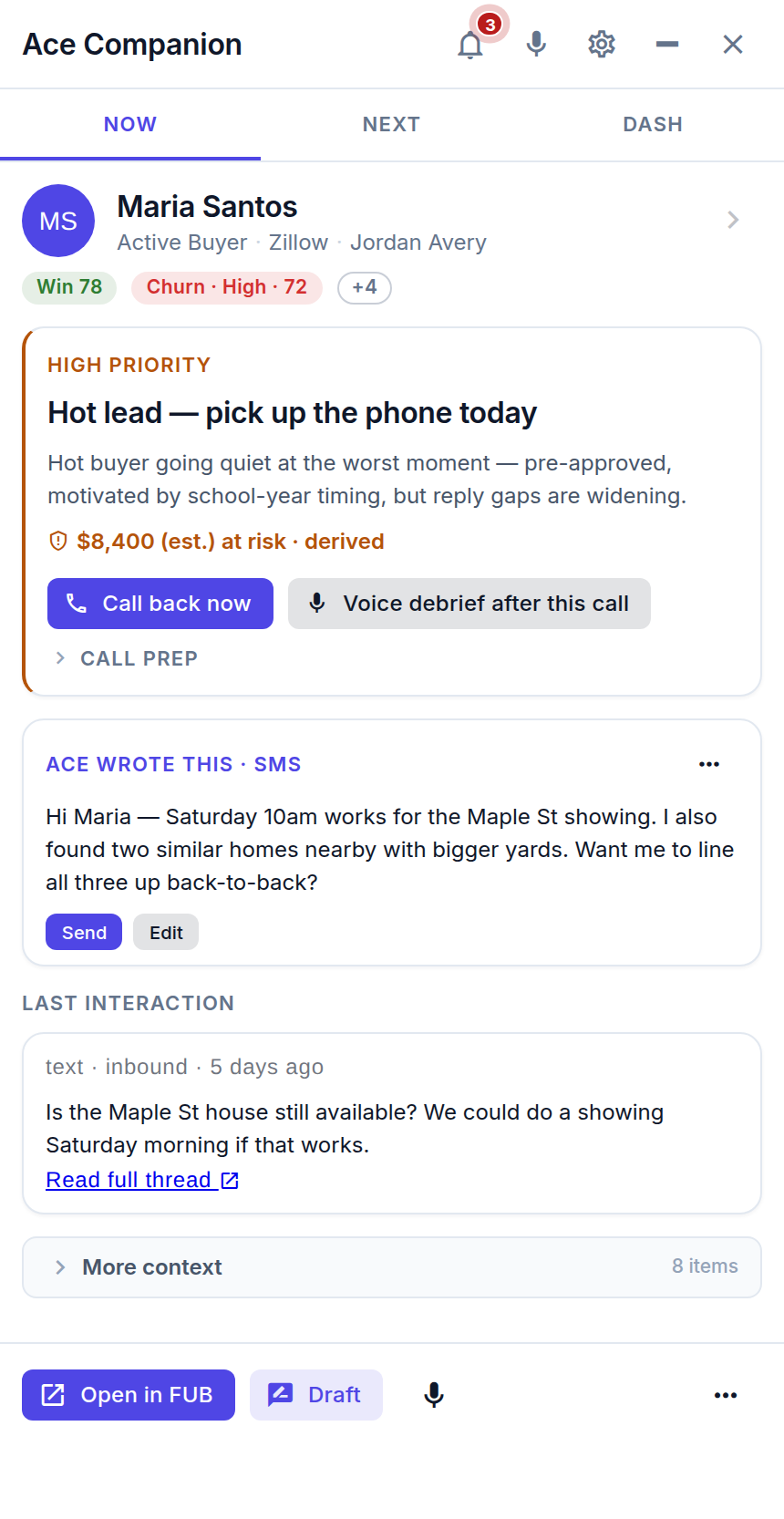
"AI in real estate" is a phrase that gets used for everything from email open-rate tracking to fully autonomous chatbots. The reality is more specific: AI tools in 2026 are most useful as a layer on top of your existing CRM — one that handles the cognitive overhead of managing a large pipeline so you can focus on the irreplaceable human parts of the job.
Here's what a concrete, realistic day looks like for an agent who has set this up properly in Follow Up Boss with Follow Up Ace.
7:30 AM — Morning: AI has already been working overnight
Before the agent opens their laptop, two things have been running in the background:
- Ace scoring update: Every contact's Ace Score, Ace Tier, Velocity Score, and Days Since Inbound has been updated via webhooks based on overnight activity — portal logins, email opens, click-throughs, any inbound messages that came in after hours.
- Automated nurture sequences: Contacts in long-term nurture action plans received their scheduled monthly market update email. No manual send required.
The agent opens FUB and goes directly to the Hot Leads smart list — filtered by Ace Tier = Hot. This is not the list sorted by date added or lead source. It's the contacts with the highest current engagement scores, who have taken the most recent action, and whose velocity is rising. That's who gets called first. (Source: chat-app/shared/aceIntelligenceFieldsConfig.js — Ace Tier: Hot/Warm/Cool/Cold/Dormant)
8:00 AM — Power hour: working the hot list
The morning call block runs from 8:00 to 10:00 AM — the two hours when response rates are typically highest for buyer outreach. The agent works through the Hot list:
- Contact 1: A buyer who toured two homes last week and opened yesterday's listing email three times. Ace Score: 88, Velocity rising. The agent calls — this is a buyer who's close. The call converts to a second showing scheduled for Thursday.
- Contact 2: A lead who went quiet 45 days ago but replied to yesterday's nurture email with "actually, can we talk?" — now flagged Hot. The agent calls, they're ready to re-engage. Appointment set.
- Contact 3: A new Zillow lead from 6 PM yesterday. Ace Score: 62 (new leads start with limited history but the fast inbound trigger elevated it). The agent's auto-text already went out last night; this call is the personal follow-up. Connected, conversation leads to a discovery call next week.
Each call takes 5–10 minutes. In two hours, the agent has made 10–15 meaningful contacts with the people most likely to transact — not 15 random contacts from a date-sorted list.
10:00 AM — Pipeline health check
After the call block, the agent runs a pipeline health check — either manually by reviewing their FUB pipeline view, or by asking their AI assistant (connected via the Follow Up Ace MCP at https://followupace.com/mcp) to run the pipeline-health-check tool. (Source: mcp-server/src/index.ts:4198)
The pipeline health check surfaces:
- Leads who have been in "Active" stage for more than 30 days without a stage progression
- Contacts with dropping Ace Velocity (engagement falling — needs intervention)
- Any gaps in the follow-up sequence (contacts who fell out of an action plan)
This takes 5 minutes. The agent doesn't need to build a spreadsheet or sort through 500 contacts manually. The AI finds the gaps and surfaces them with context.
10:30 AM — Zillow lead response review
For teams receiving Zillow leads, speed-to-lead is critical. Follow Up Ace includes a zillow_speed_to_lead_check tool (Source: mcp-server/src/zillowTools.ts:261) that shows the agent or team lead exactly how quickly each Zillow lead was contacted — and flags any that exceeded acceptable response windows.
If the agent is a team lead, this is where coaching conversations originate: "Our average Zillow response time this week was 18 minutes for new leads, but three of those came in after 9 PM and didn't get a response until the next morning. We need an after-hours auto-text for those." The data exists in FUB via the Ace Response Time field; the Zillow check makes it instantly visible.
11:00 AM — Showings and client time
This block is sacred: no admin, no data entry, no CRM work. The agent is with clients. This time is protected precisely because everything administrative has been delegated to automated systems.
While the agent is showing homes, FUB continues working:
- Any new leads that come in receive an immediate auto-text
- Contacts in action plans receive their scheduled touches
- Trove can schedule additional batched score refreshes after meaningful engagement
2:00 PM — Message drafting and nurture optimization
Back at the desk after showings, the agent has a batch of follow-up messages to send: post-showing notes, responses to inbound questions, re-engagement attempts for the Dormant segment.
For agents using Claude or ChatGPT with the MCP connector, this is where the AI assistant earns its keep. The agent types: "Draft a follow-up text for Sarah Chen — she toured 247 Oak Street this morning and seemed interested in the backyard but hesitant about the kitchen. She prefers texting." The AI pulls Sarah's contact record from FUB, knows she's in the Active Search stage, and drafts a specific, personal message. The agent edits and sends.
For the Dormant segment, the agent can also run the lead-nurture-optimizer tool (Source: mcp-server/src/index.ts:4230), which analyzes dormant contacts and recommends re-engagement approaches based on their engagement history — not generic "just checking in" templates.
3:30 PM — Compliance check on outgoing messages
Before any batch messages go out (market updates, neighborhood alerts, open-house invitations), the agent's compliance workflow triggers a check via Follow Up Ace's Fair Housing scanner. The scanForComplianceViolations() function in chat-app/utils/complianceGuard.js:293 scans for language that could trigger Fair Housing or steering concerns. This runs automatically — the agent sees a flag if something needs review, and nothing if everything is clean. Details at followupace.com/compliance.
4:00 PM — Evening prep: setting up tomorrow's priorities
The agent's last 30 minutes of the day are forward-looking:
- Glance at the Hot list for any changes — did anyone new surface to Hot status this afternoon?
- Check for any contacts who responded to today's outreach that need a personal reply before end of day
- Review the next day's action plan task list — any manual calls scheduled for tomorrow morning?
That's it. Everything else runs automatically overnight: nurture emails, score updates, sequence advancement for contacts who hit time triggers.
What's different about this day vs. a non-AI-enabled agent?
| Task | Without AI | With AI |
|---|---|---|
| Morning lead prioritization | 20–30 min manual sorting | Open Hot smart list, start calling |
| After-hours lead response | Lead waits until morning | Auto-text fires within minutes |
| Pipeline gap identification | Spreadsheet audit (weekly at best) | Pipeline health check tool (5 min, daily) |
| Nurture message drafting | Generic template or manual write | AI draft from contact context, agent edits |
| Long-term nurture | Forgotten after 30–60 days | Automated monthly value-add sequence |
| Compliance check on outreach | Manual review or skipped | Automatic pre-send scan |
What does this system not do?
It's worth being direct about the limits. This system does not:
- Replace the agent's judgment on pricing, negotiation, or local market dynamics
- Auto-send messages without human review on the most important touchpoints
- Guarantee a conversion — it improves the inputs (speed, prioritization, consistency), not the outcome
- Work without setup — the action plans, smart lists, and scoring fields need to be configured first
The agent is still the expert. The AI is the infrastructure that makes sure the agent's expertise gets applied to the right people at the right time — and that no lead falls through because of a scheduling gap or a forgetting-to-follow-up moment.
How do I set this up?
The foundation is Follow Up Boss with Follow Up Ace connected. The Ace Score fields (free tier) activate immediately and start scoring contacts via webhooks. From there:
- Build the Hot, Warm, and Dormant smart lists in FUB using the Ace Tier field
- Create or audit action plans for new leads, active clients, and long-term nurture
- Set up automated lead routing via FUB native integrations or Zapier for any non-native lead sources
- For AI assistant integration: connect Claude or ChatGPT via the MCP URL (
https://followupace.com/mcp)
For the full follow-up automation setup guide, see How to Automate Real Estate Lead Follow-Up. For the cadence framework used in the morning call block, see the Real Estate Follow-Up Planner. For the agentic AI tools referenced in this article, see the agentic overview.
Try Follow Up Ace in your Follow Up Boss
Free to start, no sales call. Connect Follow Up Boss in one click and Ace works inside your CRM.
Get Started FreePillar guide: the AI real estate assistant inside Follow Up Boss.