Boosting Pipeline Management: How to Track & Close Deals Faster in Follow Up Boss

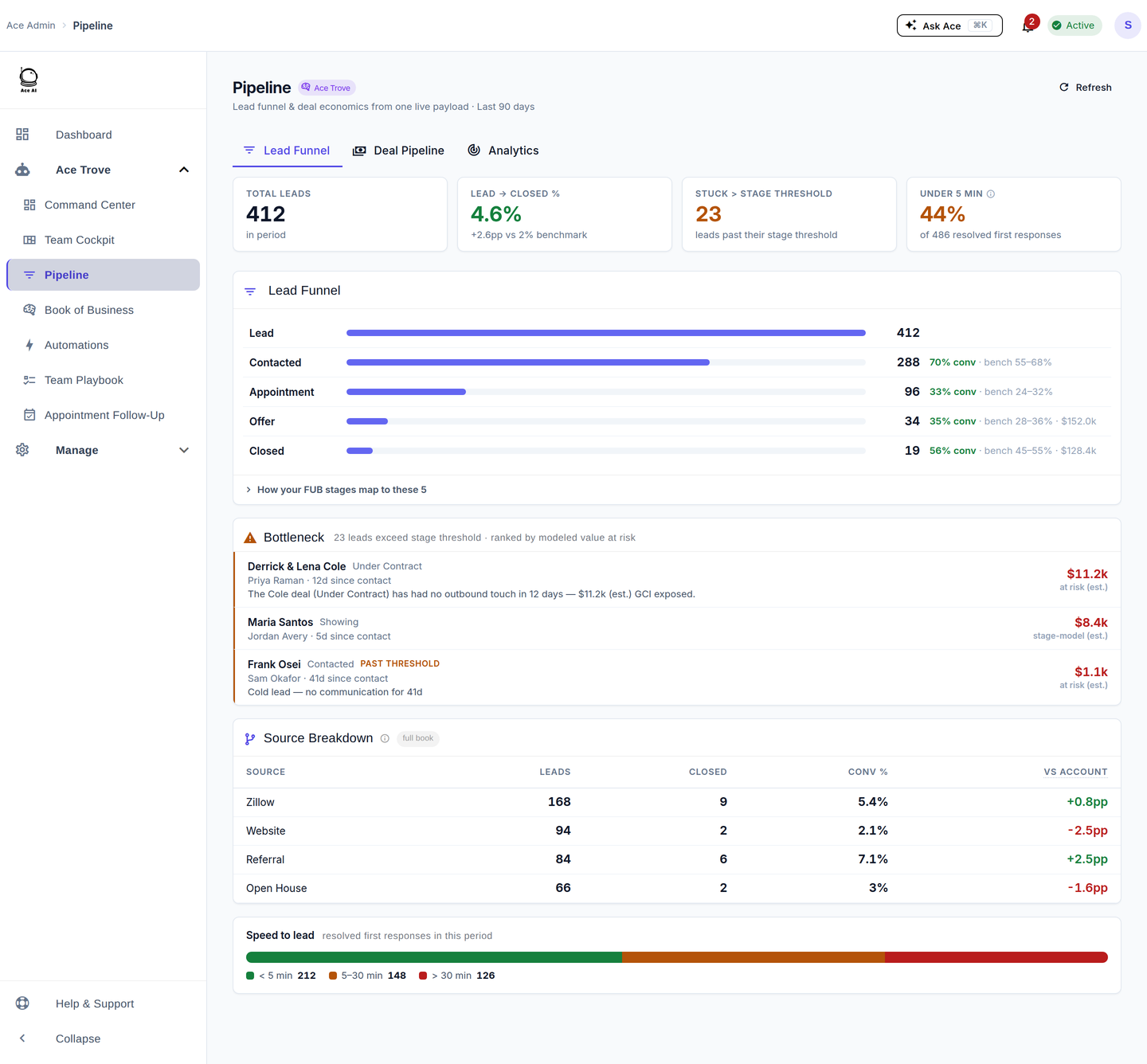
Use Follow Up Boss pipeline stages, smart lists, and action plans to track every active deal from first contact to close. Assign tasks at each stage, set automated follow-up sequences, and review your pipeline weekly. Follow Up Ace's pipeline-health-check prompt and Ace Score fields help surface stalled deals before they go cold.
What Is Pipeline Management in a Real Estate CRM?
Pipeline management is the practice of tracking every active deal — from first inquiry to signed contract — through defined stages so nothing falls through the cracks. In a real estate CRM like Follow Up Boss, your pipeline is the complete picture of where every lead and client sits right now, what action is next, and how long they have been sitting at that stage.
Without clearly defined stages and regular reviews, leads expire silently. A buyer who went quiet after a showing two weeks ago looks identical to a buyer you called yesterday — until you lose one of them to a competitor who followed up first. Structured pipeline management forces visibility: you know exactly how many deals are active, which are moving, and which are stalled.
Effective pipeline management in real estate typically tracks these key moments:
- New inquiry — lead comes in, needs initial contact
- Contacted — you've reached them; qualifying conversation started
- Appointment set — showing or consultation booked
- Active buyer/seller — currently working together, property search or listing prep underway
- Under contract — offer accepted, now in escrow/closing process
- Closed — transaction complete
- Nurturing — not ready now, but worth staying in touch with over months or years
The purpose of naming these stages explicitly is that each one triggers a different set of actions. What you do for a brand-new internet lead is completely different from what you do for a client two weeks before close. A CRM like Follow Up Boss lets you make those stage-specific actions systematic rather than reactive.
How Does Follow Up Boss Help You Track Your Pipeline?
Follow Up Boss gives agents pipeline visibility through four core tools working together: pipeline stages, smart lists, action plans, and the team inbox. Each one addresses a different dimension of the problem — where a deal is, who's responsible, what happens next, and what's coming in the door.
Setting Up Pipeline Stages in Follow Up Boss
Follow Up Boss lets you create custom pipeline stages that match your actual sales process. Here is a straightforward setup workflow:
- Go to Admin > Pipeline in your Follow Up Boss account settings.
- Create your stages in the order a deal moves through your process — for example: New Lead → Contacted → Qualified → Appointment Set → Active → Under Contract → Closed → Nurturing.
- Assign a default action plan to each stage so that when a contact moves into that stage, a follow-up sequence kicks off automatically.
- Set stage-specific tasks — for example, when a lead moves to "Appointment Set," a task fires to confirm the showing details 24 hours before.
- Train your team on what "moving a contact" means — stage updates should reflect real-world progress, not optimism. A contact is "Active Buyer" when they have signed a buyer agreement, not when they said they might want to buy.
- Review your stage list quarterly and consolidate any stages that rarely get used. A pipeline with 14 stages is harder to maintain than one with 7.
Using Smart Lists to Monitor Every Stage
Smart lists in Follow Up Boss are saved filtered views of your contacts database. They are the fastest way to see exactly who is in a specific stage, has not been contacted in a set number of days, or belongs to a particular agent on your team.
Useful smart lists to build for pipeline management:
- Stage = Active Buyer, last contacted > 7 days ago — active clients you have not touched this week
- Stage = Under Contract, closing date within 14 days — deals approaching close that need transaction coordination attention
- Stage = Contacted, no task scheduled — qualified leads with no next step defined
- Stage = Appointment Set, appointment date < 48 hours away — showings happening soon that need confirmation calls
- Stage = Nurturing, last contacted > 60 days — long-term leads going cold in the nurture bucket
Smart lists are not reports you run once — they are live views. Pin the ones most relevant to your current pipeline in your FUB sidebar so they are always one click away during your daily review.
What Are the Biggest Pipeline Bottlenecks for Real Estate Agents?
Most pipeline problems come down to three recurring failure patterns: leads going cold between touches, no follow-up task scheduled after a conversation, and unresponsive contacts buried under active ones. Recognizing which pattern is draining your pipeline is the first step to fixing it.
Leads going cold between touches. The gap between a showing and the next meaningful touchpoint is where most deals die. Without a scheduled next step, the contact sits in your CRM at the same stage indefinitely. Every week without a task is a week where a competitor could be filling that gap.
No follow-up task scheduled after a conversation. Agents often end a call thinking "I'll follow up in a few days" — and then don't, because there is nothing in the CRM telling them to. A conversation without a scheduled next task is a lead with an invisible expiration date.
Unresponsive contacts buried under active ones. When a database grows, unresponsive leads from six months ago sit in the same "Active Buyer" stage as someone you just showed a home to yesterday. Without scoring or segmentation, they compete for the same visual attention — and the urgent work loses to the volume.
Stage inflation. Agents sometimes leave contacts in "Active Buyer" or "Appointment Set" long after the situation has changed, because moving a contact to "Nurturing" feels like giving up. This inflates the active pipeline with phantom deals and obscures where you actually stand.
How to Close Deals Faster with Follow Up Boss Action Plans
Action plans in Follow Up Boss are automated sequences of emails, texts, tasks, and reminders that trigger when a contact enters a specific stage or meets a specific condition. The key to closing faster is having a purpose-built action plan for every pipeline stage — not one generic drip sequence that touches everyone the same way.
Here is how to structure action plans by stage:
New Lead action plan (days 1–14): High-frequency, multi-channel. Speed to lead matters most here. The plan should trigger an immediate text within minutes of lead capture, a follow-up call task for the assigned agent within the hour, and an email sequence that introduces you and your value over the next two weeks. After 14 days of no response, the plan should automatically move the contact to a lower-frequency nurture sequence rather than letting them sit in "New Lead" indefinitely.
Qualified / Appointment Set action plan: Shift from lead capture to relationship. The plan should send a confirmation of the showing or consultation, a pre-meeting email with relevant market context, a day-before reminder task for the agent, and a same-day check-in message. After the appointment, a task should fire immediately to log notes and schedule the next step before the agent closes their laptop.
Active Buyer / Seller action plan: Cadenced, not automated. At this stage, automation supports the relationship rather than driving it. Weekly check-in tasks for the agent, automated market update emails, and milestone messages (e.g., "we've been searching for 30 days — let's recap what we've seen") keep momentum without overwhelming active clients.
Under Contract action plan: Closing coordination. This is the highest-stakes stage. The action plan should include task reminders for every deadline in the transaction: inspection, appraisal, contingency removal, final walkthrough, and closing day. Missing a deadline here does not just lose the deal — it can create legal exposure.
Nurturing action plan (long-cycle): Low-frequency, high-value. Monthly or bi-monthly touches — a market update, a neighborhood report, a relevant article — keep you top of mind without burning out a contact who is not ready to transact for another 12–18 months.
Stage-by-Stage Pipeline Actions
Use this table as a quick reference when auditing your pipeline setup or onboarding a new team member. Every stage should have a defined key action and a FUB tool that enforces it.
| Pipeline Stage | Key Action | FUB Tool to Use |
|---|---|---|
| New Lead | Make first contact within minutes | Speed-to-lead action plan + team inbox routing |
| Contacted | Qualify and schedule a next conversation | Task assignment + contact notes log |
| Appointment Set | Confirm details and prepare for showing | Appointment action plan + pre-meeting email |
| Active Buyer / Seller | Weekly agent touch + market updates | Recurring task + automated email sequence |
| Under Contract | Hit every transaction deadline | Closing coordination action plan + deadline tasks |
| Closed | Request review + start post-close nurture | Post-close action plan + smart list for anniversaries |
| Nurturing | Stay top of mind without over-contacting | Long-cycle drip action plan (monthly cadence) |
| Dormant / Cold | Re-engagement attempt, then archive | Re-engagement action plan + smart list filter by last contact date |
How Follow Up Ace Surfaces Pipeline Health Issues Before They Cost You Deals
Follow Up Boss gives you the structure to manage a pipeline. Follow Up Ace adds an AI intelligence layer on top of that structure — identifying which contacts in your pipeline are stalling, which are gaining momentum, and which need attention right now rather than next week.
The pipeline-health-check Prompt
Follow Up Ace includes a pipeline-health-check MCP prompt that scans your active pipeline for stalled deals and gaps. Rather than manually building smart list filters and checking them one by one, you can trigger this prompt to get a structured read on where your pipeline is healthy and where it has problems — surfacing contacts that have not moved stages or received a meaningful touch in a meaningful time window.
This is particularly valuable for team leads managing multiple agents, where individual pipeline review would require checking 10 or 20 separate views. The health check gives you a consolidated signal across the whole team pipeline. Learn more about what Follow Up Ace's agentic tools can do for your team's pipeline work.
Ace Score and Ace Tier: Which Contacts to Prioritize
Every contact analyzed by Follow Up Ace receives an Ace Score (0–100) and an Ace Tier (Hot, Warm, Cool, Cold, or Dormant). These populate as custom fields directly inside Follow Up Boss — which means you can sort your pipeline view by Ace Score and immediately see who your highest-priority contacts are, regardless of what stage they sit in.
This solves one of the most common pipeline management problems: an "Active Buyer" stage with 30 contacts, 10 of whom are genuinely active and 20 of whom have not responded in weeks. Sorting by Ace Score surfaces the 10 who actually need your attention today — without requiring you to read through every contact's history manually.
Ace Tier works as a quick visual filter. Contacts in the Hot tier should be in your daily call list. Warm tier contacts belong in your weekly follow-up rotation. Cool and Cold contacts may be appropriately served by an automated nurture plan rather than manual agent time. Dormant contacts are candidates for a re-engagement campaign or eventual archiving.
See the full breakdown of how AI improves lead scoring in Follow Up Boss for more on how Ace Score is calculated and applied.
Ace Velocity Score: Spot Contacts Gaining Momentum
The Ace Velocity Score (0–100) measures engagement momentum — how quickly a contact's interaction level is increasing or decreasing. A contact with a rising Velocity Score is showing more engagement than they were a few weeks ago: more email opens, more replies, more response to your outreach. That shift often precedes a buying or selling decision.
In practice, the Velocity Score lets you catch momentum before it becomes obvious. A contact who has been quiet in the "Nurturing" stage for six months but suddenly starts opening every email you send is worth a proactive personal call — even though their pipeline stage has not changed. Without a velocity signal, that shift goes unnoticed until they call you, or call someone else.
Stage and age: the signals Follow Up Boss already tracks
The Ace Status and Ace Days Since Inbound fields this article once described were retired on June 28, 2026. To see where a contact sits and how long it has been since they came in, use the pipeline stage and dates Follow Up Boss already tracks. A contact who has been in the system a long time without converting is a signal that either the nurture sequence is not working, or the contact genuinely is not a buyer or seller in your market and should be archived.
Ace adds a second dimension on top: the free Ace Win Score and Ace Churn Risk fields on every connected account. Ace Trove adds five more — Expected GCI (est.), Opportunity, Seller Tier, Buyer Tier and Last Analyzed — for a team with at least one paid Ace or Ace Pro seat.
How Often Should You Review Your Real Estate Pipeline?
Most agents who lose deals do not lose them to competitors who were better at their craft — they lose them because they stopped paying attention for a week. A consistent pipeline review cadence is what separates agents who close consistently from agents who have unpredictable months.
Here is a cadence that works for most individual agents and small teams:
Daily (10–15 minutes): Check your today's tasks in FUB, review the team inbox for new inbound activity, and scan your "Active Buyer / Under Contract — no task scheduled" smart list. The goal is simple: make sure nothing urgent fell off the radar overnight.
Weekly (30–45 minutes): A full pipeline review. Go stage by stage. For every active deal, ask: Is the next step clear? Is it scheduled? Has anything changed since last week that should update the stage? This is also when you run the Ace pipeline health check to surface contacts that have quietly stalled without triggering a task.
Monthly (60–90 minutes): A deeper audit. Review your Nurturing bucket for contacts ready to move back to active. Review your Closed bucket for past clients who are approaching a move anniversary (the average homeowner moves again within 7–10 years). Prune contacts in stages where they no longer belong — stage accuracy compounds over time.
Quarterly: Evaluate your pipeline stage setup itself. Are all stages being used? Do your action plans reflect how your business has changed? Are there new lead sources coming into your database that need their own entry stage and action plan? The pipeline should evolve as your business does.
Team leads should add a weekly or bi-weekly team pipeline review on top of their individual cadence — a structured conversation where each agent walks through their active deals, flags blockers, and surfaces contacts that need manager attention. FUB's team inbox and agent assignment features make this review measurable rather than anecdotal.
For a broader look at how AI tools can support your Follow Up Boss workflow across the entire contact lifecycle — not just active pipeline — visit the Follow Up Ace guides library.
- Pipeline stages without action plans are just labels — connect each stage to a specific follow-up sequence.
- Smart lists are your daily operating view; build them around time-sensitive conditions like "no task scheduled" and "last contacted > X days."
- The biggest pipeline killer is not a bad lead — it is a good lead with no next step defined.
- Ace Score and Ace Tier let you sort your pipeline by actual priority, not just stage order.
- Ace Velocity Score surfaces momentum shifts before they become obvious — giving you a head start on re-engagement.
- Review your pipeline daily (quick), weekly (deep), and monthly (audit) to keep it accurate and actionable.
Try Follow Up Ace in your Follow Up Boss
Free to start, no sales call. Connect Follow Up Boss in one click and Ace works inside your CRM.
Get Started Free